

Hello Tagdiv support,
I have 2 issues:
1. I would like to move the Above Post ADS (YOUR ARTICLE TOP AD )to Left a little bit because as you can see my website is RTL
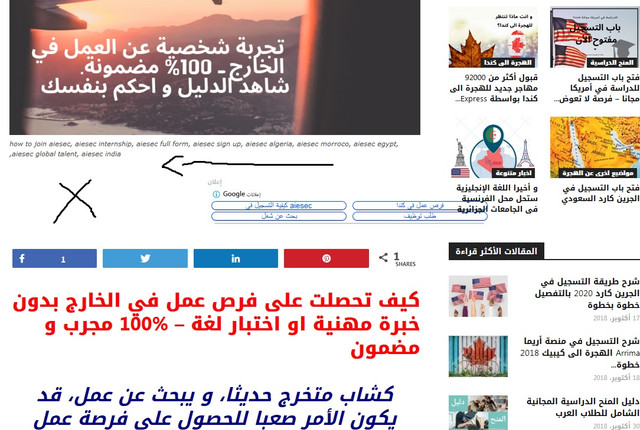
However in MOBILE, they are 1000% responsive , just in DESKTOP there is this issue.
2. Since I bought the theme, the ( YOUR ARTICLE INLINE AD ) never appears even though I set them after 2 paragraphs, In mobile AMP they appears after 2 paragraphs, but in desktop or when I visit my website via mobile they don’t appears , how can I fix this?
3. If you visit my website via mobile, you will see that the Search button is on the menu button like an error, I want to disable the button of search for mobile.
I used this CUSTOM CSS under Mobile theme in THEME PANEL but it didn’t work
#td-header-search-button-mob {
display: none;
}
.header-search-wrap {
display: none;
}
-
This topic was modified 7 years by
reddisl.

Hi,
For what I can see you are using a RTL language, please notice that our theme is not full compatible with RTL; also please provide me a link where I can inspect this problem, in this way I will be able pro provide you an working css.
Thank you for your understanding!
Hello Sir,
this is my website: https://clipaxis.info
Looking forward for your answer :
1. Move Above Post AD a little bit to left
2. Fix ARTICLE INLINE AD not showing
3. Remove Search button in mobile theme
Hi,
You can try this custom css for the post ads
.td-g-rec-id-content_top, .td-g-rec-id-content_bottom {

    text-align: center;

}
The code need to be set in Theme panel> Custom code>Custom css
Please check the inline ad from our article from here ->https://forum.tagdiv.com/article-ads/
The code that you set is hidden the search button -> https://www.screencast.com/t/eZXUMxlN I think that was just a cache problem.
Thank you!
Hello,
The code is working 100% and now position of ads is perfect, as well as, I fixed inline ads from the tutorial you provide me. Thank you very much, it was so helpful !
BUT STILL I HAVE THE SEARCH BUTTON ISSUE , THE BUTTON SHOW WHEN YOU ADD google xxxx.com/article/?amp
I mean in AMP pages, and the problem is 75% of my visitors use mobile so it is very important for me to fix this issue
Thank you.

Hi,
So you want to remove the search icon in mobile and AMP, from what I can see it is removed at the moment.
Mobile – http://prntscr.com/ocxhgq
AMP – http://prntscr.com/ocxhk3
If I misunderstand the problem, please let me know.
Thanks
Hello,
Please check again the AMP screenshot you took, as you can see the search button is in the same position of menu button.
So when you click on menu button, you get the search function.
& This is why i want to remove the search button in AMP to fix this issue
Seems I missed it, sorry about that. I suggest that you try something like this, remove the previous code and enter this one in the mobile theme custom CSS section
– http://prntscr.com/odi5gt
Then there should be no more search on mobile theme and AMP – http://prntscr.com/odi94x
– http://prntscr.com/odi9a9
.td-search-icon {

display: none;

}
Let me know.
