

Hi Team,
Recently I have made created my subdomain and there is an issue came additional canonical Tag in travel.trendpunjabi.com I want to know how can I resolve it.
Thanks

Hi,
The additional canonical tag is from revolution slider that you have on the page -> https://i.imgur.com/YPOCpNm.png
Thank you!
Hi thanks for getting back to me The solution which you have given I think that isn’t correct I have https://imgur.com/a/DqXn1h7 check it here
Hi,
Please make a quick test, please deactivate ALL plugins except tagDiv plugins, also if you are using child theme or cache plugin, deactivate them, clear all cache and try again.
On my install is appearing only once -> https://i.imgur.com/DdfjIdW.png
If there is still a problem, you can send us an email at contact@tagdiv.com and provide admin login, as well as cPanel or FTP if possible. We will take a look. Include a link to this topic in the email.
Thank you!

Hello Calin,
I have the same issue with the theme! I don’t have revolution slider. I deactivate ALL plugins except tagDiv plugins, child theme or cache plugin, and CDN system and clear all cache and not working!!
The only way for remove the canonical tag is set up theme to latest post option, but with this option, I can’t setup excerpt posts and none configuration.
Please I need you help ! my traffic is drop 75% for it !
Thank you very much!
Calin,
my website don’t have directory: /blog is the same with @jaspalsingh
I think the theme is breaking the Yoast code and adding a canonical tag.
I already tried almost everything and I can’t solve it!
I reset the theme, delete demo, I installed the demo again. add the filter to function file: remove_action (‘wp_head’, ‘rel_canonical’, 100); and nothing works.
My static page name is: ‘Inicio” (home)
But I don’t have posts page: /Blog
Please look my image:
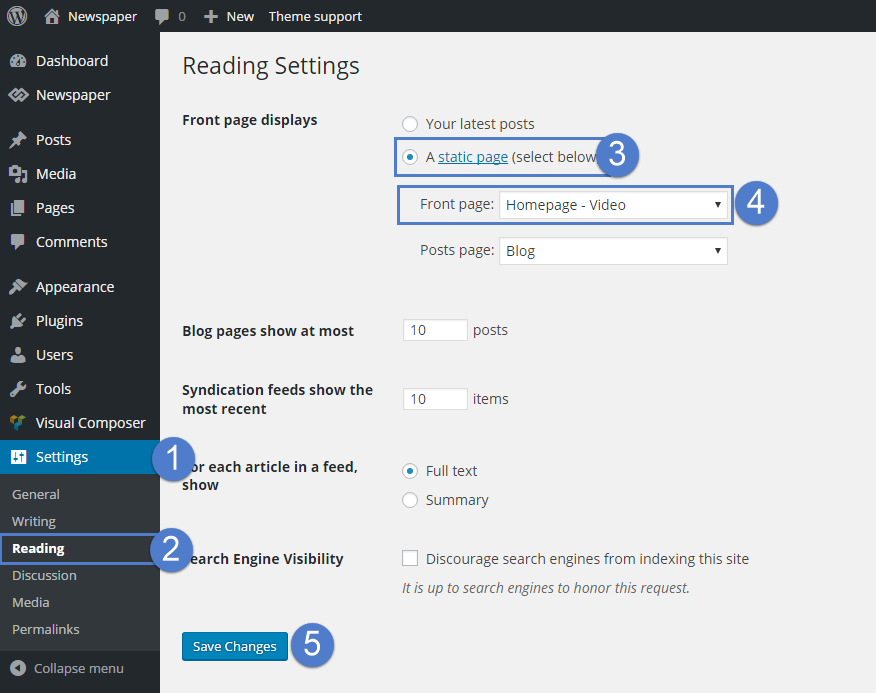
Could it be the issue you should fix? I can see that @jaspalsingh is not fixed the issue yet.
Thank you very much!
Hi, @ruffo I see in your site you have finally removed the Yoast canonical tag, Could you tell me how you did it?
Hello @jaspalsingh,
Here the solution:
You need to delete TagDiv Composer, TagDiv Standard pack, TagDiv Cloud library and reinstall them from Theme panel.
Thank you very much!


