I have lost all (featured) images on my start page. When I open the posts themselves everything look fine; the featured images are there.
I updated WP, the theme, some plugins and the language translations yesterday; one by one. For WP, the theme and the plugins everything looked fine after the updates, so I believe the problem came with the update of the language translations.
With langugage translation I mean the fourth section on the WP Update page; under WP update, plugins update and theme update.
Any suggestions? Can it be the translation update causing the problem? The dependency between the two makes no sense to me.

Have the same issue, on my main home page my featured images are not appearing even though if I individually go into a post I can see a featured image set. Haven’t found a solution yet, but you are not the only one experiencing this.
I am not sure if the problem has to do with the translation update (Swedish), but I went to the Translation section tn the theme panel. Opened some options, but did not save anything. Suddenly the feataured images came back on my desktop but not on my mobile device. This is getting more and more suspicipous.

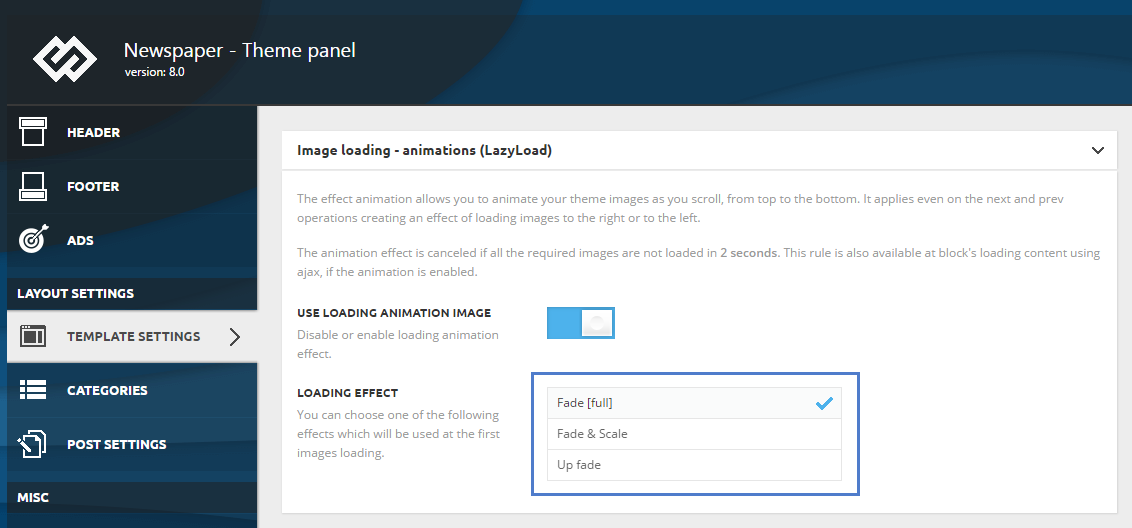
Disable: USE LOADING ANIMATION IMAGE
– Theme panel -> TEMPLATE SETTINGS -> Image loading – animations (Lazyload) /TURN OFF – USE LOADING ANIMATION IMAGE/
https://forum.tagdiv.com/wp-content/uploads/2017/05/loading_effects.png

I’ve just managed to fix this on my site – go into theme panel, template settings and turn off ‘USE LOADING ANIMATION IMAGE’.
It worked for me on > https://www.theirishroadtrip.com/