

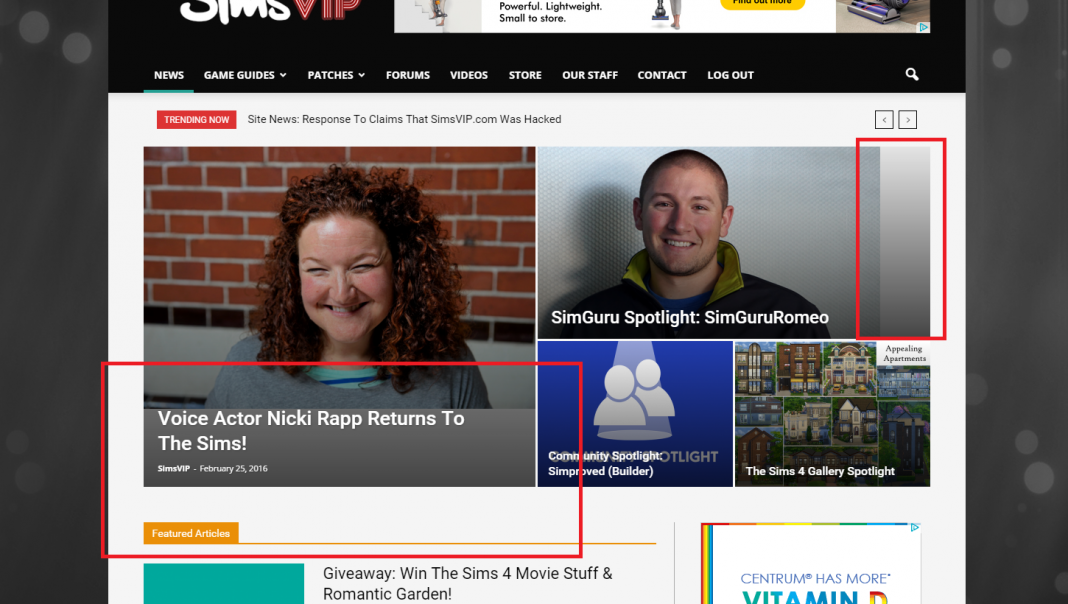
I’ve recently noticed an issue with featured images, where they are cut off in Big Grid 3, and are also not filling the space in the article lists. They are above and beyond the sizes required (min size) but I cannot seem to narrow the issue down.
I have disabled plugins to test if they were causing a conflict, and none of them resolved the issue. I feel as though the theme is no longer stretching them to fit? I can’t really explain what I mean, but here’s a pic.
Any help? – Link http://simsvip.com/

Hello AlexaB,
Our theme uses a lot of predefined thumbnails in blocks and modules. If you check the Theme panel->Block settings area you can see the list with all dimensions of the thumbs wich is used in the theme and which elements -> blocks/modules uses -> http://screencast.com/t/tQuimSer9 If you want to exclude the cropping system wich you have to use the right dimension for your images.
Our theme uses the system of cropping from center to top. The theme uses thumbs to reduce the page size and speed up page loading time. From each image uploaded are generated thumbs for each thumb size used by the theme. Basically, when a post it’s displayed on the page in a block, the featured image displayed is not the one which you uploaded in the media file, it’s a thumb cropped from the original image at the precise dimension. To change the picture orientation most likely you will need a different cropping system. We use a WordPress function – add_image_size() – you can read about it here – https://codex.wordpress.org/Function_Reference/add_image_size – and here – http://www.davidtan.org/wordpress-hard-crop-vs-soft-crop-difference-comparison-example/
Our theme crop (cut) thumbnails in some cases to avoid creating a lot of thumbnails in order to reduce to load more spaces on the server.
If you don’t have the possibility to upload large images you could use a combination of plugins to upscale the thumbs – Thumbnail Upscale and Force Regenerate.
Hope this helps!
Thank you for the message!
Hello AlexaB,
Please try my workaround after you have disabled all the active plugins because if you are using some untested plugins these can interfere with our theme and could cause some errors. Please try to disable all the active plugins, leave just Visual Composer, clear all cache and install only the plugins that come bundled with our theme and rule out the conflicting plugins. Also, you should not use Photon by Jetpack plugins because we have bad reports about this plugin that create a lot of damage in our theme and we do not recommend to use it.
Hope this helps and let us know how it goes!
Thank you for the message!
Hello,
I have already done the above. All plugins were removed and the issue still exists. And I thank you for the warning, but photon has corrected the issue. Was there an update in WordPress that changed the way images are cropped? Because The issue only started after the last update. It refuses to use my images (THAT ARE WELL ABOVE THE MINIMUM DIMENSIONS) to fill in the entire space of the home page block images and the grid up top.
I have tried regenerating images, and I will not use the “force” version as it tends to break images. I cannot afford to fix 5000+ posts.
What is the underlying issue here?

Hi,
I’m not sure why your issue occurs. Now it seems to display fine. They might have been affected by cache so the changes only applied when the cache was cleared. The WordPress update did not change nothing regrading the thumbs/images. If you still have this issue without any plugins, then please send us an email at contact@tagdiv.com and provide wp-admin so we can take a look. also provide a link to this topic.
Thank you!
