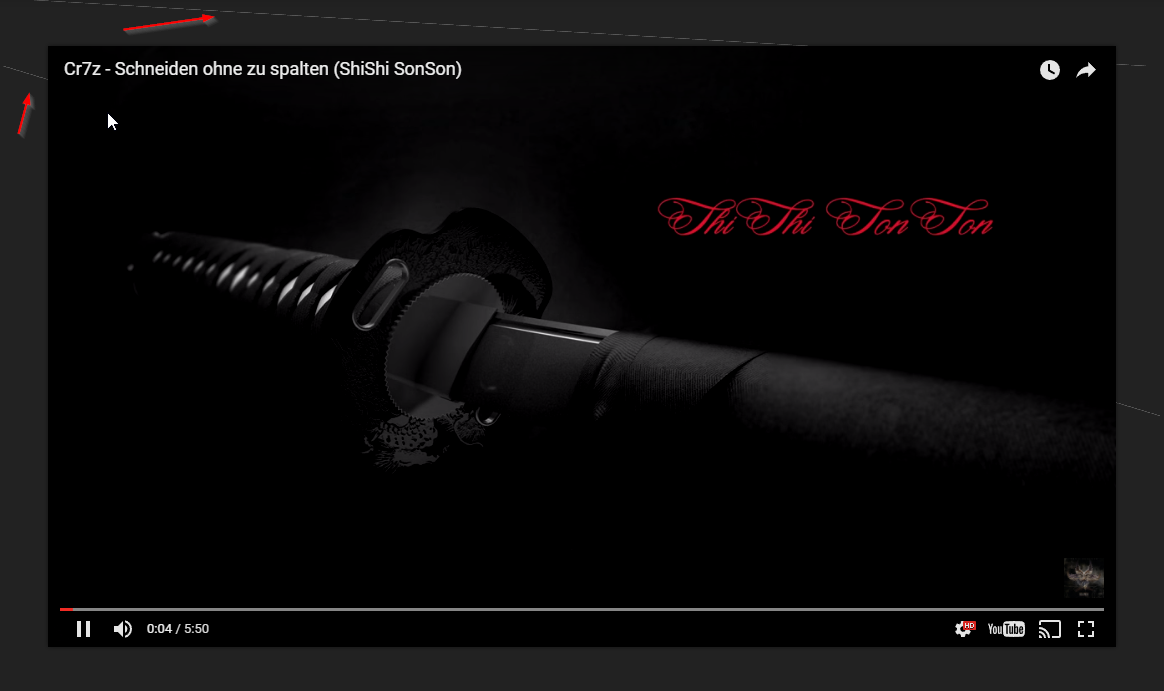
In Post Template 10 and 11 they are some Lines behind the Youtube Video
When i move over the Menu they are gone but when i move then to the Youtube Video the comes again.
See here: http://fs5.directupload.net/images/170504/jw3yxe6t.png


Hi,
I have inspected your website and tried a few if your videos, but I do not see this problem, or any other problem what so ever with the videos – https://www.screencast.com/t/K3bnvBD7xU
If this is still happening for you, try on a different browser, or computer to see if the issue is still present.
Thanks
This issue is only in google chrome, ive deactivated all extensions, reinstall chrome but is still there. When i play the video and scroll up and down this goes away but when i move with the mouse back in the video this strange lines are there. Maybe something with javascript but i dont know.
This appears only in Post Template 10, 11 and only when the youtube video will played.
Checked other sites with embed youtube video and they are ok.
It’s the same issue on your demosite i use google chrome Version 58.0.3029.96 (64-bit).
It’s a strange problem but i think i use post template style 9.

Weird, I’m not seeing that issue in my browser with Chrome
Version 58.0.3029.96 (64-bit)
I am getting some errors, but common with YouTube:
JQMIGRATE: Migrate is installed, version 1.4.1

widget-b68bc3d-b96170a4.js:5 SoundCloud Embed Player (api-web)

/C:/Users/StudioA/AppData/Local/Google/Chrome/User%20Data/Default/Extensions/pnlccmojcmeohlpggmfnbbiapkmbliob/8.3.1.1_0/content.js:2 Uncaught ReferenceError: zam is not defined

    at /C:/Users/StudioA/AppData/Local/Google/Chrome/User%20Data/Default/Extensions/pnlccmojcmeohlpggmfnbbiapkmbliob/8.3.1.1_0/content.js:2

/C:/Users/StudioA/AppData/Local/Google/Chrome/User%20Data/Default/Extensions/pnlccmojcmeohlpggmfnbbiapkmbliob/8.3.1.1_0/content.js:2 Uncaught ReferenceError: zam is not defined

    at /C:/Users/StudioA/AppData/Local/Google/Chrome/User%20Data/Default/Extensions/pnlccmojcmeohlpggmfnbbiapkmbliob/8.3.1.1_0/content.js:2
I “suspect” it’s from the code injected by Facebook or Soundcloud which are loading in your sidebar.