Hello,
I’m trying to implemant meta name=”theme-color” in the header.php before </head> but it doesn’t seem to work.
Ps: I did exactly what it’s been told here (https://forum.tagdiv.com/topic/meta-nametheme-color/) so I don’t know where the problem is coming from. I also cleared all the cache after I added the code in the header.

Yes of course. I put the code here public_html/wp-content/plugins/td-composer/mobile/header.php
Screenshot’s link : https://i.ibb.co/Yj3VFtn/1.png
Hello,
Mobile theme? I guess that’s what I’m doing wrong, I don’t have TagDiv Mobile Theme unstalled. So should I add the meta code elsewhere?
Hello!
Yes, if you need it for desktop, the code should work if being added here: https://www.screencast.com/t/7FuvaOVM45h
Thank you!
Hello,
Thank you for your quick response.
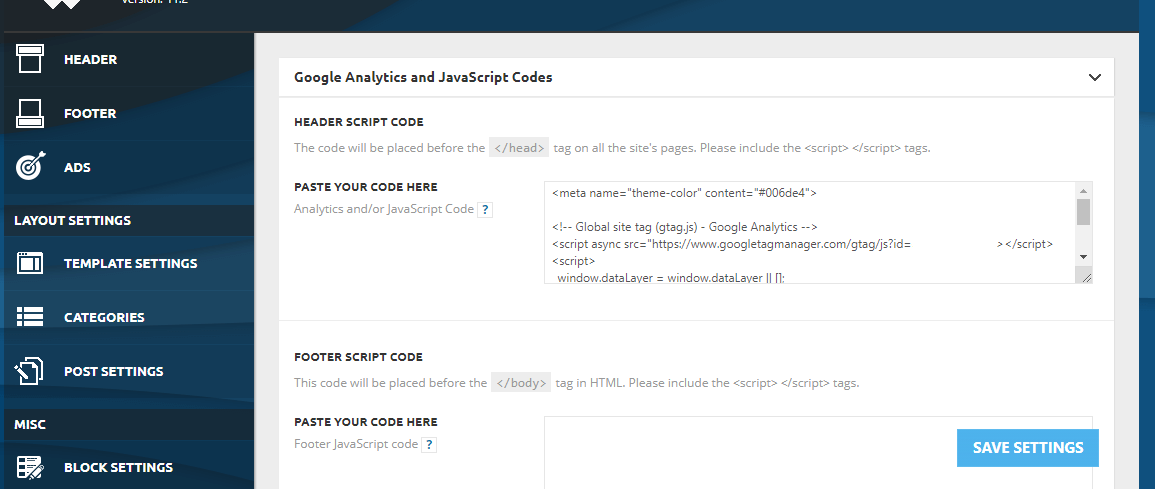
I just added the code here (https://i.ibb.co/SJzwZfS/1.png) and I cleared all the cache but still nothing as you can see (https://i.ibb.co/tZST693/Screenshot-20210810-142452-Chrome.jpg)
-
This reply was modified 5 years by
Abder Fath.
-
This reply was modified 5 years by
Hello!
We would like to investigate this issue further, Please contact us via email at contact@tagdiv.com and provide the following:
– admin url and credentials
– A link to this topic in order to identify you
Our team will take a look!
Thank you !
Hello,
Thank you for your assistance, the theme-color works now!
All I had to do is keep an empty line between the google analytics code and the theme-color code like you see in the screen : https://i.ibb.co/kg9cS69/Meta-color.png