

hi NewsMag,
I deactivate my mobile theme plugin.. I have a problem with the Navigation. Theres no = in the Nav and I cant find the Search icon..
https://prnt.sc/h8iz7p
https://www.biliranisland.com/blogs
Thanks

Hello jalmz,
I have inspected your mobile website and I saw that your mobile menu button is white and that’s why it’s invisible. Try to change the color of it using the following code ->
#td-top-mobile-toggle i{

color:#111;

}
The result is here -> https://www.screencast.com/t/KjD5lgAzMXuu
Thanks.
Hi,
The search icon is just already added on the top right in the mobile menu, like this
-> https://www.screencast.com/t/dN64keGm
Thanks.


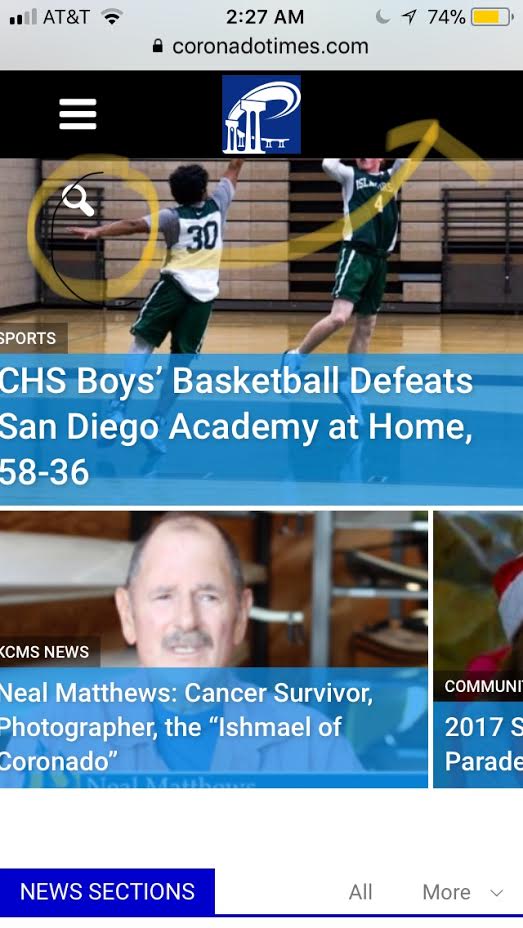
Hi Bogdan, on my mobile version, the white search icon is wrapped below. How do I make it be on the right side of the top bar when bringing up the mobile version of http://www.coronadotimes.com ? I want to use the “regular” mobile version I’ve been using for the site, but the “white search icon” wraps under the top header vs. showing up on the right? Thanks for the help.
-
This reply was modified 8 years by
sejpost.
