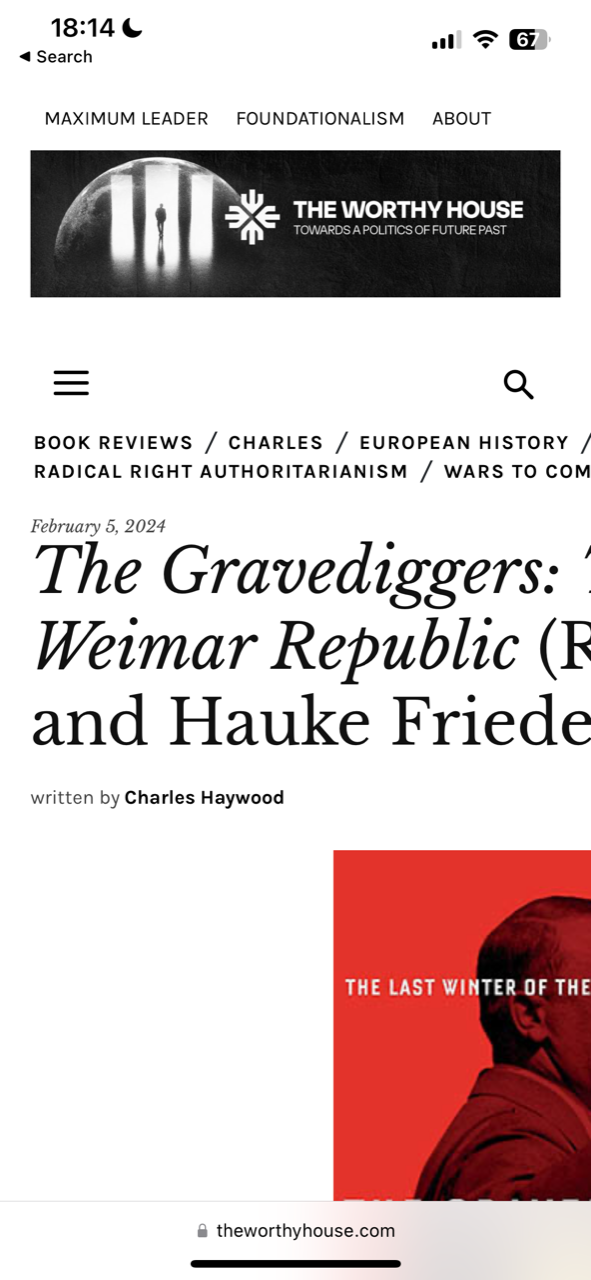
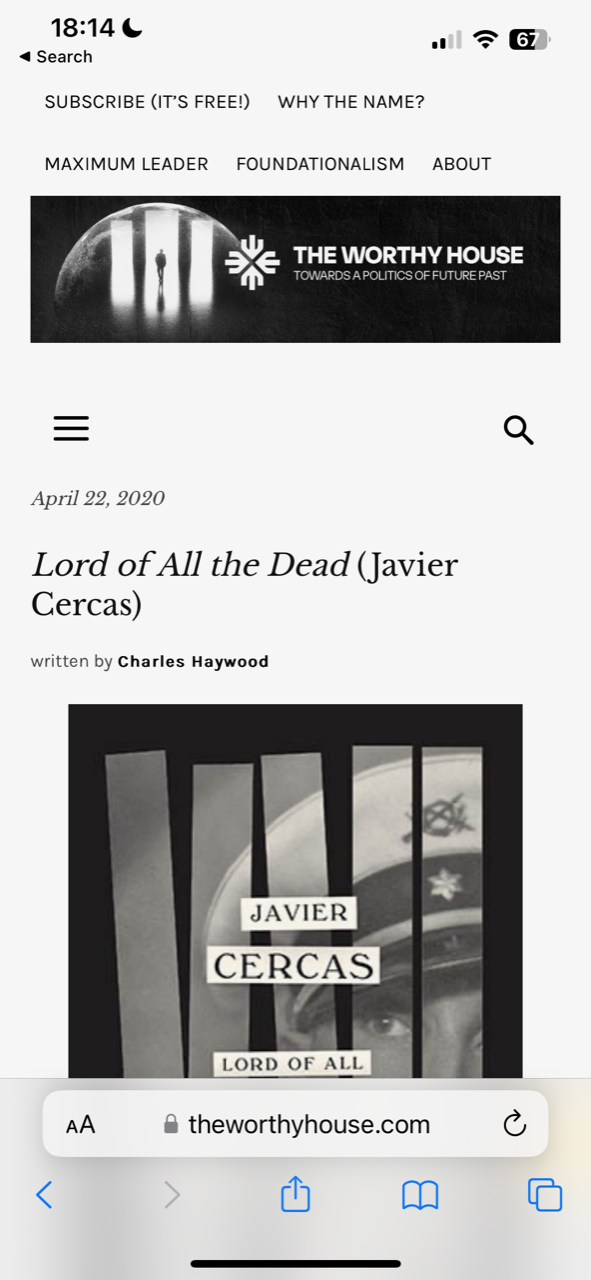
Mobile pages, across browsers and devices, are randomly showing up as misformatted, making some posts impossible to read on mobile. The site is http://www.theworthyhouse.com. It has nothing to do with cache; refreshing or clearing cache, etc., does not fix the problem. All posts are otherwise identical. However, it sometimes happens with one browser and not another (e.g., Safari/Brave)–but not consistently one browser or another. Examples:
Bad formatting: https://theworthyhouse.com/wp-content/uploads/2024/02/Incorrect-Formatting.png
Good (correct) formatting: https://theworthyhouse.com/wp-content/uploads/2024/02/Correct-Formatting.png
Thanks.
-
This topic was modified 2 years by
chaywood0896.
Also, please do not tell me it is my plugins. I have already deactivated plugins, and the problem persists.

Hello @chaywood0896!
Kindly use TagDiv Composer to change the mobile page and ensure that the feature image is positioned correctly.
Thank you!
Thanks. What does “correctly” mean? The images are precisely the same size in every post. How could that help, given that this problem only shows up sometimes, on some posts? No individual edits have been made to any mobile page, yet the problem shows up unpredictably.
Hello @chaywood0896!
If all the settings are correct (the images are left aligned) and it looks good in the tagdiv composer, then the problem is not with the theme. It’s a caching issue.
Thank you!
How can it be a caching issue? That would imply that at some point a misformatted post is being served to a cache. When all caches are cleared, the problem continues to reoccur randomly. It sometimes fixes itself when the page is refreshed; sometimes not. It’s obvious the theme is serving a misformatted page at random times, or (even if it is in the cache) the page would always be formatted correctly. How can that be stopped? Thanks.
Hello @chaywood0896!
Let the cache plugins that you use be disabled and see if the problem occurs anymore.
Thank you!
Hello @chaywood0896!
Make a test and deactivate ALL plugins except tagDiv ones, and try again.
Thank you!
I have done this. It does not help. I am using CloudFlare, but that only serves the pages from the main server. The problem usually resolves upon a refresh, but not always.
This is still happening. It has nothing to do with caching or plugins. It is solely due to your theme. Please fix it.
For example, a TOTALLY NEW POST THAT COULD NEVER HAVE BEEN CACHED, ALWAYS SHOWS LIKE THIS INITIALLY. Then, after multiple refreshes, eventually it looks correct. By that time, of course, the reader has long since gone away. This is totally unacceptable and again, is not due to some caching problem.
-
This reply was modified 2 years by
Hello @chaywood0896!
Please contact us via email at contact@tagdiv.com and provide the following:
– admin url and credentials
– cpanel url and credentials
– a link to this topic in order to identify you
We will take a look and try to help you asap.
Thank you!
Thanks. The admin url for the WordPress instance? You couldn’t login to cpanel; it has 2FA.
Hello @chaywood0896!
Yes, we need an admin account. Can you please disable it until we finish the investigations?
Thank you!
How long will that take? I’m skeptical why I would have to do this at all; it seems very risky. I’ve clearly identified the problem, which you can duplicate on your own by trying.
Hello @chaywood0896!
Some minutes to check the issue you have and help you if you need it. What was the issue?
We are here to help and let you know what can be done there. We won’t do anything on your website without your permission. Do not worry!
Thank you!
The issue is extensively detailed above. I will not provide cpanel access unless you can provide a very specific reason why what would be necessary. The first step should be for you to review all the details I have provided and see the problem for yourself on your own mobile device. Once you have confirmed we agree on the problem, and you still cannot tell why your theme is doing this without direct access to the website, then I will consider providing access the WordPress instance. Thanks.
To recap (although I have provided screenshots above), sometimes when viewing a page on mobile, on different browsers, the formatting is wrong (it extends beyond the edge of the page). This does not occur on all pages. It is usually, though not always, fixed by a refresh. It happens to pages that have just been published, so therefore there is no caching problem. Pages revert to this problem later. I use CloudFlare, but it is not a caching problem there either; I regularly purge the entire cache.
Hello @chaywood0896!
First of all, is that misformatted layout visible in the tagdiv composer too or not?
If not, then this is not a theme issue, and it could be for many other reasons. The access is only for investigating the issue you have and finding the problem that causes it.
Thank you!
Please (a) review my screenshots and (b) try the same thing yourself on multiple mobile devices, so you understand what the problem is. Thank you.
Hello @chaywood0896!
Unfortunately, I can’t see the issue on other posts. Are you sure that you use the same single post template?
Thank you!
There is a Single Post Template. Within that option, there is a Mobile Template (and only one). It is the Mobile Template that works most of, but not all of, the time. There appears to be an option to not have a separate Mobile Template for posts, but to have a mobile version of the Single Post Template (this is not currently used). Is that a better option that might avoid this problem.
Hello @chaywood0896!
I’m not sure what is causing this issue, but if you force refresh the page on the mobile layout, then the issue is not there anymore.
Thank you!