Email Body:
Hello TagDiv Support Team,
I’m currently using the Newsmag 5 theme for my website MahakalTimes.com
, and I’d like to display a Google Web Stories section just below the Hero Area on the homepage.
I’ve installed and configured the Web Stories plugin by Google, which provides the [web_stories] shortcode. However, I don’t see any built-in option in TagDiv Composer or the homepage template to insert this shortcode directly below the Hero section.
Could you please guide me on the following points:
How can I manually insert the [web_stories] shortcode below the Hero Area using code (PHP or a custom module)?
Which template or PHP file (for example, template-homepage.php, loop.php, or any Hero module file) should I edit to safely add this shortcode below the Hero layout?
Do you have any recommended method or sample code to integrate plugin shortcodes like [web_stories] inside the homepage structure without affecting theme updates?
My goal is to feature a Web Stories showcase (horizontal scroll or grid style) immediately under the Hero section, maintaining full visual alignment with the theme’s layout.
Thank you for your time and support.
Best regards,
Umesh Sharma
Editor – MahakalTimes.com

Hi,
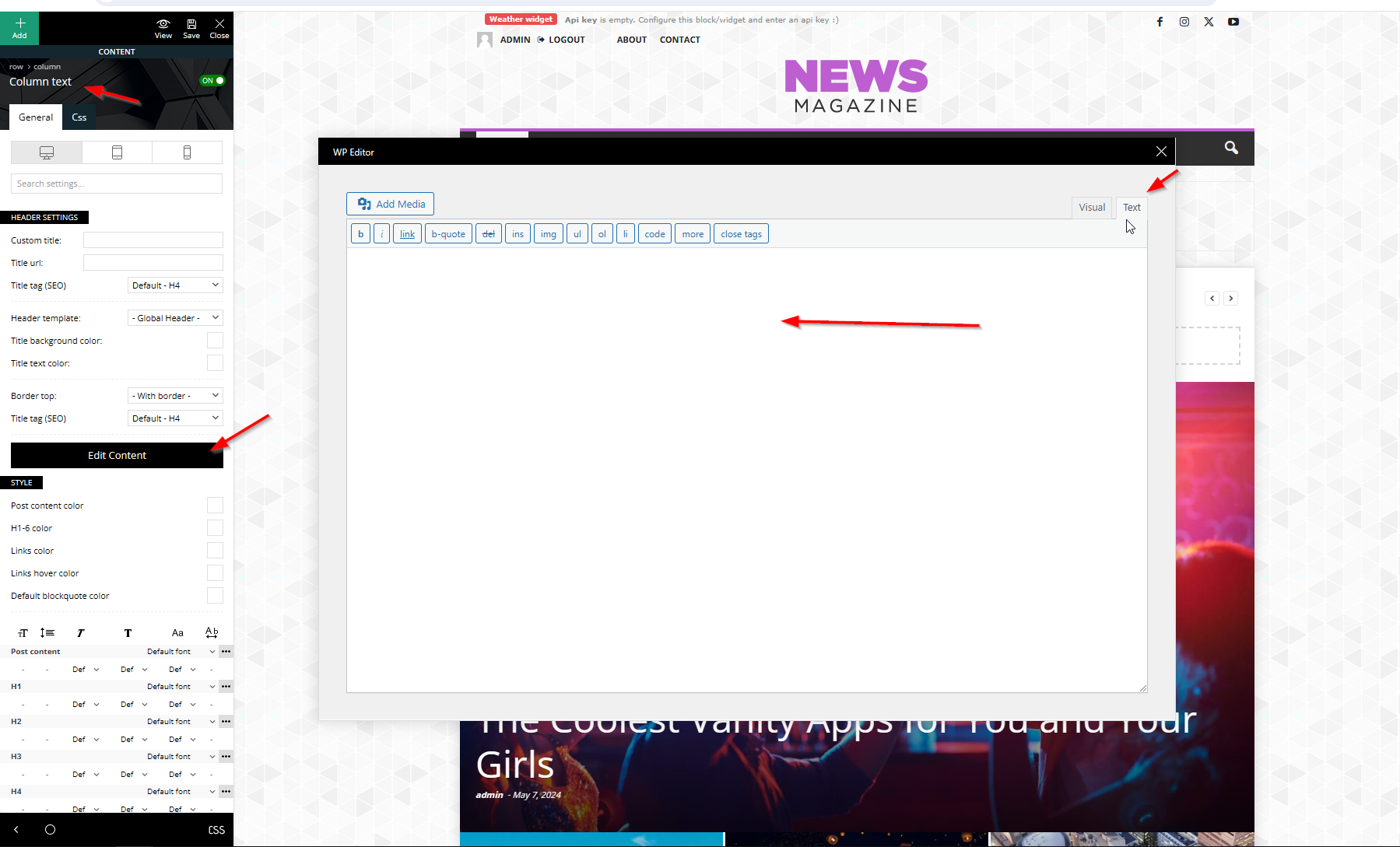
There is no need to make any edits in the theme or plugin files, the code can be easily set using tagDiv Composer on the homepage. Edit the homepage and you can set the shortcode directly in column text or text wit title elemets in the text zone – https://imgur.com/DSSni9j
Thank you!
Hi Calin,
Thank you for your response. Unfortunately, the Imgur link you shared isn’t accessible in India, so I’m unable to view the example image.
Could you please share it through another platform — for example Google Drive, Dropbox, or as an image attachment — so I can see the reference properly?
Thanks again for your help and guidance.
Best regards,
Umesh Sharma
Hi,
You can see the image using this link – https://cdn.tagdiv.com/wp-content/uploads/2025/10/text-zone.png
Thank you!
Hi Calin,
I followed your guidance exactly as you mentioned, and everything displays correctly on Google Chrome.
However, the same section is not displaying properly on Mozilla Firefox.
I’ve attached a screenshot of how it appears on Firefox for your reference.
Could you please help me resolve this issue?
https://we.tl/t-4bN6pae3WZ
Thank you again for your time and support.
Best regards,
Umesh Sharma
Editor – MahakalTimes.com
-
This reply was modified 12 months by
urishtaujjain.
Hi,
I just checked the situation on Firefox, and for me it’s ok – https://i.imgur.com/wuMVFVS.png. Do you use a Mac?
I also checked it on Brave – https://i.imgur.com/Vls7S4R.png and Microsoft Edge – https://i.imgur.com/1oh2dXw.png and for me, on all of them is the same.
Can you check if you have any updates for your browser?
Thank you!
Hi Calin,
Thank you for your response. Unfortunately, the Imgur link you shared isn’t accessible in India, so I’m unable to view the example image.
Could you please share it through another platform — for example Google Drive, Dropbox, or as an image attachment — so I can see the reference properly?
Thanks again for your help and guidance.
Best regards,
Umesh Sharma
-
This reply was modified 12 months by
Hi,
I set the images via WeTransfer.
https://we.tl/t-fIHgrOFE6M
Thank you!