Hey:
This one’s a bit out of my league.
Basically, when I try and enter my location into the weather widget, it pops up with the name of a hole-in-the-wall town 150 km away.
This is really irksome, and it’s not just OWM. Google had the same bad data until I complained to them.
However, OWM has changed how they’re doing things, so when I asked them if they could fix it at their end, they sent me this note.
1) Our data is based not only on weather stations; our data is a whole chain, and the basis is based on our model, so in your case, it’s not just a weather station that stands in Groundbirch.
2) This moment will be more complicated, and this is geocoding. In our products, for example, in current weather or, on our website, or in hourly forecast, there is a database with all cities – embedded geocoding. Previously, it was supported, supplemented and updated. However, for more than a year, we have completely removed the support and production of embedded geocoding, and because of this, new locations or the repair of old ones are not supported. Of course, in general, the performance still remains for users, but we do not recommend and do not guarantee quality when using.
As an alternative to the old embedded geocoding, we have introduced our new separate Geocoding API product; this product dynamically updates a database filled with recent locations and supported. And, of course, in our geocoding, your location is there, and this is a separate city; examples will be shown below.
Documentation – https://openweathermap.org/api/geocoding-api#description
Requests syntaxes – https://api.openweathermap.org/geo/1.0/direct?q=Tumbler Ridge&limit=5&appid=yourapikey
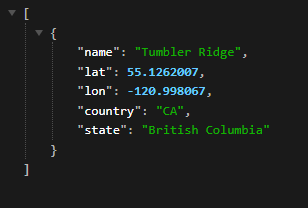
Requests syntaxes – https://api.openweathermap.org/geo/1.0/reverse?lat=55.1262007&lon=-120.998067&limit=5&appid=yourapikey
Screenshot or response – https://i.gyazo.com/3db694f93e406ff4069dba4440c68ef7.png
3) The main point you will have to pass to the technical team is that they will need to use another plugin or write a separate script. In this script, the main point is that you will need to use the coordinates for the request you will receive from the Geocoding API, after which you will substitute the exact coordinates in the Gecodoing API, which will return the correct location.
I, of course, understand this only enough to know that it’s over my head. Is this something that is currently able to be done with the weather widget? I’ve tried, but it doesn’t seem to work, but it could just be operator error, and I might have tried to fix it one too many times and introduced an error. Or it could be at their end, because as of right now, I’m not able to get any data to load, even if I type in London, which is where they are HQed out of. Are you able to see weather data for where you are?