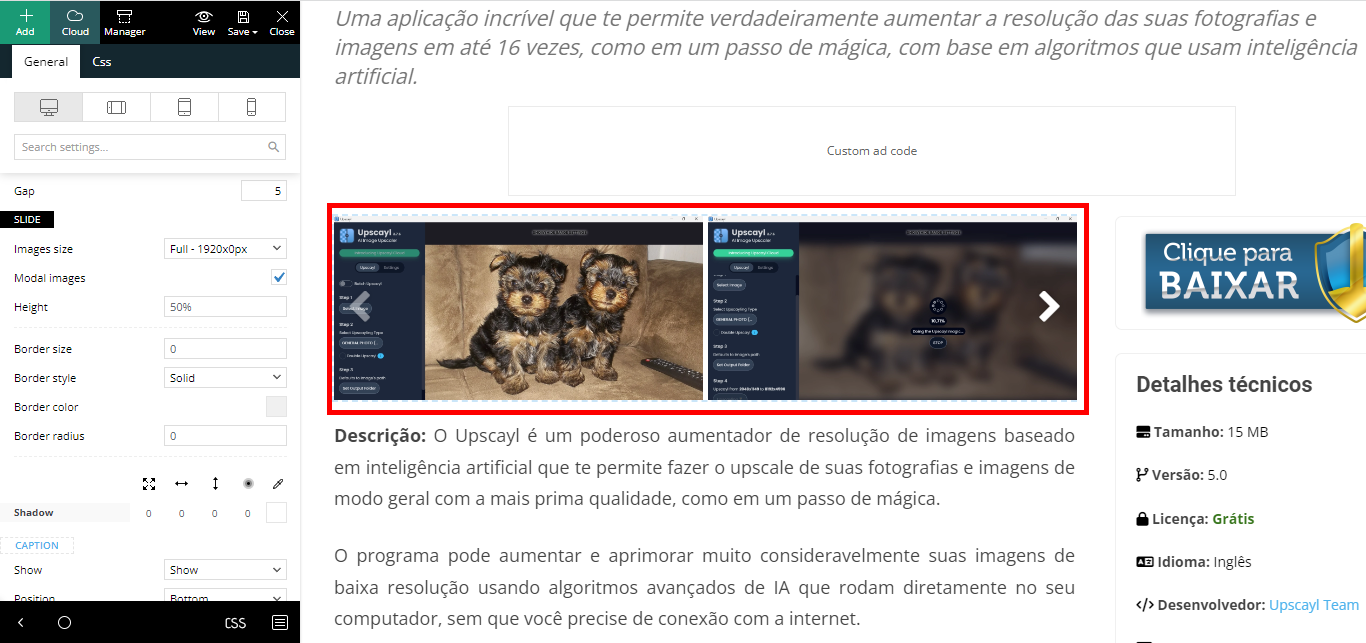
Hi there, I’m working in a new project here and now I’m using the “Gallery” from the theme.
It is very good, but I need to optimize for pagespeed and some other things.
It is taking the images from the “Post/CPT gallery”. Very ultra nice thing added recently.
I just need to know where to go so I can edit this gallery, just that.
I will need to customize so it takes small version of the images (those that WordPress generate thumbnail, average and
big), but when the user clicks on the image, it open’s the full image.
Here is the new post template I created: https://www.baixesoft.com/download/upscayl
Thank you very much for the attention!

Hello!
If you use this gallery: https://prnt.sc/zlrKiIoh1gPD, then you could choose any images that you want from your Media Library.
Thank you!
Yes I’m using this gallery, thank you.
The gallery is not working in a optimized way. Like I sayed I will need to customize so it takes small version of the images (those that WordPress generate thumbnail, average and big), but when the user clicks on the image, it open’s the full image.
https://www.baixesoft.com/wp-content/uploads/2023/09/Gallery.png
tagDiv Composer do not offer the options I need.
Please, acess the link https://www.baixesoft.com/download/upscayl
use the gallery and you will see.
I just need to know where to go, I will customize the necessary code there. Thank’s
Hello!
If you set the image size here: https://app.screencast.com/JK6uwjzS4Su7O then it will appear in that modal at the same size.
Thank you!
Yes, I was testing that, thank you, but when you click to enlarge the image, it will open the modal image, not the full image. And I need it to open the full image for the user, not the scaled-down version.
For example, if I set the option there for the “Medium 696x0px”, it will display there nicely, but when you click in to the image to enlarge, it will open this Medium version, not the full image. That is the ONLY problem.
Also I need to check the box “Modal images” for the images to be clicable.
Thank’s for all your help, but now I think you understand the full picture.
-
This reply was modified 3 years by
rafael-l.
Hello!
Yes, I understand.
This will require custom work, which is not covered by the support team.
For customization and other services, you can contact our custom work team here: https://tagdiv.com/premium-customization-services/.
Thank you so much for your understanding!