


Hi,
If I’m right you have the last theme version, 12.7.1, right? if is so, then please download the tagDiv Composer using this link – https://cdn.tagdiv.com/wp-content/uploads/2025/05/td-composer.zip and replace the one from your website. This plugin contains a fix made by our developers.
Thank you!
Hi,
All those 4 domains are using the theme?
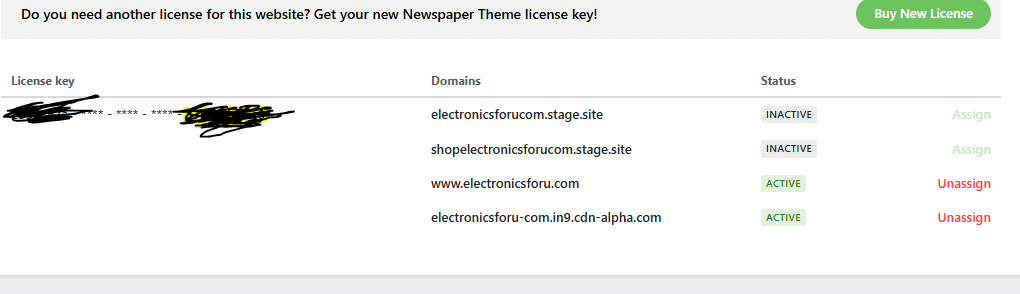
Checking the image, the key is used on more the 2 domains how it should normally be used and ho it is allowed, therefore the theme can not be used on those domain that has the status inactive – https://i.imgur.com/uYqkTT7.png so if the problem you mentioned is on one of those domains then this has nothing to do with the above replies, this situation appears when a license key is used on more then 2 domains. Normally a license key is for 1 website, please check the ThemeForest license specifications here – https://themeforest.net/licenses/standard – https://themeforest.net/licenses/terms/regular -> https://prnt.sc/X0AldIM7e7ni
We allow the key to be used on 2 websites at the same time because we consider that most website owners require a testing website besides the live website, and the theme must be activated there as well.
If you used the license key on more than 2 domains, then it will require more license keys. Also, we can not interfere with the domains that are online and use the theme that has been activated with the license key.
Thank you for your understanding!

Hi Atithya,
It seems the issue is related to the license key being used on multiple websites, rather than being limited to a single site as specified by ThemeForest’s licensing terms. Unfortunately, this can lead to misuse, where some users activate the license on several domains, which impacts its proper functionality.
As previously mentioned, a license key should not be used on more than two active domains. In the screenshot you shared, it appears the key has been used on four different domains. If all of these are live and using the theme, the license may become temporarily blocked. During this period, the license cannot be unassigned from any domain until the block is lifted.
Thank you for your understanding!
Hi,
In your screenshot https://i.imgur.com/C2RxXc3.png the key has been used on 4 domains and it should be used only on 2. What you say is that the key is assigned only on 2 domains, this is because because you are not allowed to used it on more then 2 domains, if you try the unassign/assign button/link will be locked.
Now in case that the other 2 domains no longer use the theme, or no longer exists it, please contact us via email at contact@tagdiv.com and provide the license key, we’ll make a request to be checked.
Thank you!


