Dear support
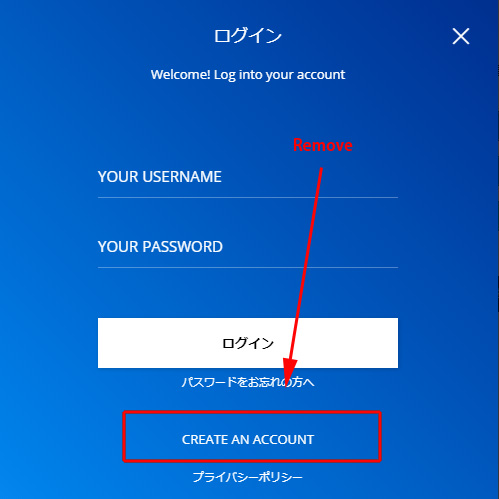
I plan to remove “create accout” link and text on login window.
We need not it. Because we have another specific create account page.
Please tell me how to remove it.
Please see this photo..
https://shokuhin.press/files/loginwindow.jpg
Regards
-
This topic was modified 5 years by
shokuhinet.

Hello,
You can remove the “create account” simply go to Settings -> General tab, and uncheck the “Anyone can register” box => https://www.screencast.com/t/bhUb1Mzi
Hope this helps you!
Thank you!
Dear support
Thanks.
But we need to get new subscribers (users).
We use member plugin and getting subscribers.
It is connecting wordpress “users” area.
If unchecking it, I think it is impossible to get them?
We only want to close orginal wordpress create accounting area for customers.
Regards
-
This reply was modified 5 years by
Hello,
I’m sorry I didn’t understand exactly what you want.
If you want to use the WordPress option, then you can just hide the create account link, with this code
.mfp-content #register-link {

display: none;

}
https://prnt.sc/100riwl
Set this code in Newspaper -> Theme panel -> Custom code -> Custom css.
Hope this helps you!
Thank you!
Dear suport
Please tell me css code for mobile menu’s ,too.
Regards
Hello,
You can use this code for mobile version
.td-login-register-link{

display: none;

}
Set the code in Theme Panel -> Custom Code -> Advanced CSS -> Phones => https://www.screencast.com/t/jBWzlKYjHh
if you have the mobile theme plugin you can use this code
#register-link{

display: none;

}
Set the code in Theme Panel -> Mobile Theme -> Custom Code => https://www.screencast.com/t/St204VtFl3NU
Hope this helps you!
Thank you!