I made a test with GMetrics and I was told to serve scaled images concerning the mobile theme. I habe enabled in the block settings all thumbs that are used in the mobile plugin. But now I get the message:
https://www.topfgartenwelt.com/wp-content/uploads/2019/11/Blog_Topfgartenwelt_Adventkranz_228Custom29.jpg is resized in HTML or CSS from 639×426 to 120×80. Serving a scaled image could save 67.5KiB (96% reduction).
The scale 120×80 I can’t find in the list of thumbnails. What should I do?
Greetings Kathrin

Hello !
It looks like GTMetrix doesn’t seem to find this as an issue: https://www.screencast.com/t/qaYcTrpv
Thank you !
When the mobile theme is shown, GMetrics tells me that the images in the grid aren’t scaled correctly. You can see it on the pictures here: https://www.topfgartenwelt.com/newspaper-4. Unfortunately sometimes the desktop-version of the blog is loaded on the mobile phone than this problem doesn’ appear…
Greetings Kathrin
-
This reply was modified 6 years by
Topfgartenwelt.
Hello !
That is a suggestion from gtmetrix and google to use the perfect sizes but that will affect your website in other ways. Because using another thumb for mobile will create additional images on your website which will lead to more space occupied on your server.
Most of the results from gtmetrix and google page speed are suggestions. You can add another size for your thumbs in wordpress here:
Go to your WordPress dashboard.
Navigate to the Settings > Media tab.
Look for the Image sizes > Thumbnail size section.
Change the default width and height of your thumbnails in pixels.
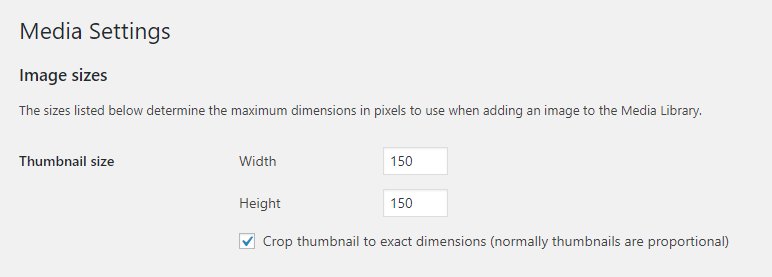
Thank you !
Thank you very much for the information!
Greetings Kathrin

Reopening this thread since I have a similar problem but with featured images. I’m not using the mobile theme plugin but instead using the default responsive version of the site for mobile devices.
GTMetrix does show that some images are not scaled properly. My recommendation was: ****imagelink****.webp is resized in HTML or CSS from 1280x920 to 335x241. Serving a scaled image could save 29.2KiB (93% reduction).
Is there a setting or a way to serve smaller featured images when viewed via mobile?
All my images are optimized via imagify and this is the one problem I can’t figure out.