Hello srikant,
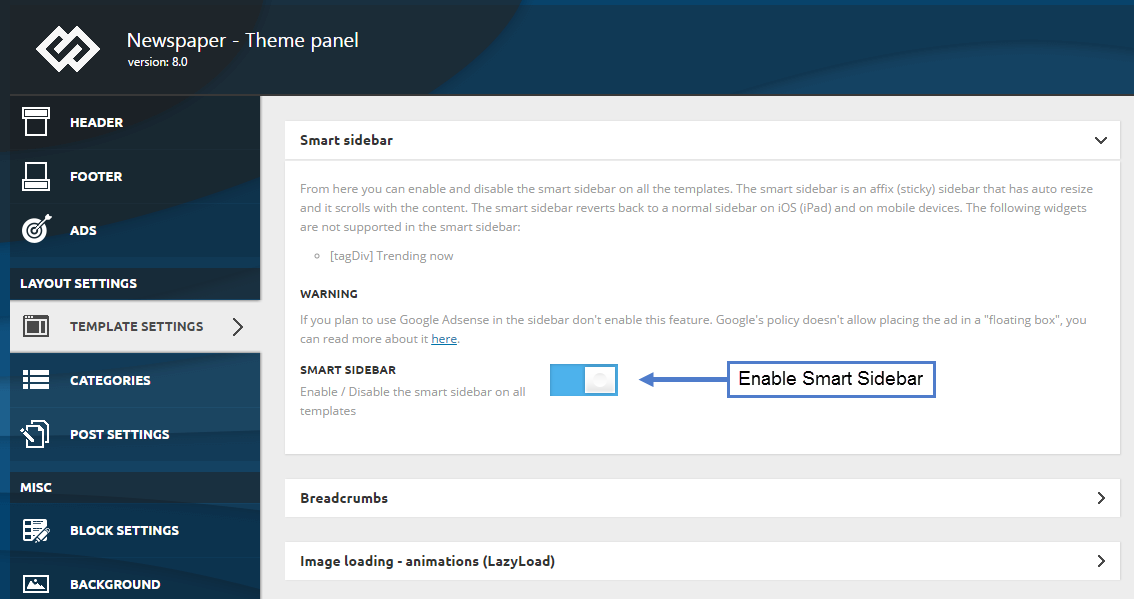
Notice that our theme has a functionality for Sticky Sidebar which is named Smart Sidebar. For more information about this element, please check here -> https://forum.tagdiv.com/smart-sidebar-2/
Thanks for the message!
Hi Catalin,
Thanks for the reply, I am aware of this smart sidebar option.https://forum.tagdiv.com/wp-content/uploads/2017/05/smart_sidebar_1.png But What about this warning message? I am using Google Adsense on the sidebar.
And the second thing I don’t want the floating popup sticky sidebar. I am only looking for the option to stick the current sidebar.
Hope you understand my query.
Regards
srikant
-
This reply was modified 8 years by
srikant.

Hi,
If you use Adsense ads in the sidebar then it is not recommended to use the smart sidebar feature according to Google policies
– https://www.screencast.com/t/aztyvtdGZCiU
– https://support.google.com/adsense/answer/48182?hl=en
This could potentially be a Adsense violation, and you may suffer penalties. Disable the sticky sidebar or remove the ad.
The option in the theme panel can only be disabled or enabled, you cannot set it for only some sidebars and not for others. Only on pages you can specifically create sticky sidebars as you want using a custom row class, as mentioned in the guide.
Thanks
That means The theme has no option to stick the sidebar only right?
Check the post form my different blog : https://windows101tricks.com/fix-your-pc-did-not-start-correctly/
while scroll down the post the sidebar get sticky I want the same option only. Is there any way to make it possible ?
Regards
srikant
Hi,
The sidebar is stick from what I can see, that means the option is enabled in the theme panel. What that does is that when the end of the sidebar is reached while scrolling, it will always remain in view.
I don’t quote understand what you are asking however, the smart sidebar can be enabled/disabled only, for all the website. It should not be enabled if you plan to use Adsense in the sidebar content.
Thanks