

Hi,
i’m actually trying to optimize my autoloaded tables because seems it was over 2 MB, looking in the database (after a small cleanup) i actually see the tables in the image attached.
The list below is called by using this query:
SELECT option_name, length(option_value) AS option_value_length FROM wp_options WHERE autoload='yes' ORDER BY option_value_length DESC;
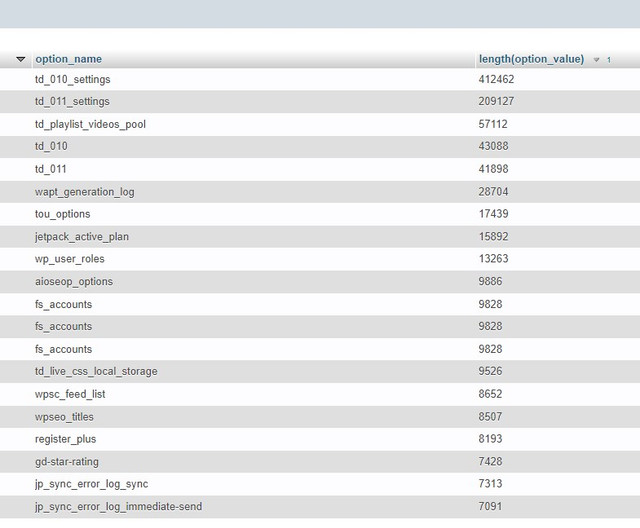
the first 2 (td_010 and td_011) are connected to our beloved theme.
The thing i would like to know is if, in your opinion, the length you see here is normal or not. And if not, can i do something to improve it?
Thanks
-
This topic was modified 2 years by
reloaded.

Hi,
Those tables are part of the Newspaper theme; the theme panel settings and other settings from the theme are stored in those tables.
In td_011, all the data from the theme is stored. The settings, cloud templates, backup for the theme panel, pages and so on are stored. -> https://imgur.com/k7nkIRg
If you have more settings and a big website, then it is possible for the database to grow; there are set data for posts and pages, categories, and authors. There is a limit that you can set to revert back the settings https://i.imgur.com/Riz0x9H.png
If you want, you can check this article: 7 Tips To Reduce WordPress Database Size -> https://eu.siteground.com/kb/reduce-database-size-wordpress/ But before taking any action, please make a full backup of your website and database and only then make changes in the database.
Thank you!
There is a limit that you can set to revert back the settings https://i.imgur.com/Riz0x9H.png
if i want to try to ONLY change from 5 to 3 (no idea if this helps me to reduce autoloaded and persistent objects) the number of backup what should i “hit” to save it?
“import theme settings” ?
Sounds like a dumb question but like this seems i will import a blank page of theme settings
i’ve been reading a lot of articles about database optimization, problem is that a blog started in 2007 has stored so much garbage from plugins that once uninstalled they leave stuff in it
-
This reply was modified 2 years by

Hi,
I understand what you mean and in this situation what I will recommend is to copy in a file the current settings from the theme panel – https://i.imgur.com/d2kB11r.png then change the backups numbers to the one you want 2-3 then click on disable theme panel settings – https://i.imgur.com/V00r0le.png – and when the popup is displaying check the checkbox to delete all backups to – https://i.imgur.com/fHz9bYr.png then enabled back the option – https://i.imgur.com/nqXnyVq.png – https://i.imgur.com/Qec1YFg.png
Also, there is another place where date is stored and can be clean from time to time 😀 for this you need to go to Newspaper > System status and scroll to WP_DEBUG then click a few times on it after that a hidden section will be display with some data that has been cache and can be removed. I think this will help too.
Thank you!



