
unwanted line at bottom of posts

Posted in: Newsmag
Post count: 93

i have looked at all settings and i cant seem to remove this line at the bottom of my posts? can anyone help please?
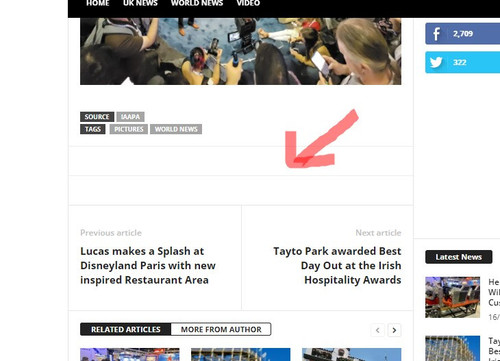
H9TOdFf.md.jpg<br />gif upload site<br />

Post count: 35449

Hi,
Normally that line should be removed with the option that has been between the lines. In cans is not then it can be done only with custom CSS.
Thank you!

Post count: 93

hi Calin,

I don’t get what you mean by “be removed with the option that has been between the lines”

thanks

Post count: 35449

Hi,
For example, if you disable the button social share – https://i.imgur.com/viGNo7C.png then one of the lines should be removed – https://i.imgur.com/txQvr8E.png
Thank you!

Post count: 93

Hi,

i have removed the social share buttons but the line is still there?

i have also removed features at the bottom of posts and it is still there?

cant seem to find whats making the line 🙁

Post count: 35449

Can you please provide a link to your website and I will try to help you to remove the extra lines.

Post count: 93

Hi Calin,

The link is Theme park Spy

Thanks for your help.

Post count: 35449

Hi,
Please try this custom css
.single .td-post-sharing-bottom {
display: none;
}

Set this code in the theme panel> custom code> custom CSS.
I hope this will help you!

Post count: 93

Hi Calin,

That worked great! 🙂 Thank You for your support.

Post count: 35449

I”m glad I was able to help!

Viewing 10 posts - 1 through 10 (of 10 total)
The forum ‘Newsmag’ is closed to new topics and replies.

