

I tried it with the single template import and then use the ACF option but it’s not to my liking. Besides that it only shows the entered data and not the field title I would like to know what to add to the single.php because it looks totally different from what I’m used to and I’m having a hard time finding the right code snipped.
So I made a field named Region and on posting I enter for example USA:

It should show like this:
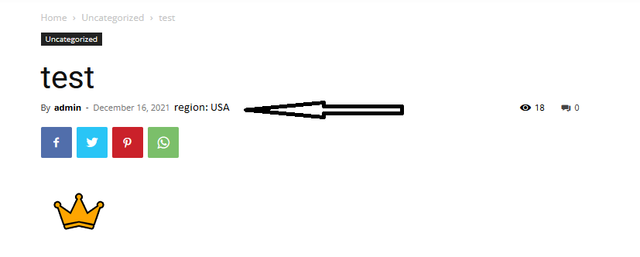
But I don’t understand your single.php, it’s coded totally different so what I need to add to show it properly on the front-end?
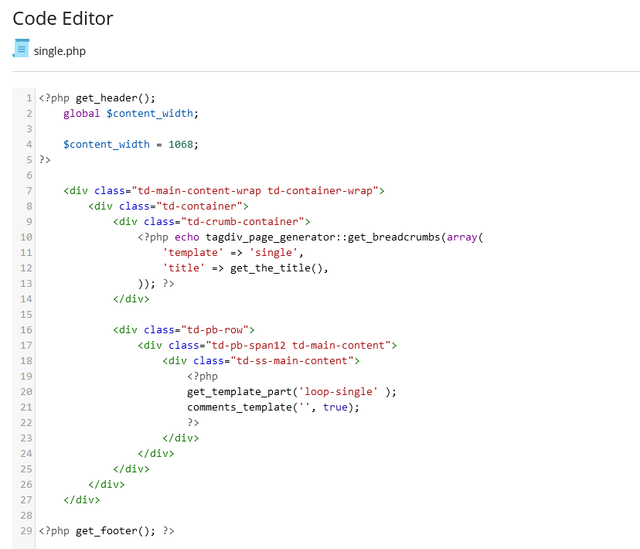
Cheers

Hello!
I recommend you to use the ACF plugin with cloud templates and display the custom fields like how it is described in this topic: https://forum.tagdiv.com/topic/how-to-add-code-acf/
Thank you!
Hello!
An easier workaround could be to use cloud templates and add the custom field as a shortcode. “Column text” and “text with title” elements have a button called “edit content” and if you click on that button, the WP Editor will open and you can add some text/code/shortcode there. To see the changes, save the changes in Composer and view the page.
Thank you!
