

Hi Team
I’m using the RTL recommended template: RTL news magazine
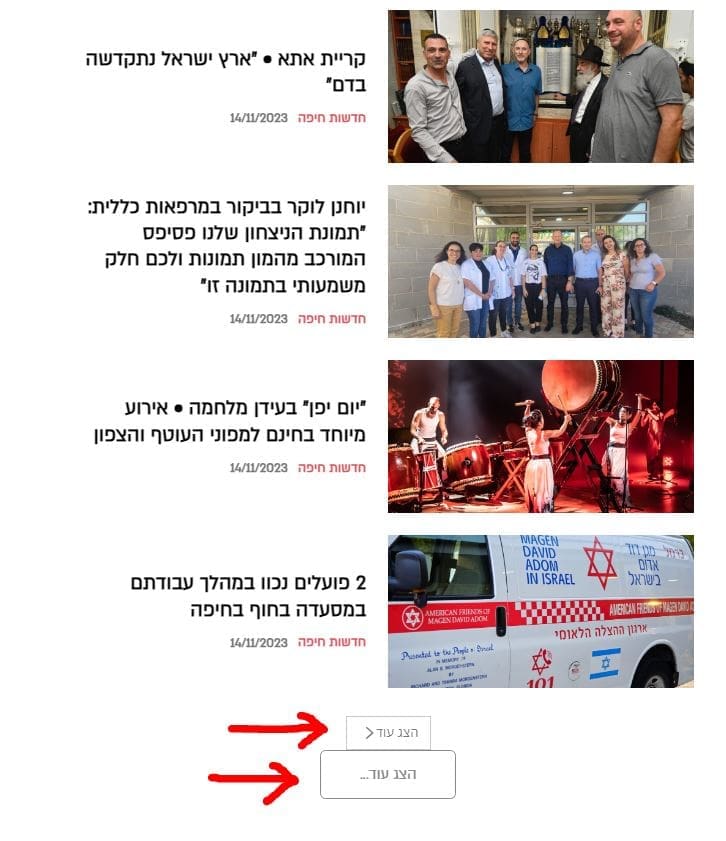
But when I try to add a block of all typer, the block header and buttons remains LTR
And I didn’t find a way to align it RTL
See this example it reflect all block headers and buttons.
–
URL to see the example:
https://dev2.haipo.co.il/item/476084
–
Thanks,
Yaron



Hello Yaron!
You should adapt the RTL from the Composer settings or CSS code because we do not have the RTL feature in our theme. Try to set the buttons like this: https://app.screencast.com/rLJA45XHpOUZK
Thank you!
Hi Bettina,
Thanks for sharing the above intructions.
I did customize a default button, but it doesn’n change the default design of the design of components
When I load a component to the TAGDIV designer, it comes with its own button and header.
And they are always diverted to LTR.
I must have a solution for that because it is a very basic functionality when working RTL with your page builder…
–
Thanks,
Yaron
Hello Yaron!
Did you import a section from the RTL demo? If not, then this should be adjusted with the help of CSS code.
If you can’t handle to solve this issue, then contact us via email at contact@tagdiv.com and provide the following:
– admin url and credentials
– a link to this topic in order to identify you
Thank you!
