

I followed your API page at /youtube-api-key/ and you cover all the things except one that is somewhat important.. I think?
After Step 9 when you click “What credentials do I need?” button to retrieve your API key, the API key comes up but so does a warning. You can see it in your screen shot as well.
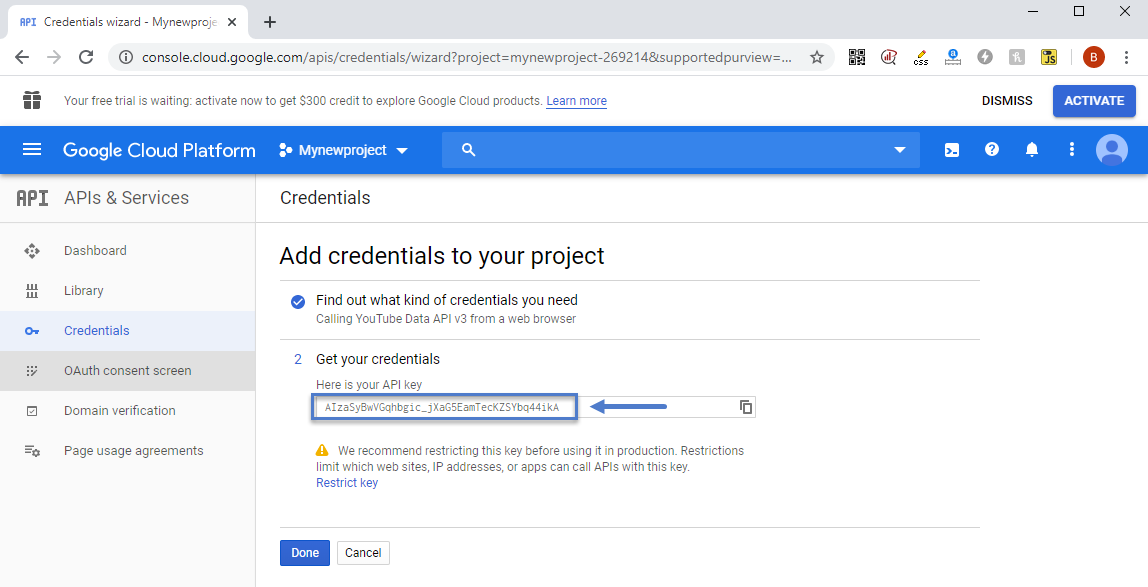
“We recommend restricting this key before using it in production. Restrictions limit which websites, IP addresses, or apps can call APIs with this key.”
In the past I did not restrict a key on previois APIs assuming my sites is small, it’d be fine, I was wrong. I was using the API in a simple YT plugin called Yottie and my site, with little to no traffic somehow had YT emailing me, suspending the API. They wanted me to resubmit an application and detail how/where it’s being used etc. Jump through hoops basically. I’m happy to copy/paste those emails if curious. I assumed it was the plugin, so I tried other plugins, and again.. same thing, too many calls, all over Quota.
I removed all YT API’s and plugins and was going to just copy/paste the URL for each video into a post as needed, knowing WordPress would embed it properly, it’d work, all would be fine.
I tried this, it worked fine, but.. the social counter I think needs the API doesn’t it? Can it work just with a channel name?
If I enter channel/yt-channel-code-here, will that work or do I absolutely need an API key?
So with those answers, I’ll know if I need the key for the counter.
Also – If I add the key in the theme panel under networks, when a video is loaded on a post I make, is that referencing my API key so YT is adding that page load against my quota?
That seems odd given I can just copy/paste the url in and it works so no api is needed etc.. am I missing something?
If I need the key, and I chose to restrict as Google suggests, any suggestions on how to restrict? As in, will this work against the theme at all? Easy to restrict using http/https as noted on their page https://cloud.google.com/docs/authentication/api-keys so that would be it.. right?
Thanks in advance



Hi,
Normal the YouTube amp key is use to can display the subscribers in social counter, to can display a video background on row -> https://i.imgur.com/meGEDqK.png and for video playlist, the rest of option are using without this key, the implementation for YouTube api key was only to can keep these features, if you do not use theme or you can live without theme, then is no need to use the api key.
Also this https://i.imgur.com/waRO0Bh.png is just a recommendation, for best practices, secure and performance.
Thank you!


