

 Ans
Ans Thanks for your reply, Simion.
Just want to use the pre-designed infobox of Newspaper theme for quick notes or disclaimer. (Similar to the blue info box in newspaper theme docs)
Ans Thanks for your reply.
To be clear, for https://imgur.com/PajVRJT, please press the 2nd button in thumbnail regeneration plugin. Did you see if these td_xxx sizes image can be generated in server in your test? Thank you.
My expericence: thumbnail regeneration plugin can show the td_xxx sizes in dashboard page but cannot regenerate those images in server in real run after pressing the button.
Ans As I said before:
Normally we only want to regenerate thumbnail for MAIN image only (but not gallery/secondary image) for td widgets usage.
Force Regenerate Thumbnails seems regenerate for ALL images which cause uncessary inodes/usage in server. Please advise any plugin/options to regenerate thumbnail for MAIN image only, thank you.
Ans Please press the 2nd button in thumbnail regeneration plugin to see if these td_xxx sizes’ image can be generated in server? Thank you.
My expericence: thumbnail regeneration plugin can show the td_xxx sizes in dashboard page but cannot regenerate those images in server in real run after pressing the button.
(FYI, the thumbnail regeneration plugin not updated for 2 years)
Ans Yes, I did tested with Regenerate Thumbnails plugin and found an related issue:
Disabling “tagDiv Standard Pack” plugin will remove all the td_xxxx thumbnail sizes in thumbnail regeneration plugin (can show it but cannot regenerate image), even though we can select thumbnail sizes in theme panel of td. (eg. 265×198 and 741×486 for mobile theme)
When I enable the “tagDiv Standard Pack” plugin again and the regeneration return to normal.
Please check and advise, thank you.
Ans Normally we only want to regenerate thumbnail for MAIN image only (but not gallery/secondary image) for td widgets usage.
Force Regenerate Thumbnails seems regenerate for ALL images which cause uncessary inodes/usage in server. Please advise any plugin/options to regenerate thumbnail for MAIN image only, thank you.
Ans Found an related issue: Disabling “tagDiv Standard Pack” plugin will remove all the td_xxxx thumbnail sizes in thumbnail regeneration plugin (can show it but cannot regenerate image), even though we can select thumbnail sizes in theme panel of td. (eg. 265×198 and 741×486 for mobile theme)
Note that I enable the plugin again and the regeneration return to normal.
Please check and advise, thank you.
Ans Problem solved after disabled scalability plugin during thumbnail regeneration. Thanks.
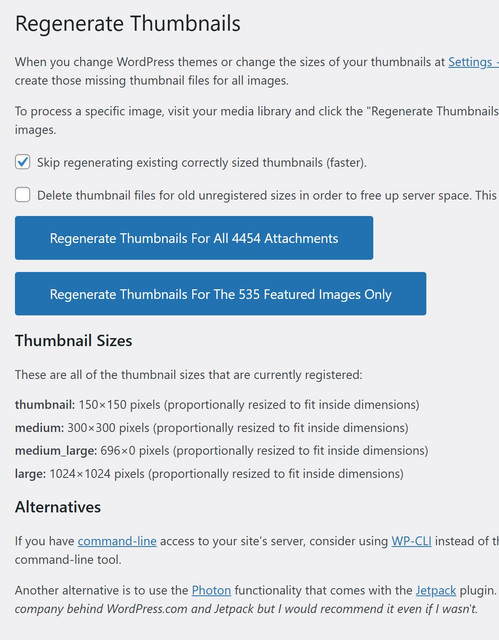
Ans To be clear, I did select 265×198 and 741×486 in theme panel for thumbnail regeneration as 1st screenshot.
While not matter what size I selected in panel, it only shows/generates the generic thumb sizes of WordPress as sreenshot as 2nd screenshot.
Please help check and advise, thank you. @Calin

Ans Ans Same here, asking to only disable lazy loading for post featured image.
Please consider, thank you.
Ans Hi Support, may I know if it’s possible to fix this bug in the coming monthly release?
As it’s critical during designing stage of new sites, thank you.
Ans Thank you for your help.
Ans Hi Bettina,
Love the speed for Mobile Theme (instead of responsive/mobile page).
Could you please mark it as feature request for Mobile Theme:
Add “LOOP AD2” and “ARTICLE INLINE AD2” locations & related settings (AFTER POST2, AFTER PARAGRAPH2) for Mobile theme ads
Currently only one ad location for blog loop and article inline loop espectively, which is not enough for long list or long article.
Thank you.
Ans Hi Bettina,
Could you please mark it as feature request for development:
Add “LOOP AD2” and “ARTICLE INLINE AD2” locations & related settings (AFTER POST2, AFTER PARAGRAPH2) for Mobile theme ads
Currently only one ad location for blog loop and article inline loop espectively, which is not enough for long list or long article.
Thank you.
Ans Hi Bettina,
The main point of this request to add SET 2 for these 2 locations. (2nd ad in post loop or in an article)
Please double check and advise below, thanks.
Is it possible to add “LOOP AD2” and “ARTICLE INLINE AD2” locations & related settings (AFTER POST2, AFTER PARAGRAPH2) for Mobile theme ads?
Currently only one ad location for blog loop and article inline loop espectively, which is not enough for long list or long article.
Please consider, thank you.
Ans Without nagivation, would caching the content in Grid widgets help reduce queries/page load? Thanks.
Ans Agreed, please add the h1-h6 option to header / text for all blocks/modules, thanks.
