azinus
 Theme version 12.6.2
Theme database version 12.6.2
azinus I already tried updating PHP 8, and there is still error.
azinus But still need to fix error: The WP_Scripts::localize function was called incorrectly. The $l10n parameter must be an array. To pass arbitrary data to scripts, use the wp_add_inline_script() function. Read Debugging in WordPress for more information. (This message was added in version 5.7.0.) in /home/vigilar1/public_html/wp-includes/functions.php on line 6031
azinus Actually I find solution. It was problem with Advanced Ads.
azinus Hello, thanks for your reply. However, I found some options where I turned off the redirect AMP plugin.
My next problem is: that the banner that is right below the menu bar is not displayed.
When I turn on only mobile in the theme settings, I get an error: Notice: The amp_has_paired_endpoint function was called incorrectly. Function called while AMP is disabled via amp_is_enabled filter. The service ID “paired_routing” is not recognized and cannot be retrieved. Read Debugging in WordPress for more information. (This message was added in version 2.1.1.) in /home/vigilar1/public_html/wp-includes/functions.php on line 6031.
The only part I need to solve now is to display the banner that I have on the front page, it should be on the mobile version. Is there any way to edit it, because whenever I want to edit the mobile version it looks totally different.
azinus UPDATE:
I’d like to add, that I solve kind of problem, but there still problem when I’m on mobile: in footer I have option (exit mobile version) when I exit my post views shows, when I go to mobile version my post views disappear.
azinus In my post’s are that picture that missing, but on my homepage that picture is there.
also my hamburger menu is not working (error: Click here – to use the wp menu builder)
azinus Ok Anamaria, thank you.
But that is not write way… because, I have one design that I want on desktop and mobile. I’m really sorry that I cannot use TagDiv system to create mobile pages…. (Yes, when I have mobile plugin activate)
Look at these example: http://www.vigilare.info/doniraj – check it on desktop and check it on mobile…
azinus Hi, i really don’t understand you’re advice…
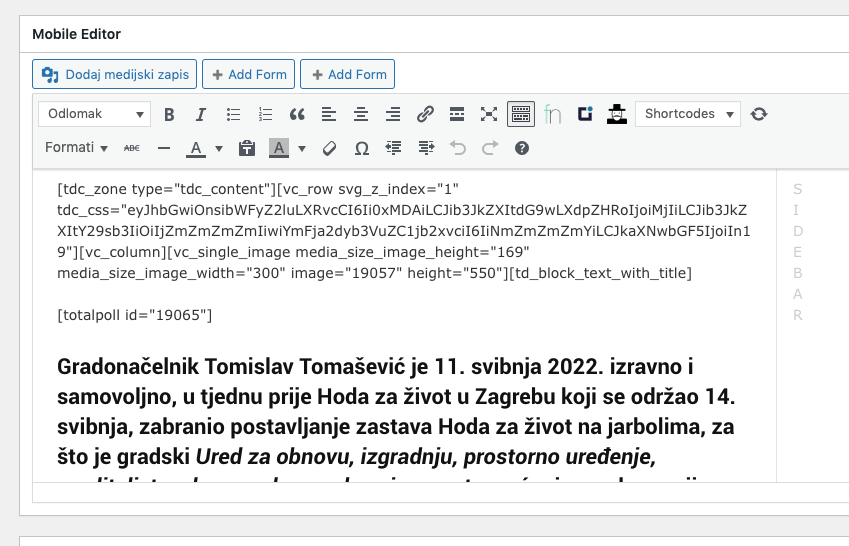
On your screenshoot there is no any code, here is the screenshot of mobile version: https://vigilare.info/wp-content/uploads/2022/06/Screenshot_20220603-085132_Chrome.jpeg
and screenshoot of page edit: https://vigilare.info/wp-content/uploads/2022/06/Slika-zaslona-2022-06-03-u-08.51.42.png
azinus Hi Bettina,
thank you so much, yes, I have a wrong offset number in my category template!
Thank you once more!