

 handiso
 In case someone need this, here is the easy full steps for a separate mobile menu.
(line number for NewsMag theme v1.5)
1) themedir \parts\menu-mobile.php
Line 18 change to 'theme_location' => 'mobile-menu',
2) themedir \includes\wp_booster\td_menu.php
Line 9 change to var $is_header_menu_mobile = false;
@wishdigital: you just need to modify here.
3) same file as 2)
Line 235 add this line 'mobile-menu' => 'Mobile Menu',
before 'footer-menu' => 'Footer Menu'
That’s it. Of course you need to create a new menu for the “Mobile menu”.
Hope this help.
handiso I have the exact same problem. I am working on it and will share here if I figure anything out.
handiso Great! Thank you very much for your help.
I changed it a little bit.
Add the following code to: themedir “\includes\wp_booster\td_module.php” instead of each module.
function get_the_tags() {
	$buffy = '';
	$td_post_tags = get_the_tags($this->post->ID);
	if ($td_post_tags) {
		$buffy .= '<ul class="td-tags td-post-small-box clearfix">';
		$buffy .= '<li><span>' . __td('TAGS') . '</span></li>';
		foreach ($td_post_tags as $tag) {
			$buffy .=  '<li><a>term_id) . '">' . $tag->name . '</a></li>';
		}
		$buffy .= '</ul>';
	}
	return $buffy;
}
and add this to module files:
<?php echo $this->get_the_tags();?>
-
This reply was modified 11 years by
handiso.
handiso I tested it again this morning. It works in the loops of taxonomy, search, archive, etc… but not on Visual Composer’s pages. Mmm…
-
This reply was modified 11 years by
handiso Thanks for you help. Well, that was exactly what I did. That’s why I said “I must have missed something”.
Of course, I did it again and followed your steps and code EXACTLY, still no tags shown. Weird.
handiso Hi, Lucian
You need to click the arrows in the upper-right corner back and forth to see this issue.
handiso Please see screenshots attached (http://demo.tagdiv.com/newsmag, Firefox 34.0.5, Window 7 32bit).
http://www.screencast.com/t/Z7ZsEbyGb
http://www.screencast.com/t/wZZRvMeo2iSR
http://www.screencast.com/t/bhOta1tsCajw
http://www.screencast.com/t/Z0IHLerEd7
-
This reply was modified 11 years by
handiso @masbay93
Sorry but I am not sure what you mean. Did you try the fonts I shared?
Christopher
Your website is perfect now, at least at my side.
http://www.screencast.com/t/GWNiDuGxua
handiso @cityslicker444 @masbay93:
at step 3: select all icons, make sure you select only icons imported from newsmag.svg.
you may try the fonts I regenerated, if you want.
https://www.dropbox.com/s/nn6n04z39g8ml2v/newsmag.zip?dl=1
-
This reply was modified 11 years by
handiso As the test result shown in my last reply, maybe something wrong with the font “newsmag”? Anyway, I re-generated the font and the problem is fixed.
HOW:
1. go to https://icomoon.io/app;
2. button “import icons”, import from newsmag.svg (in /images/icons/),
3. select all icons;
4. button “generate font”, button “download”;
5. copy the 4 files (.eot, .svg .ttf .woff), in “fonts” folder in the downloaded zip file, rename icomoon.* to newsmag.*, replace old files, done.
For your reference ONLY.
handiso Well, I am not here to show a different theme or something. I just want to say, is there any chance something wrong with the theme?
Theme Newsmag uses custom icon font “newsmag” which made from FA I believe. So it’s not easy for me, or anyone, to compare it with other themes.
All right, let’s compare it to itself. I don’t own this theme, so I got a copy from someone, for test only, of course. (Sorry about that if tagdiv team do mind this.)
Here is a quick test. I just put 2 icon fonts into the theme Newsmag, one is official Font Awesome 4.2, another one is my custom font, icons from icomoon or flaticon, compiled by icomoon, compatible with IE 8-11. My sites use icon font except the one using theme Newspaper.
http://www.screencast.com/t/I0QhQxZ5RZsD
I can see two search icons but not the one from font “newsmag”. Is this make any sense?
handiso OK, no pix no truth. 🙂
No, I Can’t!
Newsmag demo:
http://www.screencast.com/t/kUkOkgWnkg
GA-GA.com:
http://www.screencast.com/t/t2ctTqvC9ab
ladgeneration.com:
http://www.screencast.com/t/6INjhXkcj
Yes, I can!
absolute theme:
http://www.screencast.com/t/mrAcgfs7whgJ
….
I like Newsmag theme, but how could I purchase/use it without the icons?
handiso Thanks for the tips. That means I am not alone.:)
When I run the test on GTMetrix for the same page, I can see the icons. Really weird.
Actually my working computer is the only one on which some browsers (Chrome, Opera, and old version IE) can’t see the icon font from newsmag theme. So far. From here, I can see icon font in any (so far) wordpress theme except Newsmag.
handiso I am from California.
You are right, I can’t see icons on the demo http://demo.tagdiv.com/newsmag/. However, I CAN see other sites using icon fonts via same browser (Chrome) with setup and plugins unchanged, for example:
http://themeforest.net/item/voice-clean-newsmagazine-wordpress-theme/9646105
http://themeforest.net/item/newsline-responsive-news-and-magazine-theme/9614971
http://themeforest.net/item/top-news-wordpress-news-magazine-theme/9359816
Of course, I CAN see icons on themeforest.net.
Might be something wrong at my side, but what it is? I even disabled all extensions, emptied cache, in Chrome, just the same.
-
This reply was modified 11 years by
handiso Bad news for Christopher. Your site is just the same as Arved007’s at my side. Not a single icon such as search or arrow shows up, in IE, Chrome and Opera. I do have a lot of extensions or plugins in chrome, firefox, and I am not sure if they cause this issue, however, Opera I tested in is a totally clean instance, and should be issue free.
I tested a lot of themes recently, no similar issue found.
handiso Hi, it’s Arved007’s site http://www.anim-arte.com/, not mine. BTW, CDN could be a reason, but not in this case I think. I visited his site on the same computer via 4 different browsers( just tested on Opera and failed) plus phone/ipad, results:
IE 10: failed
Desktop Chrome: failed
Opera: failed
Firefox: OK
safari :OK (iPad only)
Mobile Chrome: OK
Please advice.
handiso FYI, I can’t see your icons in Chrome, IE10 (WIN7), but it’s fine in Firefox and Android/IOS. Weird. This stop me from using NEWSMAG. I’m testing a newspaper-theme site.
handiso I guess I need more luck with this theme. My issue is ignored, obviously. Or you guy really think that it is not a bug, just the way it works? and you won’t do anything about this? If it’s true, please let me know asap, and I need to change my plan a bit. Thanks.
handiso Hi, I am afraid we have some misunderstanding here.
I thought I understand how it works before I read your post.
Just like you show me on the features page here:
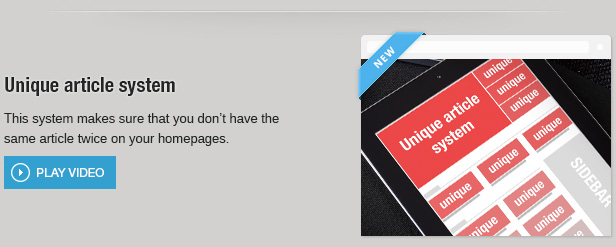
the unique Article system should work on the entire page, but NOT including the sidebar(s), at least if I want. So I thought there will be an option, including or excluding the block, but there is not.
That really does not make sense to me if I put a block on sidebar widget area with the title “Latest News”, but actually it shows, say, number 36-40 posts. I hope you understand what I mean.
Thank you.
handiso Well, I only tested in localhost/XAMPP.
You could replicate this very easily:
1)add a number on each post title, by posted date and time;
2)enable “Unique Article”
3)put a block in widget area with “Latest Posts”.
The “Latest Posts” block should show the number 1,2,3,4,5 post (if you set the limit to 5), right?
Thanks for your attention.
handiso Same here. Localhost installed, xampp, WordPress 3.8.1, English. No plugin except Animated Gif Resize and Revolution Slider. No speedbooster. Only demo posts. Please help.
