

 JBH
JBH Hi again 🙂
Question, i’m trying to defer parsing of javascripts by adding this code to the theme’s functions.php
function defer_parsing_of_js ( $url ) {
if ( FALSE === strpos( $url, '.js' ) ) return $url;
if ( strpos( $url, 'jquery.js' ) ) return $url;
return "$url' defer ";
}
add_filter( 'clean_url', 'defer_parsing_of_js', 11, 1 );
Works great! Only the images disappeared from the posts.
I guess i have to exclude some javascripts, but which one, and how?
Thanks!
JBH I’m sorry, you can visit the comment section for a example over here: http://goo.gl/4IO4Wf
JBH JBH JBH GTmetrix report homepage: http://gtmetrix.com/reports/www.vetvrij.com/Dbmvvg6R
GTmetrix resport post page: http://gtmetrix.com/reports/www.vetvrij.com/Qi2SEDvr
Thank you in advance!
 JBH
JBH I’m so sorry, found it allready!
The wp-admin directory was restricted.
This topic can be closed.
JBH JBH Hi Christopher,
Thank you! I’m not a pro and need a bit more help for this. Number 2 and 3 are definitely server related (both java script related) how to fix them?
The first ons (image dimensions) is hard becouse i can’t set those demensions by hand) the images are scaled and provided automaticly by the newspaper theme)
Can you please help me a bit.
Thank you!
JBH Hi Lucian,
Unfortunatly this code doesn’t change the color also 🙁
Are there any options left?
JBH
JBH 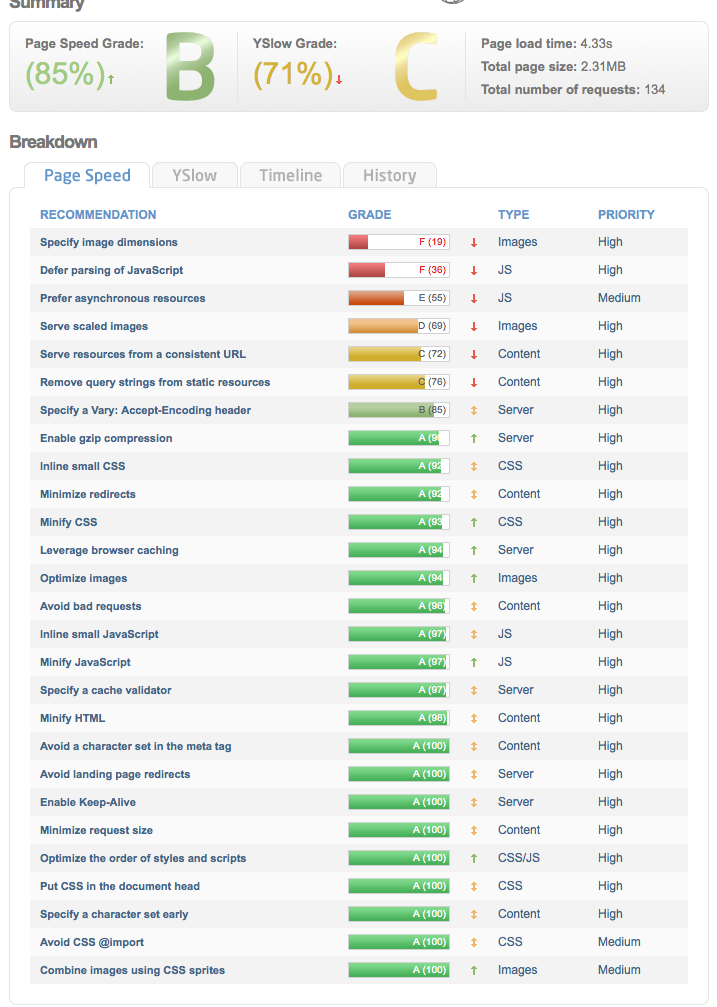 JBH
JBH Hi Lucian,
I’ve tried to change the comment link color by adding this code you prefer:
.comment-content a {
text-decoration: underline !important;
color: #1f9ee7 !important;
}
But the link colors in comments stay light grey (#cbcbcc) and i love to make them blue (#1f9ee7)
What custom css does the job?
Thanks!
JBH
JBH Great, it works!
JBH
JBH Thank you!
JBH Yes, I’ve got the same over here, no height change 🙁
JBH Great, thanks!
Can i use the same code for style 3 ?
JBH
JBH Thank you Lucian!
JBH
JBH thank you 🙂
JBH Another css question, which custom css code does change the link color in comments? (they are light grey now)
Further, i noticed that there is no ‘edit comment’ link for admins in the comment section. What’s the reason and how to change it?
Thanks!
JBH Hi,
Clear, i’ve installed 4.2.3 again and the big slider is working perfect again. I’ll wait till the next updat.
Thanks!
JBH Hi Lucian,
Add the code, worked out perfect!
Great support again, thanks!
JBH
JBH Thank you.
The post title is present in the theme panel -> custum typoography
The post content is not presetent at this moment.
http://gyazo.com/c19cee17aa204733bf441a0772d1d781
Is that possible in the future?
Thanks!
JBH
JBH I know that i don’t have to buy the visual composer but want to keep all my plugins up to date 😉
https://forum.tagdiv.com/update-the-visual-composer-plugin-wpbakery/
JBH Thank you, done it and the problem is solved.
Another problem with the ‘big slider’ I’ve upgrade the wpbakery visual coposer to v4.3.2 and the ‘big slider’ is messed up since then. This is the problem:
screendump: http://gyazo.com/8e765bdb03cad867dfc78e5953522bbd
JBH 2nd for me, it works fine for posts, but where to find the option to change te font on pages?
JBH Thanks, fixed it by entering a piece of css in ‘custom css’. Hope they add it soon to the theme panel.
