

BTW this my htaccess:
# BEGIN W3TC Browser Cache
# Deflate Compression by FileType
<IfModule mod_deflate.c>
AddOutputFilterByType DEFLATE text/plain
AddOutputFilterByType DEFLATE text/html
AddOutputFilterByType DEFLATE text/xml
AddOutputFilterByType DEFLATE text/css
AddOutputFilterByType DEFLATE text/javascript
AddOutputFilterByType DEFLATE application/xml
AddOutputFilterByType DEFLATE application/xhtml+xml
AddOutputFilterByType DEFLATE application/rss+xml
AddOutputFilterByType DEFLATE application/atom_xml
AddOutputFilterByType DEFLATE application/javascript
AddOutputFilterByType DEFLATE application/x-javascript
AddOutputFilterByType DEFLATE application/x-shockwave-flash
</IfModule>
# END W3TC Browser Cache
AddType text/javascript .js
# turns cache on for 1 month
<IfModule mod_expires.c>
ExpiresActive On
ExpiresByType text/css “access plus 1 month”
ExpiresByType text/javascript “access plus 1 month”
ExpiresByType text/html “access plus 1 month”
ExpiresByType application/javascript “access plus 1 month”
ExpiresByType application/x-javascript “access plus 1 month”
ExpiresByType application/xhtml-xml “access plus 600 seconds”
ExpiresByType image/gif “access plus 1 month”
ExpiresByType image/jpeg “access plus 1 month”
ExpiresByType image/png “access plus 1 month”
ExpiresByType image/x-icon “access plus 1 month”
</IfModule>
<ifmodule mod_headers.c>
<filesmatch “\\.(ico|jpe?g|png|gif|swf)$”>
Header set Cache-Control “max-age=2592000, public”
</filesmatch>
<filesmatch “\\.(css)$”>
Header set Cache-Control “max-age=604800, public”
</filesmatch>
<filesmatch “\\.(js)$”>
Header set Cache-Control “max-age=216000, private”
</filesmatch>
<filesmatch “\\.(x?html?|php)$”>
Header set Cache-Control “max-age=600, private, must-revalidate”
</filesmatch>
# Webfonts
ExpiresByType application/vnd.ms-fontobject “access plus 1 month”
ExpiresByType application/x-font-ttf “access plus 1 month”
ExpiresByType application/x-font-woff “access plus 1 month”
ExpiresByType font/opentype “access plus 1 month”
ExpiresByType image/svg+xml “access plus 1 month”
</IfModule>
# gzip Compression if availiable
<IfModule mod_gzip.c>
mod_gzip_on Yes
mod_gzip_dechunk Yes
mod_gzip_item_include file \.(html?|txt|css|js|php|pl)$
mod_gzip_item_include handler ^cgi-script$
mod_gzip_item_include mime ^text/.*
mod_gzip_item_include mime ^application/x-javascript.*
mod_gzip_item_exclude mime ^image/.*
mod_gzip_item_exclude rspheader ^Content-Encoding:.*gzip.*
</IfModule>
<ifModule mod_headers.c>
Header set Connection keep-alive
</ifModule>

This is what super cache should add too ur .htaccess
# Turn off ETags as we’re manually managing our caching
<IfModule mod_headers.c>
Header unset Etag
FileETag none
</IfModule>
# BEGIN Cache-Control Headers
<ifModule mod_headers.c>
<filesMatch “\.(ico|jpe?g|png|gif|swf)$”>
Header set Cache-Control “max-age=2592000, public”
</filesMatch>
<filesMatch “\.(css)$”>
Header set Cache-Control “max-age=604800, public”
</filesMatch>
<filesMatch “\.(js)$”>
Header set Cache-Control “max-age=216000, private”
</filesMatch>
<filesMatch “\.(x?html?|php)$”>
Header set Cache-Control “max-age=600, private, must-revalidate”
</filesMatch>
</ifModule>
# END Cache-Control Headers
# BEGIN Compress text files
<ifModule mod_deflate.c>
<filesMatch “\.(css|js|x?html?|php)$”>
SetOutputFilter DEFLATE
</filesMatch>
</ifModule>
# END Compress text files
Only W3 cache, nothing else… (reinstalled because of PS)
can you tell me how to fix a broken like:
http://cherrykoks.de/wp-content/uploads/2014/08/30day400200tag61-100×65.jpg
picture not exisiting anymore and its making bad request.
Don’t know how to fix that
-
This reply was modified 12 years by
Cherry.
Oh ok – thanks will try that – got an idea for this: webmaster tools says: cherrykoks.de/search not existing.
when I click the lupe in the menue on the right site of my page- it looks like this:
how can I rename the Search without installing an extra widget in the sidebar?
Would like to rename this back to “search”

I’m still not happy with the pagespeed on http://www.dailycat.de even I have optimized it quite a bit. Thus I set up google analytics page speed tracking. Maybe the results are interesting for the tagdiv team.
Mobile devices and especially tablet devices load much slower than desktop. I know, gsm and edge connection aren’t the best, however maybe its reasonable to load smaller images and reduce page heaviness for mobile devices.
https://www.dropbox.com/s/hbwpl7r4tfr6nhk/pagespeed-device-comparision.png
Second, there are some mobile devices which are much slower than others. especially android mobile. The followeing screen is the page load time compared to the websites average. I think it may be worth taking a look at the page speed performance of safari and mobile android browser, since the amount of people using them are significant.
https://www.dropbox.com/s/o43rv8lcb6ltm0n/pagespeed-mobile-android-browser-slow.png
https://www.dropbox.com/s/wlhhyj8uxe9y9qy/pagespeed-safari-slow.png
Any Ideas to improve performance on dailycat are welcome! Thx, guys for this awesome community here!
-
This reply was modified 12 years by
Manuel Fink.

@Manuel, I agree. My mobile speed is 38/100 (http://screencast.com/t/CbPRQZycSI) and desktop speed is 62/100 based on Google Pagespeed. Any suggestions?

@Manuel
obviously in your case you have elements loading from something like 7 external sites, graphics loading from the network portal vs localized, and it looks like you don’t have the setting activated for mod_pagespeed to insert image dimensions.
@sbo
obviously in your case, if your speed is 62 then you need to address all the elements on your server for caching, expiration headers, gzip/deflate, image optimization, etc., which is what this thread is all about and worth reading through 🙂
Has anyone a suggestion for better Mobile Speed?
https://developers.google.com/speed/pagespeed/insights/?url=cherrykoks.de
already minified these- and still not good enough – on desktop it’s “acceptable”
http://gtmetrix.com/reports/cherrykoks.de/MAxHG3vb
Was thinkin’ about to combine the 3 css files into 1 – (p.e everything in stylesheet.css) but don’t know how where to change the “calls” for html. (which file and which code there? )
Is it useful to combine? The internet community is torn about that issue.
-
This reply was modified 12 years by
Hi Cherry
you might want to keep ONE thread, vs starting three or more regarding your site and pagespeed. Basically if you get all the things updated already covered in your other two threads, then mobile speed will also increase.
Again, as I’ve noted previously, you can’t do anything about the external ads being served which impact speed. Not sure how you’re loading ads on a demo site anyway, frankly. You should turn ads OFF for testing your “actual” speed. So the “errors” for mobile for the javascript and images from Google ads and advertisement browser caching, are impacting your score but nothing you can address and are false positives vis a vis the site and theme.
You *can* minify the main .css file which is showing as NOT minfied, as we’ve already covered in your prior threads.
Minifying http://cherrykoks.de/…ntent/themes/Newspaper/style.css?ver=4.1 could save 7.1KiB (16% reduction) after compression.
And basically don’t use contact form 7 unless you actually need it. Since you don’t have a live site, why would you need somebody to contact you anyway at this stage of your playing with the theme and setup without actual content. If you’re planning to use that, then you could presumably add its css to bottom of the main style.css, then hack the plugin to not write its own CSS into the head of the theme; or this would be example of where — as you’d asked elsewhere — you would add the plugin to the speedbooster plugin code to get it dumped at bottom of theme and optimized.
And remember best to test a post page for score not home page, since most people do NOT land on a site home page, but “surf in” to content from a social media link/share, or search result page, etc. — home page will always be a trickier prospect since it’s not indicative of the rest of the site, using sliders, modules, more photos, ajax loads, etc.
Also be aware you cannot get a 100/100 score with a WordPress site running numerous photos, plugins, ads, social media hooks, etc. Only people who have accomplished this have done custom sites without images, using CDN, and custom coding to maximize above the fold content load separate from below the fold content.
If you get above 80 on mobile and above 90 on desktop, you can really get on with your life and worry about content and marketing.
-
This reply was modified 12 years by
simchris.
thank you – I’ll do that.
After all, I’m fed up with all this, will try to optimize these last things (best as I could p.e minify the main css) and then focus on another things. (as you maybe notice I’m to focused in that)
sorry for all my questions by the way. I’m pretty new to this.
No prob. As I think I said, I spent an entire month (January 2014) messing with this stuff, and a mix of Amazon’s CDN, our new server, mod_pagespeed, etc.
I think I mentioned someplace the flaw in Google’s speed algorithm, where one of my test pages got a 91/100 with 47% of page rendering due to blocking elements; combined some files, now only have one blocking element, but less than 1% is considered able to render before loading the main CSS file, and the score went up to 97/100 for desktop and 91/100 mobile with user UX score of 85/100, and the items for the UX score are stupid.
(Test this page, which doesn’t use CDN, doesn’t use WordPress:
http://www.send2press.com/services/ez_price_list.shtml
You can drive yourself to drink with this stuff.
And the super annoying thing is the new expectation by Google for all pages to load via https, which requires SSL cert, and to possibly enably mod_SPDY on server since https is inherently slower than http. But … that’s another story, and the one I’m suffering with now. (Sigh.)
@christophersimmons:
what you understand by “graphics loading from the network portal vs localized”? As far as I know where isn’t any CDN in Germany thus we decided to server pictures from nginx ram with having in mind that this should be faster or at least comparable to cloudfront.
Fonts and Google Analytics are loaded from Google, I think this is a preset from the theme.
jQuery and Co are loaded from public CDN. I think this is faster than serving them myself since they already should be precached.
In addition to this the only thing loaded from external servers are ads and content tests. The content tests are programmed by myself and run completely async after the on page load event. For the ads we are working on a hack to load them async, however this isn’t stable yet. The only left over part is the iam.js script. which is running sync. This is the only party I’m not allowed to change, since it is used to track the germany publisher ranking. Really sucks that they only supply a synchronous script, but it should be reasonable.
I’m not that experienced in page speed optimizations yet, thus it would be interesting for me to know which part exactly makes the page load so horribly slow? And how can I figure this out? I think up to 40 sek on mobile devices is just not acceptable for clients.
How can I activate the mod_pagespeed setting to insert image dimensions and what is it doing?
And by the way thx for your awesome expertise!
Hi! @manuel
The mod_pagespeed system runs at the server level as an nginx or apache module (we use apache as main system, with nginx used for some other things on same box, but not for WP sites). So, it runs above the domains, but re-writes content on the fly and then caches stuff and works with the server-based caching.
Benefits include automatic blank space removal, comment removal (e.g., “SEO powered by Yoast SEO” and other stuff you don’t want to “advertise” to the world, etc.) rewrite of image dimensions for anything resized to “fit” and cached version of the new size image, optimization of images, conversion of gif to png where necessary, DNS pre-fetch, etc., etc. — but you can read about it on the Google site.
We’re used the self-hosted module (aka “GPS” https://developers.google.com/speed/pagespeed/module ), but they also have a service to host content (aka “PSS” https://developers.google.com/speed/pagespeed/service ), which is a mix of CDN and the pagespeed modules together and you can test the before/after speed on their site to see if it benefits you (remember you have to do test couple of times for it to cache stuff). Test: http://www.webpagetest.org/compare

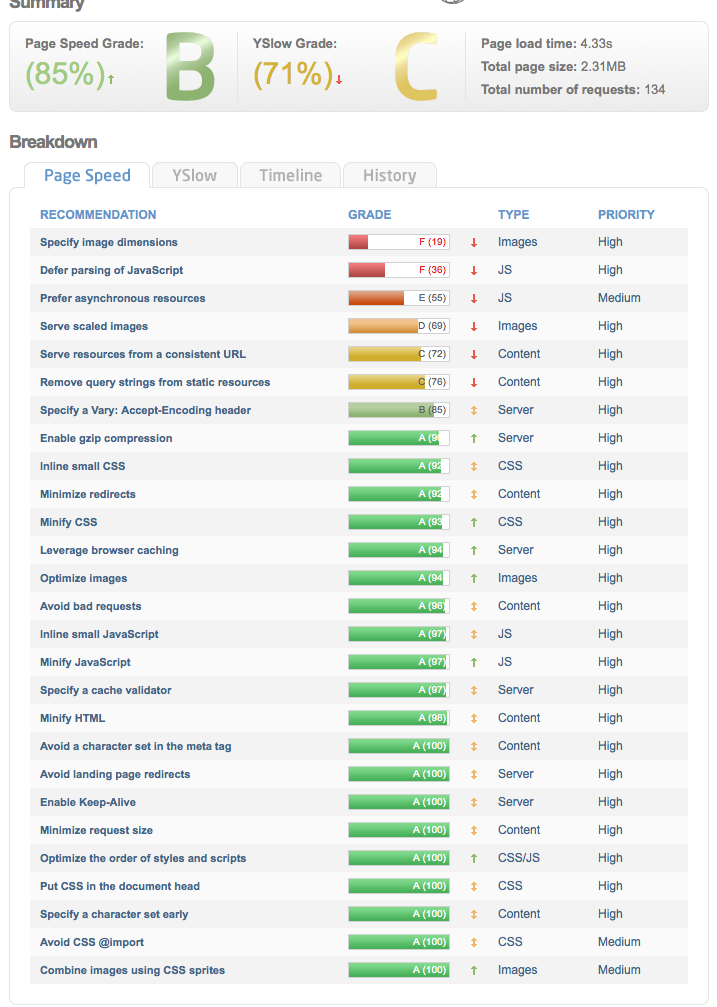
Hi Christopher,
Thank you! I’m not a pro and need a bit more help for this. Number 2 and 3 are definitely server related (both java script related) how to fix them?
The first ons (image dimensions) is hard becouse i can’t set those demensions by hand) the images are scaled and provided automaticly by the newspaper theme)
Can you please help me a bit.
Thank you!
GTmetrix report homepage: http://gtmetrix.com/reports/www.vetvrij.com/Dbmvvg6R
GTmetrix resport post page: http://gtmetrix.com/reports/www.vetvrij.com/Qi2SEDvr
Thank you in advance!

@JBH
Hi, looks like setting proper folder permissions on your site really helped to start 🙂
But, looking at your example post page you have a LOT of work to do.
most of your errors have nothing to do with the theme; so you’re going to want to address all that stuff first. Possibly find better solutions for what you’re doing with some of those external systems. Basically you’re loading too many things from external sites, which will lower your scores; more than 5 external things is bad for speed.
For example – this is crazy:
This page has 29 external Javascript scripts. Try combining them into one. This page has 13 external stylesheets. Try combining them into one. This page has 7 external background images. Try combining them with CSS sprites.
Note you can’t do much about the stuff you’re loading from other sites/servers, but you should
1) remove “versioning” — implement the .htaccess (if running Apache) and functions.php suggestions which I’ve posted, especially for the remove of the version tags. If running child theme you may need to put in child version; not sure on that.
2) optimize javascript delivery; use the td speed booster plugin to help with theme resources; but it won’t help with external stuff you’re loading
3) you cant do anything about the image dimensions of the things being loaded off external websites
4) prefer async – you’d have to hack whatever plugin you’re using for Facebook to load that as async
5) optimize images – be sure what you upload is already as small as possible; also use something like smushit or similar; possibly use my functions.php code for setting smaller default compression size for WordPress built in function (e.g., change from default 90 to 6); then do regenerate thumbnails — boom everything 20% smaller!
7) consistent URL errors coming from your “leadpages” stuff
8) vary encoding errors – coming mostly from leadpages
9) redirect issues – whatever you’re doing with Facebook and Google generating errors
10) bad request with favicon
(etc.)
HI, JBH
I will be offering this service again soon, but I’m knee-deep in redoing our sites, and was sick (with it turns out onset diabetes) and so I was REALLY REALLY sick for 2-3 months (April to early July). I’m waaaaaay behind on my own stuff, sadly.
Also my note about the functions.php compression setting should have said change to “60” not “6” … which obviously would not work.
Also, I charge $60/hour for this stuff, so not cheap. But I’ve been doing design for 30 years, webdev since 1994, and WordPress since 2006.
Anyway… “optimization” is a process. Do what you can in baby steps. From your test page, the Yslow stuff might be addressed first.



