rcallejonvillalobos
 Hola Jose, yo estoy utilizando en mi web imágenes de 1200 x 617 que además se adaptan perfectamente a FB. También existen un plugin, no recuerdo su nombre, que adapta las imágenes a los bloques de artículos para que no te suceda eso. En todo caso, otra opción sería poner unos bloques de anuncios en portada en los cuales las imágenes no requieran un gran tamaño.
Un saludo.
rcallejonvillalobos Thank You Catalin!
But the line in the menu header is incomplete.

how to fix it?
rcallejonvillalobos Ok! Sorry,only could you tell me how to change the size of the products?
rcallejonvillalobos I can not changethis problem 🙁
Mi shop in pc:

I want that my shop display in this way:

-
This reply was modified 10 years by
rcallejonvillalobos.
rcallejonvillalobos Thank you! I want that show the date in the top menu only in the PC desktop. how to fix it?
rcallejonvillalobos Thank you!!! You are the best! Ultimately, I want my top menu is sticky on mobile, it is possible?
rcallejonvillalobos Now yes! Thak you!!! Also, I only want the menu to be sticky on mobile.
This code doesn’t work:
@media(min-width:767px){
.td-affix{
display:none
}
}
I use header style 8. My web is informeinsolito.com
rcallejonvillalobos Thank you! But when I paste these codes in Theme panel -> custom code -> custom css don’t work! Please, how to fix it? My web is informeinsolito.com
-
This reply was modified 10 years by
rcallejonvillalobos Hola Ing Geek! Veo que eres de las pocas personas con conocimiento sobre el tema Newspaper que hablan español. ¿Me podrías ayudar en algunas dudas que tengo con mi web? Tal vez puedas decirme tu Skype o email para hablar sobre ello. Muchas gracias. Que pases buen día!
rcallejonvillalobos Sorry! I’ve solved the problem.
Thanks Catalin!
rcallejonvillalobos Hi Catalin, my problem persists.
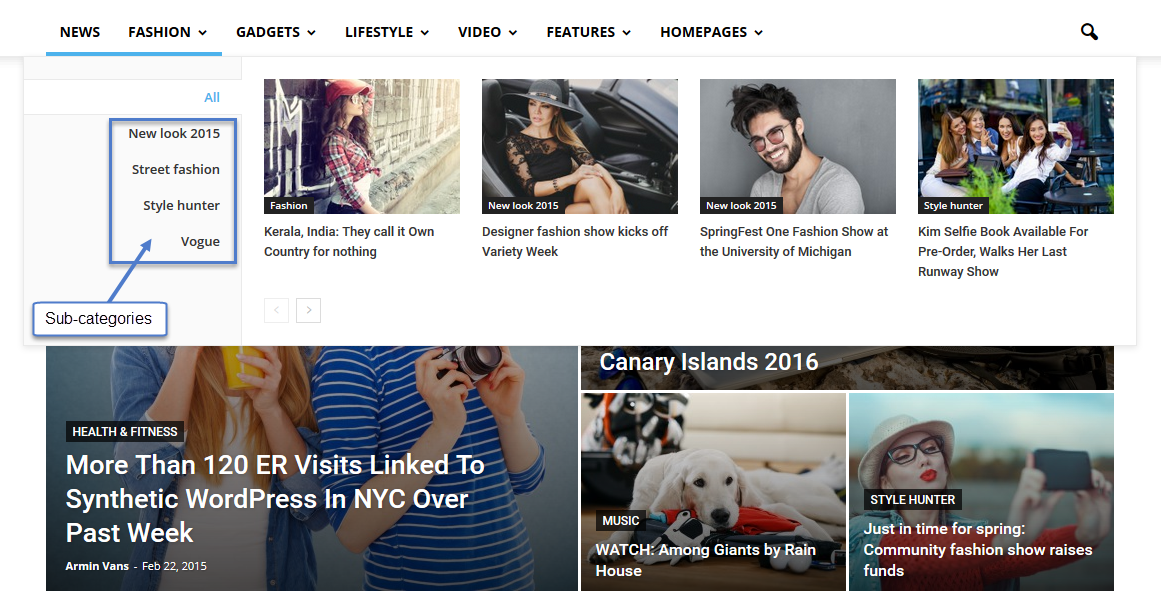
I want to put a Mega menu with sub-categories. But my sub -categories do not look good…
The sub-category appear under the blocks: http://oi59.tinypic.com/estbp5.jpg instead of to the right of the blocks: https://forum.tagdiv.com/wp-content/uploads/2015/05/2015-06-15_13-48-10.png
rcallejonvillalobos Hola,
Después de muchas horas intentando solucionar ese mismo problema he dado con la solución. Dentro del Visual Composer en cada columna aparecen en su parte superior tres botones; un +, un lápiz y una papelera, tienes que pinchar sobre el lápiz para editar y entrar en la pestaña Desing Options y donde pone margins (en la parte superior) escribes -30px.
Por cierto, podrías ayudarme a añadir la función de suscripción como la tienes en tu web. ¿Cómo hacer para enviar mensajes a los suscriptores?
Cómo has cambiado el nombre a los títulos del pie de la página?
Espero que te sirva!
-
This reply was modified 10 years by