

Hello,
I am looking to use one instance of Block 4 for displaying posts on a page. I understand that placing the block 4 element into a 12/12 VC Row will render me a three-grid layout for each ‘row’ of posts (dependent on how may posts I choose to show).
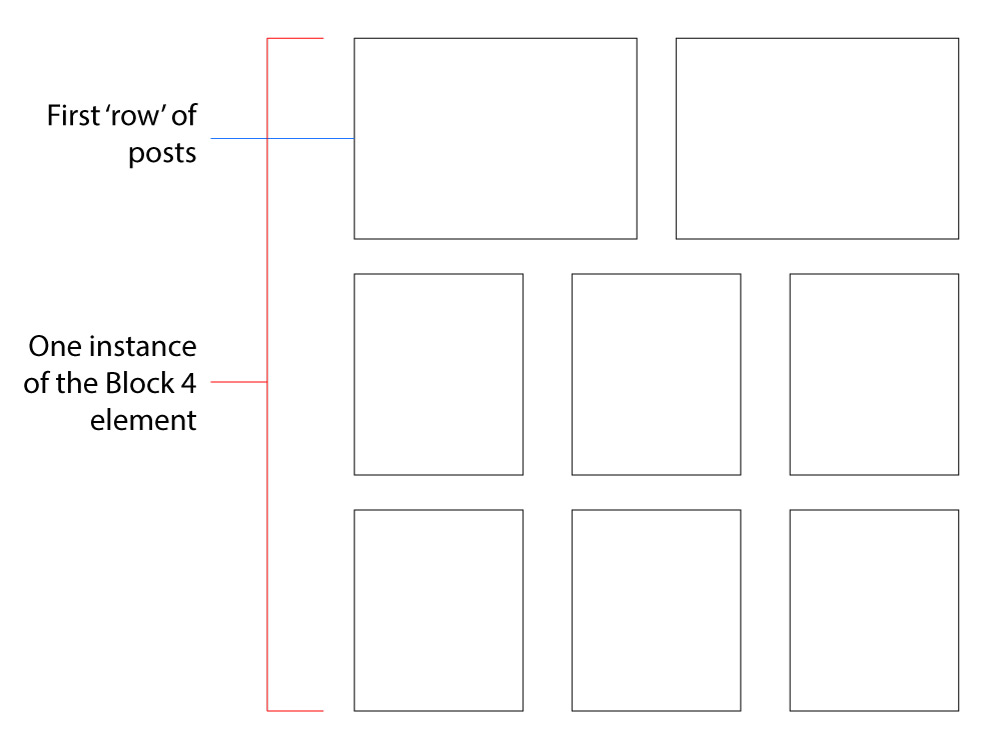
What I need to do is edit the first ‘row’ of the Block 4 element to render me a two grid layout, while keeping the subsequent ‘rows’the same at three-grid.
I’ve attached an image showing you what I’m trying to do.
Please tell me what file(s) I need to edit to accomplish this. Also, if possible, if you can tell me exactly what I need to do when editing the file(s), I would greatly appreciate it.
Thank you

Hello,
If you require 2 posts at the top and 3 posts on the bottom on the same layout (sidebar wise) then you will need to use separate blocks.
Try to use a big grid for the top 2 posts and then use block 4 for the 3 posts per column part. You can use the offset feature to not have duplicates.
https://forum.tagdiv.com/block-settings-tutorial/
Thank you!
Hello Bogdan,
I appreciate your response. However, as articulated in my post, I am looking to use one instance of block 4, not multiple. This is why I asked which files (php) need to be edited to accomplish the first ‘row’ having only two posts.
Why do I want to do this you ask? Good question. I need the category filter to effect the entire layout. I cannot have individual sections with their own filters.
If you can please point me to which files I need to edit to make this change (and possibly what code will be needed), I would tremendously appreciate it.
-
This reply was modified 8 years by
bmorgan.

Hi,
Any modification made to a block will affect any instance of the block. You cannot edit the block that is on one row in the code, without affecting all the other same type blocks. The block 4 you mention (like all blocks) has a predefined layout conditioning for each row settings where it is placed
– https://www.screencast.com/t/oyUvHL1f6
So when a block is place on a full row it will always display 3 modules, on 2/3 row it will display 2 modules etc.
Also each block will have it’s own filtering, this cannot be synchronized between blocks unless same filtering and sorting is used for all of them.
Please create the design you want using different elements or blocks, and achieve the same result through block filtering and sorting systems, maybe use the offset as mentioned
– https://forum.tagdiv.com/offset-feature/
The same block cannot have one functionality on the first row, and a different one in the other rows. But different blocks can.
Thanks
“Any modification made to a block will affect any instance of the block. You cannot edit the block that is on one row in the code, without affecting all the other same type blocks.”
I’m fine with that. Is the file in your screencast the only file I need to edit to achieve a two span in the first row of block 4, and three span underneath (one instance).
“Also each block will have it’s own filtering, this cannot be synchronized between blocks unless same filtering and sorting is used for all of them.”
This is the exact reason why I need one instance as opposed to multiple. I wrote this myself in my previous post. So I understand the functionality there.
In summary, I appreciate your guidance to corral me to other alternatives, but I really need to know where/what needs to be changed to achieve a two span for the first row and 3 span for the remaining rows (within a 12 column VC row) for one instance of block 4.
Hi,
There are no modifications that you can make to display one instance of a block that way. You cannot have two modules on the first row, then three on the rest of the rows.
Please try and find a solution o create the pages using the default implementation of blocks and grids. Take a look at the theme demos and install one of them, or use them for inspiration in design
– https://demo.tagdiv.com/select_demo/select_demo_newspaper
Thanks
