Hi there,
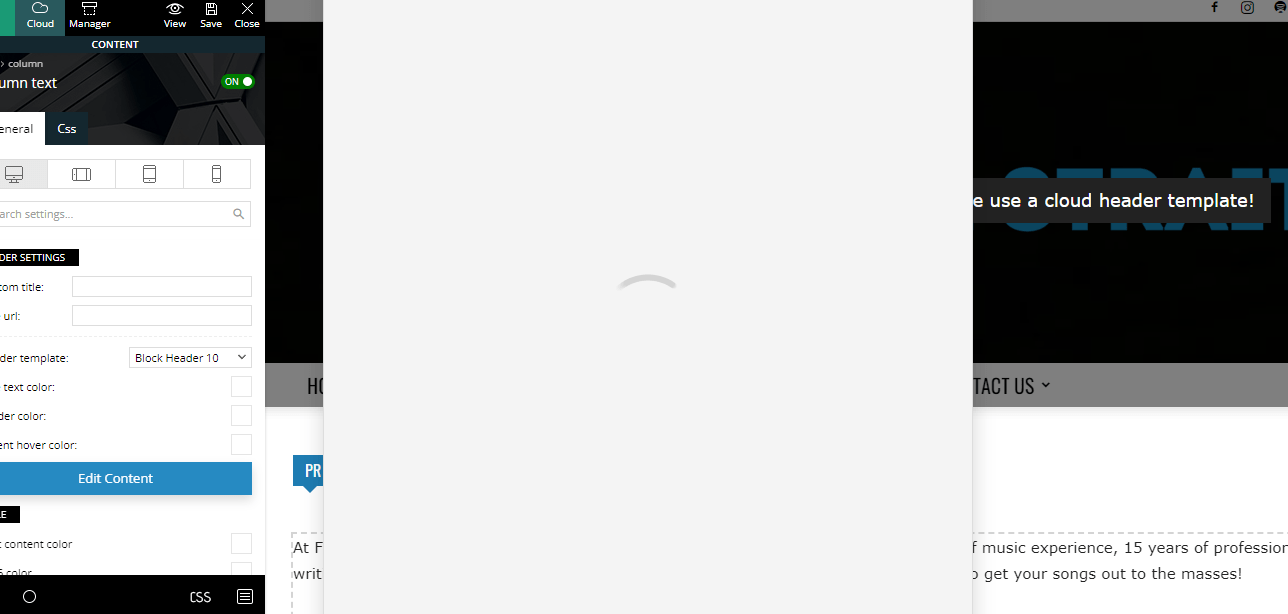
For the past two months or so, even with the new theme update(s), I’m unable to edit any written content on my pages using tagdiv composer. When I click on “Edit Content”, the window never actually loads. Here’s a screenshot as an example:https://fromthestrait.com/wp-content/uploads/2022/12/FTS-Screenshot-Edit-Content-Window.png.
My website is https://fromthestrait.com
Does anyone know how to fix this? Thanks!

Hello!
Please check the browser console to see which error do you have there.
Make a test and deactivate ALL plugins except tagDiv ones, also if you are using a cache plugin, deactivate it, clear all cache and try again.
Examine some other potential interfering factors: https://forum.tagdiv.com/general-options-may-interfere-newspaper-theme/
Thank you!
Thanks for replying – this is what came up in the Browser console (I wasn’t able to screenshot it):
JQMIGRATE: Migrate is installed, version 3.3.2
blocks.min.js?ver=69022aed79bfd45b3b1d:10 The block “yoast-seo/breadcrumbs” is registered with an invalid category “yoast-internal-linking-blocks”.
Yt @ blocks.min.js?ver=69022aed79bfd45b3b1d:10
deprecated.min.js?ver=6c963cb9494ba26b77eb:2 select( ‘core/edit-post’ ).getPreferences is deprecated since version 6.0. Please use select( ‘core/preferences’ ).get instead.
i @ deprecated.min.js?ver=6c963cb9494ba26b77eb:2
post-edit.js?ver=171c6f19994dc71467f4472e3c4f2dcb:11 Uncaught TypeError: Cannot read properties of undefined (reading ‘registerPlugin’)
at window.wpseoScriptData.window.wpseoScriptData.featuredImage.i.registerPlugin (post-edit.js?ver=171c6f19994dc71467f4472e3c4f2dcb:11:3839)
at new i (post-edit.js?ver=171c6f19994dc71467f4472e3c4f2dcb:11:3465)
at post-edit.js?ver=171c6f19994dc71467f4472e3c4f2dcb:11:4214
at HTMLDocument.<anonymous> (post-edit.js?ver=171c6f19994dc71467f4472e3c4f2dcb:11:5433)
jquery-migrate.min.js?ver=3.3.2:2 JQMIGRATE: Migrate is installed, version 3.3.2
js_files_for_wp_admin.min.js?ver=e815948e5c9ec5801de67b92a1d5a59fxx:42 Array(6)

wpeditor.php:1 Failed to load resource: the server responded with a status of 403 ()
bundle.js:2 Uncaught (in promise) Error: A listener indicated an asynchronous response by returning true, but the message channel closed before a response was received
at h (bundle.js:2:193979)
DevTools failed to load source map: Could not load content for chrome-extension://bmnlcjabgnpnenekpadlanbbkooimhnj/browser-polyfill.js.map: System error: net::ERR_BLOCKED_BY_CLIENT
VM1717 content-crop.js:77 {operation: ‘content_capture_fragment_scroll_search’}
VM1717 content-crop.js:77 {operation: ‘content_capture_fragment_scroll_search’}
VM1717 content-crop.js:77 {operation: ‘crop_after_clear_capture’}
VM1717 content-crop.js:77 {operation: ‘crop_after_clear_capture’}
VM1717 content-crop.js:77 {operation: ‘content_scroll_page’, scroll_crop: false, fragment: false, actionHideFixedElements: false}
VM1717 content-crop.js:77 {operation: ‘crop_data_screen’, dataUrl: ‘data:image/png;base64,iVBORw0KGgoAAAANSUhEUgAAAysA…eSGAAAAB6I4EBAADo7f8DIKCSQJuXKQYAAAAASUVORK5CYII=’, appType: ‘nimbus’}
VM1717 content-crop.js:77 {operation: ‘crop_data_screen’, dataUrl: ‘data:image/png;base64,iVBORw0KGgoAAAANSUhEUgAAAysA…AbyQwAAAAvZHAAAAA9Pa/joaQCq67dUEAAAAASUVORK5CYII=’, appType: ‘nimbus’}
VM1717 content-crop.js:77 {operation: ‘page_extension_activated’}

Hello,
As you can see you have a 403 error js_files_for_wp_admin.min.js?ver=e815948e5c9ec5801de67b92a1d5a59fxx:42 Array(6); please let me know what server you have.
wpeditor.php:1 Failed to load resource: the server responded with a status of 403 ()
Also, please check this guide about deny code https://forum.tagdiv.com/general-options-may-interfere-newspaper-theme/ -> https://i.imgur.com/U3tTmIx.png
If you have LiteSpeed, please ask your host to set the permissions for you to be able to edit.
Thank you!
Hi Anamria, thanks for replying!
I’m on a GoDaddy server, but they say the issue isn’t on their end. I’ll look into the info you sent about the deny code and see if that helps. Thanks!

I am facing the same issue for months too. I simply type abc where I want to place the content and then edit the page using wordpress admin itself.

Hello,
Please check if this option ModSecurity is enabled, if yes, please disable it -> https://www.inmotionhosting.com/support/edu/cpanel/how-to-disable-modsecurity-cpanel/
Also, please ask your host, seems there are problems with the request of wp editor.
Please check if this code is missing from your .htaccess: https://www.screencast.com/t/iN0R93dD3p from our requirements https://forum.tagdiv.com/requirements-for-newspaper/ this requirement is not displayed in System Status.
Thank you!

Hello, I am facing the same issue. Hosting provider is Cloudways. The ‘Edit Content” window does not load, just spins forever. Also the color picker in the Tagdiv Composer does not fully load. Screenshare here: https://app.screencast.com/uzuXq7MFRFNVJ Please let us know if this is something more widespread. I was not having these issues just 9 days ago.
Hi @Anamaria, in this case I was able to resolve it as a plugin conflict after going through and doing some more testing. Thank you.
Hi,
Please check this topic with the same error https://forum.tagdiv.com/topic/err_http2_protocol_error-on-go-daddy-hosting/
Thank you!

We had the same problem, but only with German installation, on the same domain, probably the Siteground Security Plugin or the docx plugin was to blame. After both were deactivated, the WP Editor loaded again.
Hi @beyonduality,
I think the Siteground Security Plugin was the culprit plugin.
I’m glad you solved it.
Thank you!