No search results were found in Documentation!
 Simion C.
 Hi,
If I understand correctly you want to display the social links for each of the authors in that respective page. That is a feature that displays only for the author page and it is not available in this case. Maybe you can find a plugin that has this capability and use it to display the author social links in the author box.
Unfortunately there is no option to share the images in the media grid separately. They are all part of the same element and post, and can only be shared as a whole with the post social sharing.
These are the current options for these elements at the moment, maybe additional features will be available in a future update in this matter, as the theme is is in a continuous improvement process.
Thank you for understanding!
 usman
usman Hi
Go to:
Theme Panel >> Post Settings >> Post and Custom Post Types >> Turn off “Show author box” & “show next and previous post”.
Preview: http://i.imgur.com/jr5hhOs.png
Hope this will help.
 attack12456a
 Catalin where to i find that css method ? I have no idea where to find that
.td_block_related_posts .td-related-right {
display:none;
}
in order to delete “more from author box”
 kem06bo08
At the bottom of every post, there are “previous article” and “next article” links and a box displaying the author name.
Can you please tell me how to remove these links and remove the author name box?
Thank you!
 Sebastian Escobar
Hi
I need to connect social links for the author’s social links in author’s box and also social links for to share in media grid.
I know this would be two different problems but both are for social issue.
In social box (below, in http://chilecientifico.cl/chilecientifico/2017/03/17/quienes-somos/#1490963709663-1a1aae57-1d3c) I have the photo, name and description, but I need to show also social links.
And in media grid in gallery (http://chilecientifico.cl/chilecientifico/2017/03/30/infografias/) I need to share the images separately in social network. I don’t know if this would be possible but I know this is often necessary.
 dennisjpitocco
 We have confirmed that your IP Address is not blocked. It is on a couple of authoritative Internet blacklists however: https://mxtoolbox.com/SuperTool.aspx?action=blacklist%3a5.2.168.18
Would you please try to access this Page again: https://www.bizcatalyst360.com/author/kathleenokeefekanavos/ If successful, we would appreciate your response to our Issue mentioned above. If not, are you able to at least access our Home Page? https://www.bizcatalyst360.com/
 baburaj.s
I want to add a signup widget just below the post area for all the posts. Or it can be just above the author box. How can this be done ?
 mrmung
 I hope the next update of newspaper gave no feature restrictions on the number that appears in the author box, sort by total readers post that has been made. thanks.
 EricWhittakerJr
 The fade in effect is in the column container. So like the setting for fade in is not actually on the author box. I just thought it would inherit because the author box was inside it. Is there any way to put an effect on the Author Box? and why would you not have effects for that?
 Bogdan B.
 Hello,
Sorry but I do not understand what fade-in you are referring to. Our author box element does not provide a fade-in setting. Please provide a screenshot of how you are trying to add a fade-in effect
Thank you
 RahulDubey137
Hello,
I want to Remove Social Profile Links and Icons from Author Box.
Please help. Thanks!
EricWhittakerJr Well, there is an option for the fade in effect on the container of the Author Box, and in the container, I said to fade-in… I understand if that is not going to work on the Author Box module. I just would have thought that you could include a transition effect so that if you wanted a page to look the same, you could implement those transition effects.
Bogdan B. Hello,
The post author box does not have this type of settings so it has to be made by hard-coding it. Here is an example of how to do it: https://forum.tagdiv.com/topic/disable-one-specific-author-box/
Thank you!
 m0re
m0re Hi,
I think there was a confusion. The following screenshot shows that the author box for some author is not required.
I only want the author box underneath the posts for some authors. But i want to hide this box for some authors. Please let me know if i am clear?
EricWhittakerJr I was trying to figure out what the User ID was so I could tell it what user to display. I tried hovering, but I think the issue with that method is that I am the only user on my site. I just was not sure if I was a different user ID or if it would have started at 1. So, in the end, I just tried 1, and it worked, and then I read your reply.
On another note though when I do try and put a fade in effect on the author box it does not seem to work? Any idea of how to fix that?
 hollymarie
 It’s in staging while I make changes, so I don’t think I can link to it.
This is how the author box appears, even when I input an author name into the settings and hit save:

And this is the settings box, with one of the author names added to the field (I’ve tried all author names on my site, and none of them bring up any info or the gravatar when input):

So what I am missing to get the author box to display an author’s info?
Bogdan B. Hello,
If you do not like the style of our author bio widget you can simply replace it with a plugin or a custom design. The post author box is added on each post template like so: https://www.screencast.com/t/EHVKZIHWb
Thank you!
 Catalin
 Hello hollymarie,
The whole functionality of Author Box is to display all the authors from your website through using the Author Box element from Visual Composer. Please provide more details about your problem, also, give me your website so I will be able to take a closer look and also, so I will be able to provide a more accurate response. You can provide some useful screenshots for a better understanding.
Thanks for your message!
 Meranda Devan
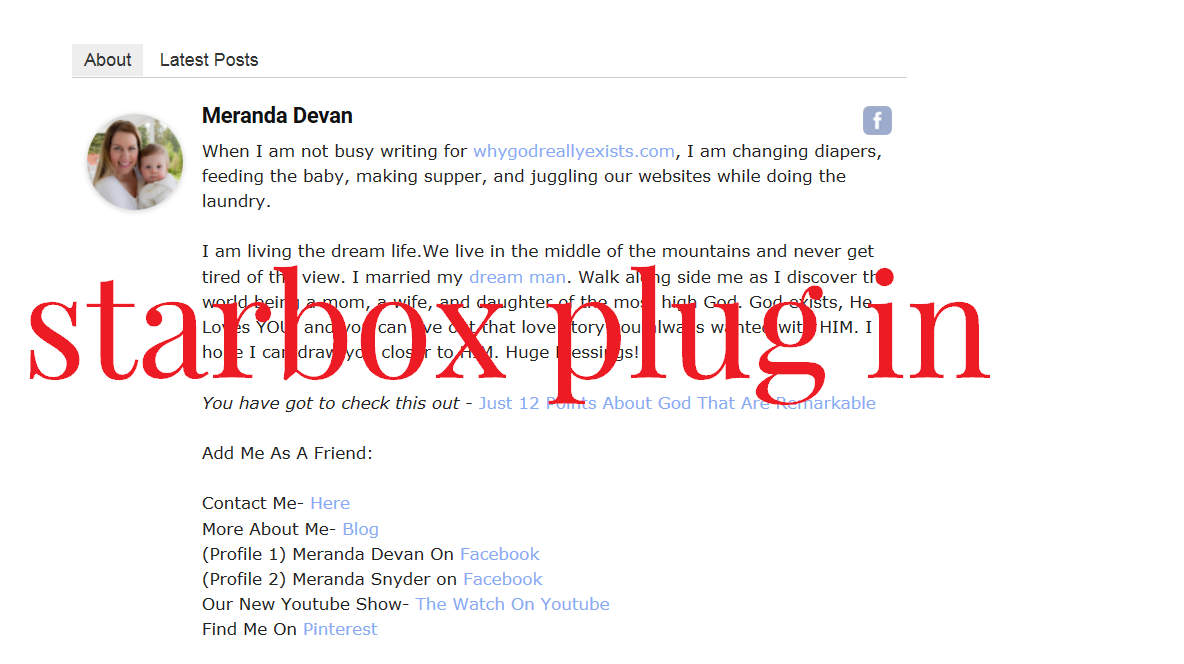
On my website I often feature guest writers who have lengthy BIOS. I have used the Star Box plug in because it allows me to copy in Html where I can space out the bio.
Here is an example.
http://whygodreallyexists.com/wp-content/uploads/2017/03/Star-Box.png
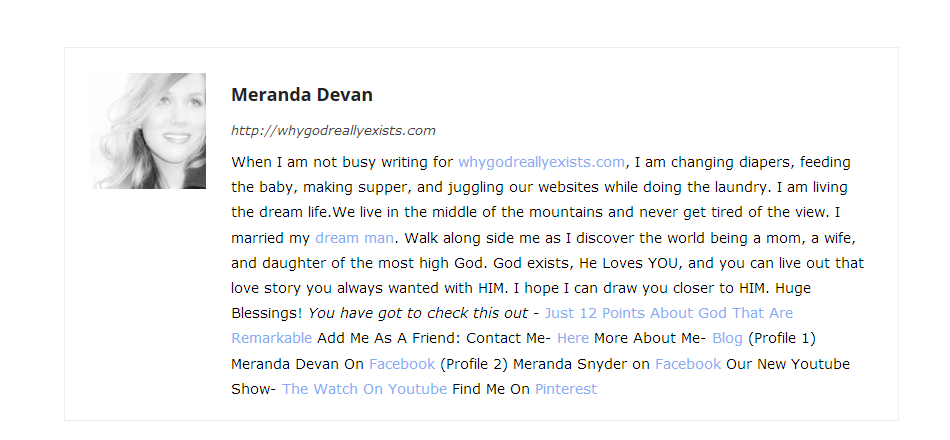
Here is how the themes bio shows up.
http://whygodreallyexists.com/wp-content/uploads/2017/03/Others.png
While this may look good for my profile…when I have very lengthy bio’s….the text runs together badly. How can I fix this? Right now I am seeing duplicate bios on my site. Perhaps removing the themes bio from the page? What do you suggest?
hollymarieI’m playing around with customizing the Beauty Blog demo in a staging area for my blog, and am having problems using the TagDiv Author Box.
When I first add the box, it shows one of the admins for the blog, along with their gravatar. If I try to change ANY of the fields in the box, it removes that displayed Author Name and gravatar (there’s just a grayed out silhouette and the words “author name”). Which would be ok, but no matter what author name I put in the Author ID field, it won’t bring up a display name or gravatar.
Am I doing something wrong? Is there an alternate author ID I’m not aware of?
EricWhittakerJr So I am doing the about page for my site. And I used the Author Box but it is not showing me as the author. It asks for the Author ID but is that the Author Username or is that the WordPress UserID given when the User is created. If it is the latter then I am not sure where I can find that number. I have read through the documentation for the theme but that documentation doesn’t talk about configuring the blocks. Is there another resource that explains how to use different blocks?
Catalin Hello marlenedeleon,
If you want to create an Author Page, notice that we have only the Author Box element from Visual Composer which displays all the Authors from your website, like this -> https://www.screencast.com/t/qeoSnHy1zI
Thanks for your understanding!
 Chrizze
The built in review feature could use a “save as template” function for the added options.
This is the author side of the rating, as for the reader you could just improve the comment box with a 5-star rating function that saves the average rating as a score, and puts the score into a td_review_reader_key (post custom field) or similar.
This way, you would cove both ends of a review with this awesome theme, author and reader. You could even make it better by attaching the final average score next to each other in the review-box. Like Our Score / Readers Score.
 marlenedeleon
I’m trying to create an author page for a multi-author blog. How can I do this with rows and columns of boxes containing a photo, name, bio and list of recent posts for each author?
 Irreverent Gent
Hi Guys,
I’ve used <div> tags to constrain my copy to a 788 px container, and I’m just wondering if there’s any CSS code I could use to do the same with the social sharing and author bio boxes at the bottom of the post.
You can see it here:
http://www.irreverentgent.com/test-post/
Thanks,
Dave