
- ApiPractical example – How to add a new Block and Module
- Apitd_api_block::delete
- Apitd_api_block::update_key
- Apitd_api_block::update
- Apitd_api_block::add
- ApiAPI – Blocks – Introduction
- Apitd_api_thumb::update_key
- Apitd_api_thumb::update
- Apitd_api_thumb::add
- ApiAPI – Thumbnail – Introduction
- Apitd_api_category_top_posts_style::update_key
- Apitd_api_category_top_posts_style::update
- Apitd_api_category_top_posts_style::add
- ApiAPI – Category top section style – Introduction
- Apitd_api_module::update_key
- Apitd_api_module::update
- Apitd_api_module::add
- ApiAPI – Modules – Introduction
- ApiUsing the Theme API in plugins
- ApiThe Theme API
 ddj
ddj I am wondering if there is any other follow-up to this final question about autoloaded data because I’ve run into the same situation.
My total db is about 1.3GB and td_011_settings accounts for about 0.8 GB of that.
If I could safely turn off the autoloaded data, it seems like the database might run faster.
My site is using Cloud Library. In the wp_options I see some larger items such as widget_td_block_21_widget and widget_td_block_7_widget. Those blocks are no longer used on the site. Do you think I could safely remove these from the database?
 marcorroma
 Thanks for support.
I figured out how to edit a specific post block.
But since I use personal fonts for my site I would like to edit all post blocks from the “theme panel”.
This way the standard fonts are my personal fonts.
And if I want to edit a post block on a specific page I do it through the “tagDiv composer” (like your screenshots).
It’s possible?
Thank you
 Anonymous
Hi!
I’m facing a problem with both FCP and CLS as seen in this screenshot:
https://paste.pics/BG3C2
Both issues seems to be coming from the Newspaper theme:
– the Largest Contentful Paint is pointed to a td-block
– the Cumulative Layout Shift is coming from the menu in desktop view in my website: https://osaopaulo.org.br
What can I do about it?
 Bettina
 Hello!
One solution for this could be to use different header template like “Block Header 2”, check this screenshot: https://www.screencast.com/t/2qqZzOUGX
Hope that helps you!
Thank you!
 Anamaria
 Hi,
The width per block is given by the screen. This changes to be full width depending on the resolution. If you don’t want to be like that, you have to choose another option for stretching.
https://www.screencast.com/t/wUGPYMOf3ol -> https://www.screencast.com/t/bqvluQoNgN
Thank you!
Anamaria Hello,
I’m glad that you managed to solve the problem.
For set a particular font on the block, you need to set with tagDiv Composer, select the block and in Style, you have the setting for the font on block and module => https://www.screencast.com/t/tyNX1UhsMM -> https://www.screencast.com/t/cNxc6JNMXoL2
Hope this helps you!
Thank you!
 Umut
Umut Hi,
I am talking about the main page settings. Not the posts.
which is created from “site identity” from customize.
if there is a way I can send you the picture.
 Calin
Calin Hi,
Top bar on mobile can be set only if you use the responsive e version and you use a custom css
.td-top-menu-full {

    display: block;

}
This code need to be set in theme panel> custom code> advance css> phone.
Thank you!
 Thejoker88
I am facing a problem with the mega menu categories post load. The loading spinner just loads infinitely and doesn’t show the articles. Please refer to below image:
https://i.imgur.com/uLFgbE8.jpg
The same thing also happens to the ajax loader in blocks.
https://i.imgur.com/f8ac3S3.jpg
I’ve tried all three options at the mega menu preloader. No preload (default), optimized preload, and preload all. Neither made a difference.
My site doesn’t have any issues so far. Everything else runs smoothly. There is a warning that my PHP memory limit is insufficient. Im not sure whether this is affecting it? https://i.imgur.com/VM4aZn9.png
Please help!
 indochine
Hi Team,
Is there a way to add a widget sidebar below a Flex Block 5? I can only add the widget manually when 1 post to display only. We also wanted to add the widget sidebar by default so when using a Load More pagination, the result will also display the widget sidebar. please see this page example. https://www.splashmagazine.ru/category/interview/
 pepperandplatinum
I have had this issue for a while now -I am editing a blog and I want to add links and there is no option at all in the TagDiv paragraph editor/blocks to underline hyperlinks.
So every time I have to go to the HTML code in the block and add the underline HTML.. which is kinda dumb cuz it should be an option just like Bold and Italic.
Does anyone know how to find this option in the Newspaper theme panel? I can’t find it anywhere in fonts or anything.
Why doesn’t tagDiv have this option when editing in the blocks?
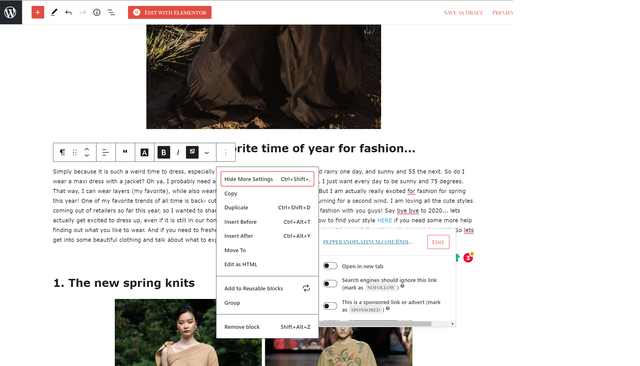
Thank you!
 Speedster
Hi!
I made an page, to have an landing page for all articles in one category. I used the Block 4 with Category filter for that. Work fine. Until now when an headline is added on top to the left of the block with “Continue to the category” (and an arrow). Not nice with an link to another automatic made landing page for same category. Can I remove that in someway?
I found it in the code. Can a comment them so they not are visible?
<div class=”td-block-title-wrap”><span>Continue to the category</span><i class=”td-icon-category”></i></div><div id=tdi_12_569 class=”td_block_inner”>
<div class=”td-block-row”>
marcorroma This feature is very important to me.
I run a local news site, and some parent categories have to manage many child categories. Parent categories have many post blocks, and the “unique post” feature is very important indeed.
Is it possible to write a php function that adds “Unique post” even in the categories? Or throughout the website.
marcorroma Thanks Bettina.
So with – the categories are excluded. And if I want to create a post block with category X and Y, and I want to exclude posts with Z tags, what can I do?
I tried to set -Z but it doesn’t work.
Bettina Hello!
You can add an element with TagDiv Composer plugin called “Flex block” and you can filter the posts by writing there the ID of the category which you want to include and you can write -ID for the one you want to exclude.
Please check this screenshot: https://www.screencast.com/t/UbXegeIBXEg
Hope that helps you!
Thank you!
marcorroma … and the “exclude sticky posts” function would also be useful.
I would like to use a page template with a Covid post cul (Covid category) slider at the top, and a large photo post block at the bottom with only the sticky posts of all categories.
If I publish an important post on Covid, marked as a “sticky post”, it should be displayed on the slide, and not in the large photo post block.
This feature is present in other page builders like WPBakery (currently I use WPBakery with Newsbeat theme which I will change with your theme soon)
 Vlad S
 Hello !
Now you can use different blocks that provide a lot more features than the post loops as you can see here: https://www.screencast.com/t/7CWTKIOVH
Thank you !
 David
DavidHi,
Security settings at my host (nginx server) cause a conflict with Tagdiv Composer (text editor not working anymore). Can you please tell me which of the following rules will conflict with Tagdiv Composer:
## WP Defender
# Stop php access except to needed files in wp-includes
location ~* ^/{FOLDER}wp-includes/.*(?<!(js/tinymce/wp-tinymce))\.php$ {
internal; #internal allows ms-files.php rewrite in multisite to work
}
# Specifically locks down upload directories in case full wp-content rule below is skipped
location ~* /{FOLDER}(?:uploads|files)/.*\.php$ {
deny all;
}
# Deny direct access to .php files in the /wp-content/ directory (including sub-folders). # Note this can break some poorly coded plugins/themes, replace the plugin or remove this block if it causes trouble
location ~* ^/{FOLDER}wp-content/.*\.php$ {
deny all;
}
# Turn off directory indexing
autoindex off;
# Kills the LetsEncrypt acme challenge
# # Deny access to htaccess and other hidden files
# location ~ /{FOLDER}\. {
# deny all;
# }
# Deny access to wp-config.php file
location = /{FOLDER}wp-config.php {
deny all;
}
# Deny access to revealing or potentially dangerous files in the /wp-content/ directory (including sub-folders)
location ~* ^/{FOLDER}wp-content/.*\.(md|exe|sh|bak|inc|pot|po|mo|log|sql)$ {
deny all;
}
## WP Defender - End ##
Thanks!
Bettina Hello @ratneshkumar684!
This feature was not implemented down there because “Posts Loop” and “Flex Block” have different purposes.
Thank you for your understanding!
marcorroma Update:
i solved the problem with woff2 fonts. They are now perfectly loaded.
I can’t set a local font for a post block.
If I have the post block called “Flex Block 1” which “general font” should I change in the “Theme panel”? And which “module” do I have to change to just change the title of “Flex Block 1”?
I set all fonts as “default” to “Flex Block 1”, and changed the default font to “Module 1” in “Modules and block – article title”.
Thanks
-
This reply was modified 5 years by
marcorroma.
 kappe79
 No, that wasn’t my point.
I defined in my post a custom field called “code” as you can see in this picture:

In home page I’m using Block 11 to show posts in list. I need to see under the post’s title the code, the custom field. So I have to customize Block 11 (with shortcode or some code insert) but don’t know how to.

Can you help me?
Thank you,
Enzo
 loopelfut
Hello,
I have a problem with my theme. When I try to add an image on the 2 blocks of the homepage, there is any image which is loading.
I don’t know why there is a problem ?
If you could check my website : https://amz-fba.fr/
Thanks
Anamaria Hello,
Unfortunately, the blocks cannot be sorted or filter by title.
The options for the block can be found here: https://www.screencast.com/t/jCEMZn6m5
1. Post ID filter => add posts by IDs
2. Category filter => choose a category from which to display posts
3. Multiple taxonomies filter => choose multiple categories from which to display posts
4. Filter by tag slug => add posts by category name
5. Multiple authors filter => specify ID authors from which to display posts
6. Post Type => specify post type, for example, if you have custom posts
7. Sort order => you can choose in which order you want to display posts
Hope that helps you!
Thank you!
 TAPA-GLOBAL
 Hi Anamaria,
Noted with thanks. With regards to the icon box background color:
.tdm_block_icon_box:hover, .tdm_block_icon_box:hover .tdm-title
{
background-color: black;
color: #fff;
}
If I do not need all icon boxes to have black background, just a selected few, how should I do it?
Thank you,
Jasmine
 gamattox
I am using td_flex_block_1 and the default behavior of the “Read More” button is set to target=_self. This causes further reading of the document to be opened in the same window. How/where can I change it to target=_blank to allow further reading of the document in a new tab?
I strongly prefer to avoid future Newspaper upgrade issues by NOT to modifying the original Newspaper files if possible. It would be great to just modify the td_flex_block_1 button behavior while in the page editor. I just can’t seem to make that work.
Thoughts?
Thanks,
GxM



