
- ApiPractical example – How to add a new Block and Module
- Apitd_api_block::delete
- Apitd_api_block::update_key
- Apitd_api_block::update
- Apitd_api_block::add
- ApiAPI – Blocks – Introduction
- Apitd_api_thumb::update_key
- Apitd_api_thumb::update
- Apitd_api_thumb::add
- ApiAPI – Thumbnail – Introduction
- Apitd_api_category_top_posts_style::update_key
- Apitd_api_category_top_posts_style::update
- Apitd_api_category_top_posts_style::add
- ApiAPI – Category top section style – Introduction
- Apitd_api_module::update_key
- Apitd_api_module::update
- Apitd_api_module::add
- ApiAPI – Modules – Introduction
- ApiUsing the Theme API in plugins
- ApiThe Theme API
 WakeUpCallProject
 I used to use WP Super Cache on my sites, however has too many issues.
Performance on WP Rocket is far better too in my experience.
Anyways back to the issue, it seems odd that grids and blocks on the homepage update but not on other pages on the site.
 Simion C.
 Hi,
Block 25 looks like this – https://demo.tagdiv.com/newspaper/block-25/
That is a screenshot of the erotic demo, this demo is not available for install anymore. It is scheduled to be redesigned and reintroduced in the future.
If you want to use the demo design for that block module, I could provide it to you
– https://www.screencast.com/t/tHKXMsJbF0p
The code can be entered in Theme Panel->Custom CSS or child theme stylesheet
– https://pastebin.com/zT2QTH6v
Thanks
 site2host2014
Hi,
Newspaper Version V 7.8.1 in that block 25 is not proper way to show
I want This look and feel
PFA
 Catalin
 Hello berchman,
Notice that plugin has not tested with our theme and therefore we cannot say for sure if it will work as expected for the whole website, sorry! This plugin seems working fine for sorting the menu and mega menu items. I do not exactly understand what kind of categories do you want to change from the homepage… All the settings regarding on categories of blocks can found in each block in Block Settings. If is not what you mean, please provide more details so I will be able to provide a more accurate response.
Thanks for your understanding!
Simion C. Hi,
That would be a sidebar, sidebars can be edited depending on how they are added to the page. If for example the sidebar is creating by simply adding elements top it with the composer, it can be modified by editing the page
– https://www.screencast.com/t/qmyUJ01ut
If a widget sidebar is used, then the sidebar can be edited in Appearance->Widgets
– https://www.screencast.com/t/4M5lk6fsYp1R
– https://www.screencast.com/t/gvDrti5Oec5
These are some useful guides that you can read
– https://forum.tagdiv.com/tagdiv-composer-tutorial/
– https://forum.tagdiv.com/block-settings-guide/
Let us know if you have more questions, we will try to help you.
Thanks
 circuitsports
[vc_row el_class="td-rev_slider_row"][vc_column][td_block_slide][/vc_column][/vc_row]
I am assuming I have to redo this part, lol is there an easy way because I can’t find it in the previous topics.
WakeUpCallProjectWhen I make a new article post it automatically adds it to the home page and category.
However on pages where I want to show that last 6 articles published, it seems to get cached and not appear.
I have caching turned on (WP Rocket) the home page yet it updates the new article to the big grid instantly.
But at the bottom of this page for example where it is supposed to show the latest 6 posts (Block 14) it does not appear until the cache has been cleared:
https://smallcaps.com.au/market-data/
How can I have new posts appear in this Block 14 latest posts without having to clear the cache each time or leave the page uncached?
As mentioned, the home page is fully cached yet updates immediately new articles.
Thanks
 berchman
I’m trying to change the default order that the categories display on the homepage we have set up here:
http://j.mp/1NUvCOn
I searched through the forums here and tried to find a solution and came up empty. I also looked through documentation and no luck.
I did find a related post in the forums here suggesting this:
“I suggest trying this plugin Category Order and Taxonomy Terms Order as I saw that many users use it to change the categories order.”
I installed this plugin and changed order, but my homepage does not reflect the altered category order.
I’m looking to make it match the menu on the link above.
Let me know if you have questions`
 Edward
 1. Section MORE FROM AUTHOR you can replace for example to READ ALSO (just to replace field in the Theme panel -> Translation).
2. You can hide this section by entering this code in Theme panel -> Custom CSS
/* Hide More From Author */

.td_block_related_posts .td-related-right {

display:none;

}
3. Either by commenting or removing this line of code from this file
– https://www.screencast.com/t/iAwsEsRPXyu
 tutbar
Hi,
I’m using the demo (default) and customizing the site as per my needs.
How to edit the ”Stay Connected” block in sidebar? See screenshot: http://prntscr.com/jwdkqo
Also, how to edit the following homepage block categories? I’m not seeing such title in the categories list. See screenshot: http://prntscr.com/jwdmfq
Please help asap.
Thanks
Simion C. Hi,
It seems there is some design coming from Visual composer, this is overriding the theme margin bottom set for the block title
– https://www.screencast.com/t/wMgeTh3FhnH
Blocks in sidebars do not seem to have this problem however, in posts or category pages.
I tested his with the same block even, in a Visual composer page
– https://www.screencast.com/t/d8oRjQx9
For me the theme margin bottom applies to the block title as it should. First you could try to clear your cache, check if this has any effect. If that does not do anything, I could give you a code to restore the margin
– https://www.screencast.com/t/ZXwng4KJp8i
.block-title {

margin-bottom: 26px!important;

}
Thanks
Simion C. Hi,
If you want to display pages in blocks/grids you first have to enter this in the post type
– https://www.screencast.com/t/CHm2RMgrqU
Then the block will display pages, you can further enter IDs to display specific pages.
Catalin Hello,
I have made a test on my website, using the Flex Block 1 and everything seems to work as expected, as you can see here -> https://www.screencast.com/t/pJbj3wlOA5H The results are good.
Thanks for the message!
Catalin Hello AxisBridge613,
Sorry, but please notice that functionality does not exist in our theme and blocks, unfortunately!
Thanks for the message!
 madox56
 Hi Simion,
Sorry – this was my fault. I mean page not post. I cannot insert pages in blocks.
Why.
Regards,
Christian
 josinc
 I received following message in inbox. But I can’t see this in the forum.
Catalin wrote:

Hello josinc,

For problem 1, notice that you should check the Excerpts section from Theme panel and switch the option by Letters or Words like this -> https://www.screencast.com/t/v8DUvrGU For problem 2, it seems to be a bug in our theme, sorry! I have added to our list of improvements and we hope to solve it as soon as possible.

Thanks for your message!

Post Link: https://forum.tagdiv.com/topic/odd-behavior-of-blocks-in-tagdiv-composer/#post-239461
I tried between words and letters in Excerpts panel.
Still excerpt length change doesn’t affect block 16 in the mentioned page.
-Josin
-
This reply was modified 8 years by
josinc.
Simion C. Hi,
That would depend on how you want to use the post IDs, for what exactly. Each block module displays the post title and additional meta and featured image thumbnail, with a few module exceptions that do not show a thumbnail.
What exactly is the problem in your case? I don’t quite understand what you are referring to, if you could elaborate more it would be very helpful. Some screenshots or link to where the problem is happening would also help.
Thanks
Simion C. Hi,
You can use CSS to style them as you please. This is a similar topic
– https://forum.tagdiv.com/topic/blockquote-custom-css-not-working/
This is a guide about using the browser inspector tool to create custom CSS code
– https://forum.tagdiv.com/create-custom-code-using-the-browsers-inspector/
Let me know if you have more questions.
Thanks
Simion C. Hi,
That is true, the mobile theme will not display blocks or grids for example. It’s purpose is to display a different and lighter version of the website on mobiles for users who want this.
If you want to display page builder content on mobiles, simply deactivate it. The plugin is optional and there will be no problem.
 Adaras
Hi,
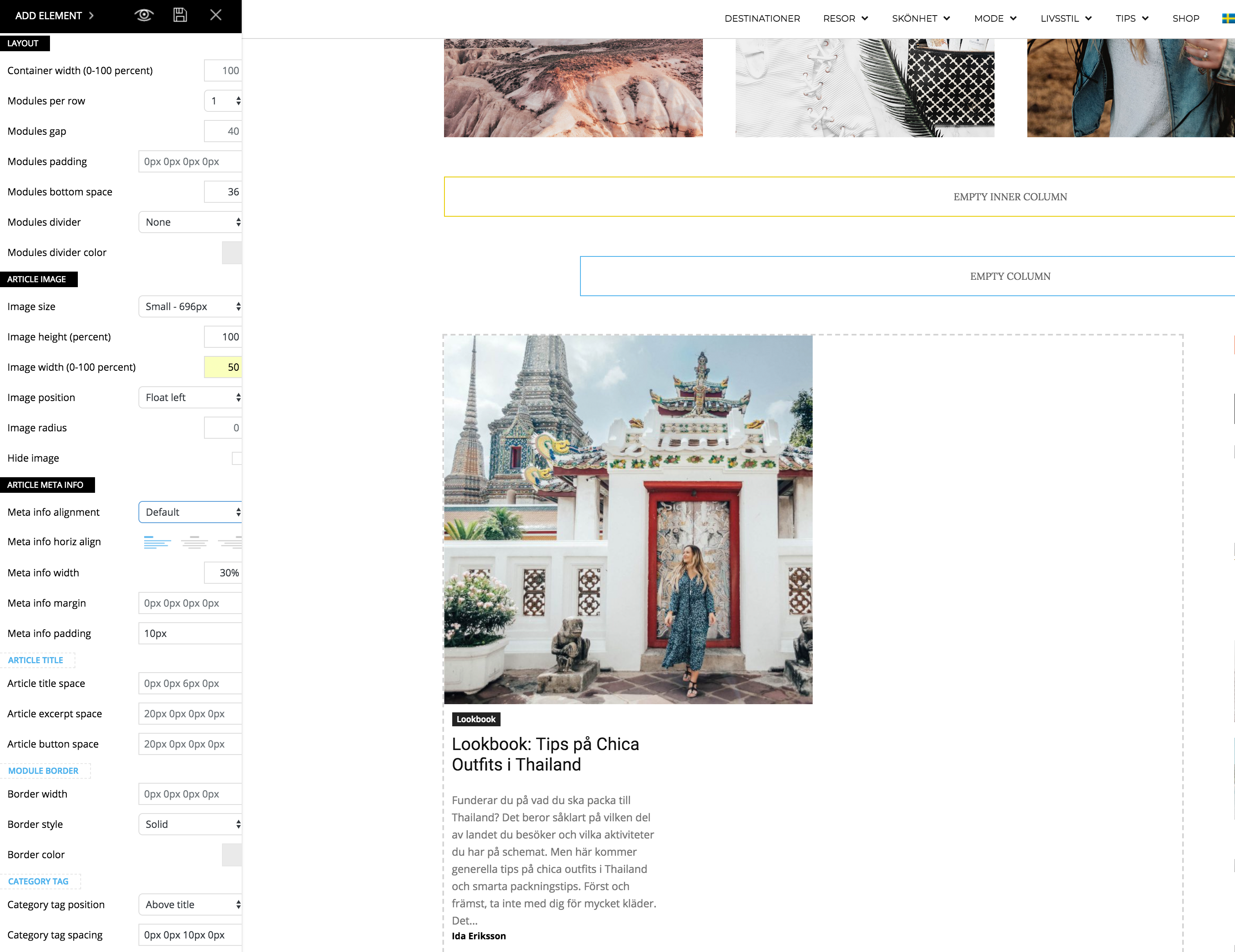
I just updated to the newest version of the theme and noticed a problem when I’m trying to make my flex block as the example for “2 modules per Row here”: https://demo.tagdiv.com/newspaper/flex-block/
I can’t get my meta description to show next to the photo. It’s position below or above the photo, no matter what I do.
When I inspected the elements I see that the difference is that my .td_module_flex_1 .td-module-container has flex-direction: column. And if I change it to “row” like in the example it works. But how do I get it right with only the TD composer?
Simion C. Hi,
Custom sizes you can define yourself are not possible with the tagDiv composer on pages or posts. You can split the row or stretch the rows to predefined sizes, but to set a desired width for a column is not possible.
The widths are calculated automatically in percentages, based on the layout you choose
– https://www.screencast.com/t/Ynx0UlrUlz
The content in sidebar like blocks or other widgets have predefined padding, margins and other design based on those percentages. So if they are changed the result will probably be a broken sidebar or entire page.
This level of flexibility is not yet possible with the composer. As it is further developed maybe such options will be available.
Thanks
Simion C. Hi,
You can disable the category tag for each module you want
– https://forum.tagdiv.com/category-tag-on-modulesblocks/
Here is a list mentioning which modules every block/grid contain
– https://forum.tagdiv.com/theme-blocks-modules/
I see you disabled them however, there are no category tags in the homepage at the moment.
The date can only be disabled in general, in the theme panel
– https://www.screencast.com/t/hfhYeLpW5zh
If you want to remove it just for that block in the homnepage, use a CSS code like this
– https://www.screencast.com/t/WbBKAjyHz
.td_block_17 .td-post-date,

.td_block_17 .td-post-author-name span {

display: none;

}
Thanks
 AxisBridge613
Hi,
How do I add meta info to a block?
I added a custom field to my post and I want that info to show up on the block, along with the title and date?
Thank you!
 adempsey
When I changed the background color for the theme, it blocks the full screen appearance of the revolution slider. Any way to circumvent this?
madox56Hi,
We are using posts for lang lasting SEO content. The problem is, that we cannot use the post id in blocks and the featured image is not shown. This is a pity.
Is there any chance to get this working?
Best regards,
Christian
