
- ApiPractical example – How to add a new Block and Module
- Apitd_api_block::delete
- Apitd_api_block::update_key
- Apitd_api_block::update
- Apitd_api_block::add
- ApiAPI – Blocks – Introduction
- Apitd_api_thumb::update_key
- Apitd_api_thumb::update
- Apitd_api_thumb::add
- ApiAPI – Thumbnail – Introduction
- Apitd_api_category_top_posts_style::update_key
- Apitd_api_category_top_posts_style::update
- Apitd_api_category_top_posts_style::add
- ApiAPI – Category top section style – Introduction
- Apitd_api_module::update_key
- Apitd_api_module::update
- Apitd_api_module::add
- ApiAPI – Modules – Introduction
- ApiUsing the Theme API in plugins
- ApiThe Theme API
 Simion C.
 Hi,
Then the code would be like this
– https://www.screencast.com/t/hr8Xk9cwx
.td_block_12 .td_module_11 .td-excerpt,

.td_block_12 .td_module_11 .td-read-more {

display: block;

}
Thanks
 Bogdan B.
 Hello,
In the thee fonts section you will find that each module in particular has it’s own font section. you can change the font for specific modules separately. Here is a list of modules used on blocks: https://forum.tagdiv.com/theme-blocks-modules/
The big grids already have a shadow under the post title so you can actually see the text.
If you need extra styling to the text, you will have to use custom css. Here is an example: https://www.w3schools.com/cssref/css3_pr_text-shadow.asp
Thank you!
 hhadmin
 hi, i have the same issue – how can i make a static (not drop down) sub menu on one specific page? using tagdiv composer I try to drag in “list menu” block, but that shows a menu vertically, instead of horizontally – i want this but horizontally?
 MrOrsh
 I have done some more testing with this and it seems to be an issue that occurs when an image is (1) centered and (2) added through tagdiv composer. The site has four pages for beauty-treatments, linked below:
https://www.baresolutions.se/vaxning/
https://www.baresolutions.se/laser-diod/
https://www.baresolutions.se/makeup/
> https://www.baresolutions.se/ogonbryn-fransar/ <
The last one of theese (ogonbryn-fransar) has the image alignment set to center/middle using the normal text with title block. The other (first) three ones has the alignment set to “no alignment”. The issue described only happens on the last one (with the center alignment).
It seems this appear not only in Safari, but also in Chrome on mobile devices. I have only tested with iPhone so far though. Further more this doesn´t happen every time the page is loaded. Sometimes the picture loads fine, and sometimes it disappears only to be shown as soon as i double tap or bring out the page-menu.
Can you replicate the issue? I have tried clearing all cashe and tried with several different iphones. The issue is there on all of them.
 Redicon
 Hi Simion,
actually I found it, I needed the H1 tag in #fff only on one block, and #000 in other part of the web site, so I added a custom class for the block only. The problem now is that there is a little black line near the with line.
Here is a screenshot http://prntscr.com/hp574w
-
This reply was modified 8 years by
Redicon.
 Hansjörg Leichsenring
 Hi
so in case of block 21: Would it be possible to add a text to the excerpt with “more” and the link?
Or, if that ist not possible to make the whole block clickable?
Cheers
Hansjörg
Simion C. Hi,
Please note that not all modules/blocks display a Read more button. Follow this topic to see a list of modules and blocks which have this feature
– https://forum.tagdiv.com/topic/read-more-button-either-missing-or-not-supported-with-voice-report-install/
Thanks
 fenomeno0chris
Hi and thank you very much for choosing my homepage for your showcase!
(By the way: the name of my page is PS4source with a small “s” letter)
Lastly I noticed, that it would be appropriate to change some font styles.
Especially on those elements, where the headline stays on top of an image (see images).
So my question is, how can I change fonts for one element and not the entire page?
I think it would be great to add contour or shadows to the headlines.
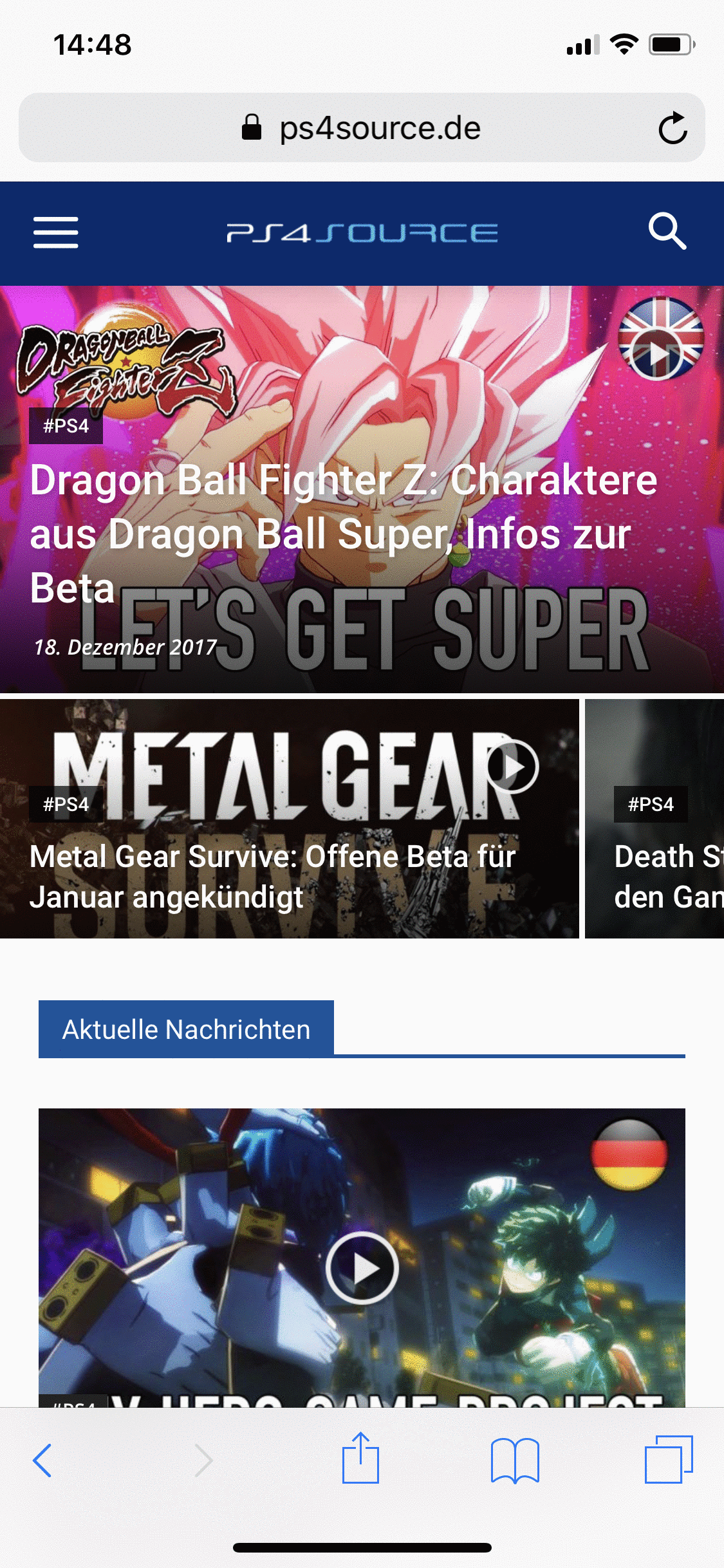
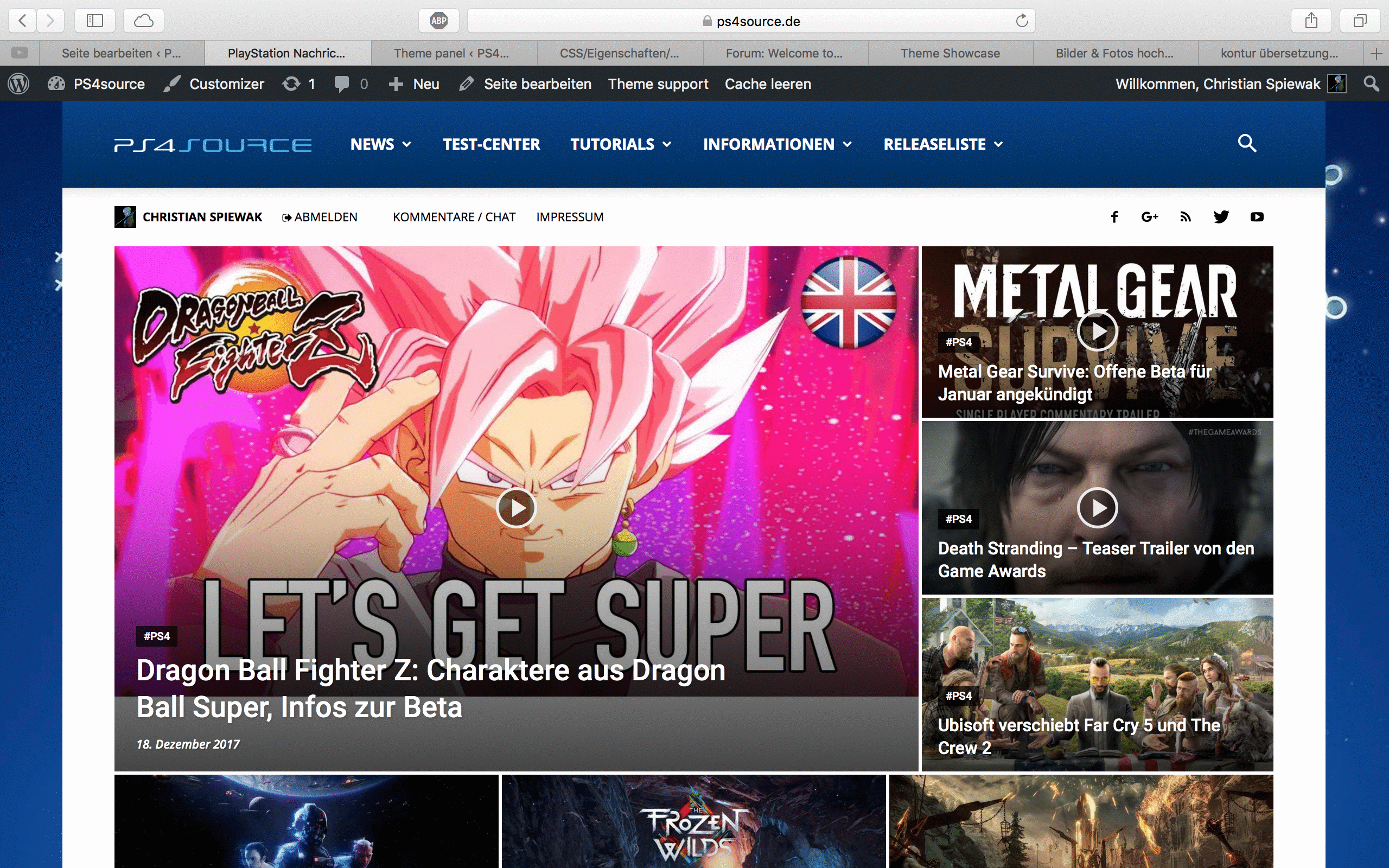
Would be great, if someone can help me!
 Helvetia67
 Hello
Yes, block filter.
Simion C. Hi,
I believe it was a design choice to hide the excerpts for that block on mobile. I could give you a code to make them visible if you need it, the block will look like this with excerpts
– https://www.screencast.com/t/ZyTu00ZxQ
Enter the code in Theme panel->Custom code->Advanced CSS in the phones section.
.td_block_12 .td_module_11 .td-excerpt {

display: block;

}
The length of the excerpt can be controlled for each module
– https://forum.tagdiv.com/excerpts-introduction/
Thanks
 jaumerrr
 I figured out myself, seems that Nginx was blocking the new Visual Composer version.
Enabled php parse on js files in php-fpm and it works now!
Bogdan B. Please check your htaccess file and remove any blocked files from it. Also contact your host and ask for any blocked files especially admin-ajax.php.
Thanks.
Hansjörg LeichsenringHi
is it possible to add “continue reading” here (Block 21, but others too)
https://www.catherine-leichsenring.de/mittelstand/
Cheers
Hansjörg
RediconHi,
I have a Block 9 in which I would want to customize the H1 tag, because the row has a different background, I can’t find the option, can you help me?
Thank you
Bogdan B. Hello,
I’m not sure what post Id you are referring to. Is it the block filter by post id? please provide more details to your request.
Thank you!
 Catalin Simion C.
 Hi,
You can control the block height, there is a a setting for that
– https://www.screencast.com/t/99R2nRpRoXO
There are also multiple image settings in this element, that you can use to create the needed result.
Thanks
 k440092
 Hi,
Ok. Thank you.. my bad =)
Another question:
I would like to show all my posts excerpts on my homepage.
I know i can do it with Visual Composer.
But if i use example “Block 12” it will show post excerpts in computer, but in mobile it shows only title?
Is there anything to do, so it would show also the excerpts in mobile view?
 Equinoctium
 Hi Chris, my hero 🙂
I did as you recommended last time, delete and copy theme, that worked, you are the best. :))
I am hosted with http://www.wealthyaffiliate.com and their site health indicates too many plugins. I stripped already down as much as possible, even decided to move my forum to a second website to keep my newspaper on speed.
These plugins are active, I hope you can help me with this one, I use the coming soon pro as I am not launched yet and this way i can prepare till the website is ready:
AccessPress Social Auto Post
A plugin to publish your wordpress posts to various social networks
Coming Soon Pro
wpshopmart wordpress coming soon pro plugin
Coupon Wheel For WooCommerce and WordPress
One nice gamified exit-intent popup plugin 🙂
tagDiv Composer
tagDiv Multi-Purpose
Design and build awesome landing pages to grow your website.
tagDiv Social Counter
Social counter for WordPress. Widget and visual composer block.
User Activity Log Pro
Log the activity of users to monitor your site with actions
WP Meta SEO
WP Meta SEO is a plugin for WordPress to fill meta for content, images and main SEO info in a single view.
WP Meta SEO Addon
WP Meta SEO Addon brings your website ranking to the next level with advanced tools like SEO Email reports, automatic 404 URL fix and more
 gh03083
Hello.
I want to show the sub category in Tagdiv Composer Block, but it doesn’t work well.
Like attached img, I type the category slug in “Ajax dropdown – show the following IDs:”
img link : https://drive.google.com/file/d/16iXixoIdoF67EMlJ3YEZbtjG37PSaqtX/view?usp=sharing
But in this img, only “명언 시리즈”(slug : speech) menu is appeared. Of course the other category has post, but it doesn’t work now.
img link : https://drive.google.com/open?id=1Esu3uG7tcGStMKudFbEYMwTCs0R7nmV6
I want to show this sub categories in block 2.
Could you tell me the solution, pls?
Thank you.
Helvetia67Hello
I cannot save posts ID anymore on grids and blocks. Someone can help ?
 tunc26gm
Dear Friend and Technical support person in Tag div;
First off all, I would like to thank you designing your theme which most of the components in your theme is working perfectly.
But there is a small but for me important problem. I am in the process of establishing multi language agricultural magazine. Therefore I had to create around 1300 categories in my portal. I can all see them in category section of wordpress. But unfortunately I cannot see all of categories in filter section of my blocks and grids of my pages. Also I cannot see all of my categories when I want to add them to the menus. I used search option but still I canot see and add them to my menu.
So my question is, is there a limitation on the number of categories I can see filter section of my blocks and grids, and category section of my menus?
My e mail is
tunc26gm@gmail.com
I would appritiate if you could inform me as soon as early
Thank you.
Note for tagdiv tecnical person if you request I can provide you my portal password and user name.
TDS
 John
John“Responsive” Google Adsense ads are not displaying properly using Custom Ad shortcodes. Below is code from my Google Adsense account for a “Responsive Link Ad” (client and slot numbers redacted).
<script async src=”//pagead2.googlesyndication.com/pagead/js/adsbygoogle.js”></script>
<!– Responsive Link Ad –>
<ins class=”adsbygoogle”
style=”display:block”
data-ad-client=”ca-pub-xxxxxxxxxxxxxxxx”
data-ad-slot=”xxxxxxxxxx”
data-ad-format=”link”></ins>
<script>
(adsbygoogle = window.adsbygoogle || []).push({});
</script>
I performed two tests. First, I entered the Adsense code from Google for a “Responsive Link Ad” in Custom Ad 2. I placed the shortcode [td_block_ad_box spot_id="custom_ad_2"] in the visual editor. After saving, you’ll see the ad appears as 336×280 link ad, not a responsive ad.
1. Responsive Adsense code entered in Custom Ad 2 of theme panel. https://www.screencast.com/t/5gHxCVjMJ
2. Shortcode inserted in visual editor. https://www.screencast.com/t/eiRIrnXd
3. Ad display using shortcode (appears as 336×280 link ad and not as a responsive ad). https://www.screencast.com/t/eiRIrnXd
In my second test I didn’t use the shortcode, but manually added Google code in text editor at the end of the post. The responsive ad displays properly using this manual method.
4. Responsive Link Ad code entered manually in text (without shortcode). https://www.screencast.com/t/o3ZoLQcVw
5. When I enter Google code manual in the text editor, the ad displays properly. https://www.screencast.com/t/XmBscT3Mh
My conclusion is responsive Adsense ads do not display properly using Custom ad shortcodes.
Please let me know what additional information you need to recreate this bug.
Thanks!
 manatwork81
Hi!
We use Ad Rotate Pro for Multisite.
We only can use PHP Codes, Shortcodes will not work Global.
When we insert our php Code:
<?php echo adrotate_group(1,0,0,1);
?>
Into ThemePanel ADS, this do not work.
<div class=”td-a-rec td-a-rec-id-sidebar td_uid_25_5a33ddb0b66e9_rand td_block_template_1″><span class=”td-adspot-title”>- Advertisement -</span><!–?php echo adrotate_group(1,0,0,1); ?–></div>
Its uncommand!
Can anyone help?
Catalin Hello Roundglass,
Unfortunately, this is not a simple task and if you are not aware of the steps which are needed to take in this case, please consider hiring a freelancer/developer to help you because we cannot provide custom services at the moment, sorry! You should edit the td_data.php and td_config.php where the thumbs are created. Also, notice that you should adjust all of the blocks which you want to use that application.
Thanks for your understanding!
