
 promes
We have created a Category template to be applied to certain category of our site. To do so, we have used the tagDiv Composer to create from scratch a category template. He you can see the template: https://elpaisfinanciero.com/tdb_templates/invertir/
But when we apply the previous template to our category, the category page appears broken, with issues when handling the columns and sticky sidebars. Here you can see the category page with the Cloud Template applied: https://elpaisfinanciero.com/invertir/
How can we solve this issue?
Thanks
 flavioferrara
I have a problem with my SVG logo, it is not displayed on Chrome and Firefox (also in TD Editor) only if it is in color, and only in Desktop viewport – Landscape viewport – Portrait viewport; in Phone viewport with the same SVG works perfectly.
If I log in with Safari (as a guest and as an administrator) I can see everything correctly.
I cleaned the cache (including Cloudflare), disabled the plugins but the problem persists.
 Calin
Calin Hi jakubz,
We found that on Single Post Template 20 the problem is with some settings that were made on Single Post Bg Featured Image, until now this cloud templates was not updated, but you can use it, what you need to do is to rested the style using the right click -> https://i.imgur.com/01X61bO.png save the changes and refresh the page, after that add the Overlay color -> https://i.imgur.com/SsAqjPz.png and save the changes and check the results.
Hope this will help you!
Thank you!
 Vlad S
 Hello !
All the PRO demos are built using tagDiv Composer and also the cloud library templates; in order to change the background color / image you will have to edit all the ROWS as you can see here: https://www.screencast.com/t/QlYxvmdoUxea
Thank you !
Vlad S Hello !
In post pages you will need to add a Cloud library post template so you can edit it using tagDiv Composer. Follow our guide here for more: https://forum.tagdiv.com/design-post-pages-using-cloud-library-templates/
Thank you !
 andrewwhiteside
Hi, Whenever I try to download a block from Cloud Library I click on the green ‘Import Section’ but northing happens. I click on the X to close the window. It disappears and a dialogue box underneath it also disappears so I don’t know what is written on it.
Any advice as to what is going on – Im using Chrome Browser on an iMac
 bzeegers
Hi,
I have added custom CSS to a Cloud Template, but it will not save the changes. Refreshing the page (after saving) shows that the code is removed. Changing a TagDiv block will save however.
 smttoday
Hi, I seem to have issues with the Cloud Templates – tagDiv Composer. I get a ERROR in the top right hand corner and I can’t change any of the layouts. Please see screen shot. Screen shot
Any ideas what is causing this and how I fix it?
 akprostudio
Hello,
After update wordpress to 5.5 I’m having problem with update any cloud template via tagComposer.
I get error like below:
Stack trace:
#0 /home/xyz/public_html/xyz.pl/cms/wp-content/plugins/woocommerce/includes/class-wc-query.php(363): WC_Query->adjust_total_pages()
#1 /home/xyz/public_html/xyz.pl/cms/wp-includes/class-wp-hook.php(289): WC_Query->handle_get_posts(Array)
#2 /home/xyz/public_html/xyz.pl/cms/wp-includes/plugin.php(249): WP_Hook->apply_filters(Array, Array)
#3 /home/xyz/public_html/xyz.pl/cms/wp-includes/class-wp-query.php(3190): apply_filters_ref_array(‘the_posts’, Array)
#4 /home/xyz/public_html/xyz.pl/cms/wp-includes/class-wp-query.php(3448): WP_Query->get_posts()
#5 /home/xyz/public_html/xyz.pl/cms/wp-includes/class-wp-query.php(3559): WP_Query->query(Array)
#6 /home/xyz/public_html/xyz.pl/cms/wp-content/plugins/td-cloud-library/state/tdb_state_loader.php(642) in /home/xyz/public_html/xyz.pl/cms/wp-content/plugins/woocommerce/includes/class-wc-query.php on line 376
[19-Aug-2020 10:29:07 UTC] PHP Notice: Trying to access array offset on value of type bool in /home/xyz/public_html/xyz.pl/cms/wp-content/plugins/td-cloud-library/state/single/tdb_state_single.php on line 275
[19-Aug-2020 10:29:07 UTC] PHP Notice: Trying to access array offset on value of type bool in /home/xyz/public_html/xyz.pl/cms/wp-content/plugins/td-cloud-library/state/single/tdb_state_single.php on line 275
[19-Aug-2020 10:29:07 UTC] PHP Notice: Trying to access array offset on value of type bool in /home/xyz/public_html/xyz.pl/cms/wp-content/plugins/td-cloud-library/state/single/tdb_state_single.php on line 275
[19-Aug-2020 10:29:07 UTC] PHP Notice: Trying to access array offset on value of type bool in /home/xyz/public_html/xyz.pl/cms/wp-content/plugins/td-cloud-library/state/single/tdb_state_single.php on line 275
[19-Aug-2020 10:29:13 UTC] PHP Notice: Trying to access array offset on value of type bool in /home/xyz/public_html/xyz.pl/cms/wp-content/plugins/td-cloud-library/state/single/tdb_state_single.php on line 275
[19-Aug-2020 10:29:13 UTC] PHP Notice: Trying to access array offset on value of type bool in /home/xyz/public_html/xyz.pl/cms/wp-content/plugins/td-cloud-library/state/single/tdb_state_single.php on line 275
[19-Aug-2020 10:29:13 UTC] PHP Notice: Trying to access array offset on value of type bool in /home/xyz/public_html/xyz.pl/cms/wp-content/plugins/td-cloud-library/state/single/tdb_state_single.php on line 275
[19-Aug-2020 10:29:13 UTC] PHP Notice: Trying to access array offset on value of type bool in /home/xyz/public_html/xyz.pl/cms/wp-content/plugins/td-cloud-library/state/single/tdb_state_single.php on line 275
[19-Aug-2020 10:29:45 UTC] PHP Notice: Trying to access array offset on value of type bool in /home/xyz/public_html/xyz.pl/cms/wp-content/plugins/td-cloud-library/state/single/tdb_state_single.php on line 275
[19-Aug-2020 10:29:45 UTC] PHP Notice: Trying to access array offset on value of type bool in /home/xyz/public_html/xyz.pl/cms/wp-content/plugins/td-cloud-library/state/single/tdb_state_single.php on line 275
[19-Aug-2020 10:29:45 UTC] PHP Notice: Trying to access array offset on value of type bool in /home/xyz/public_html/xyz.pl/cms/wp-content/plugins/td-cloud-library/state/single/tdb_state_single.php on line 275
[19-Aug-2020 10:29:45 UTC] PHP Notice: Trying to access array offset on value of type bool in /home/xyz/public_html/xyz.pl/cms/wp-content/plugins/td-cloud-library/state/single/tdb_state_single.php on line 275
[19-Aug-2020 10:29:48 UTC] PHP Notice: Trying to access array offset on value of type bool in /home/xyz/public_html/xyz.pl/cms/wp-content/plugins/td-cloud-library/state/single/tdb_state_single.php on line 275
[19-Aug-2020 10:29:48 UTC] PHP Notice: Trying to access array offset on value of type bool in /home/xyz/public_html/xyz.pl/cms/wp-content/plugins/td-cloud-library/state/single/tdb_state_single.php on line 275
[19-Aug-2020 10:29:48 UTC] PHP Notice: Trying to access array offset on value of type bool in /home/xyz/public_html/xyz.pl/cms/wp-content/plugins/td-cloud-library/state/single/tdb_state_single.php on line 275
[19-Aug-2020 10:29:48 UTC] PHP Notice: Trying to access array offset on value of type bool in /home/xyz/public_html/xyz.pl/cms/wp-content/plugins/td-cloud-library/state/single/tdb_state_single.php on line 275
Vlad S Hello !
Please let us know what kind of header are you using. The Cloud library templates and PRO demos are fully editable using tagDiv composer where the normal standard templates are editable by using the Theme panel.
Thank you !
Vlad S Hello !
Please provide a screenshot of your header in Cloud library. It looks like your header has been created over the post template not over the header template.
Thank you !
Vlad S Hello !
All the PRO demos are built using tagDiv Composer and also the cloud library templates; in order to change the background color / image you will have to edit all the ROWS as you can see here: https://www.screencast.com/t/QlYxvmdoUxea
Thank you !
Vlad S Hello !
All the PRO demos are built using tagDiv Composer and also the cloud library templates; in order to change the background color / image you will have to edit all the ROWS as you can see here: https://www.screencast.com/t/QlYxvmdoUxea
Thank you !
Calin Hi angelahou,
You can make a landing page using tagDiv Composer, in this way you can build the page how you like.
Also if you want you can check some pages/homepages from cloud templates, maybe you found something that you like and all you need to to is to make some adjusts.
-> https://i.imgur.com/GGGH0u3.png -> https://i.imgur.com/uiEatmO.png
Hope this will help you!
Vlad S Hello !
Yes, in the Cloud library templates you can insert the ads as shown in our video. Set your website to be live and wait for a couple of hours. Make sure to clear your cache and let us know the result. If your website is not online, Google most likely won’t display any ads.
Thank you !
 CityCampus
I tried to adjust the dark background behind the picture of above mentioned cloud template without success. Can you please advice me how to change this?
Kind regards,
Anne
Vlad S Hello !
When using a Pro Demo or any cloud library template you will have to edit them using tagDiv Composer. For more information about is follow our guide here: https://forum.tagdiv.com/tagdiv-composer-tutorial/
Also you can take a look at our short video guides here: https://www.youtube.com/user/tagdiv
Thank you !
 loslunes
 I have added code in header, side bar and article (top, inline and bottom) But using a cloud template the guide said to do it using the composer and the post content> ads.
Just going to put to the site online and see what happened and then see if I need more help
Calin Hi,
This can be done with custom work or some plugins, unfortunately using pro demos (cloud templates) these changes can not be set in a child theme, therefore you’ll lose all these changes when you’ll make a theme update.
Here is a similar topic -> https://forum.tagdiv.com/topic/acf-into-cloud-template/ also if you want to add these custom fields in blocks, you ca do it in the files from this folder -> wp-content/plugins/td-composer/legacy/Newspaper/includes/shortcodes
Thank you!
Vlad S Hello !
All the Cloud library templates are fully editable using tagDiv Composer. You will have to use tagDiv Composer to edit it as you can see here: https://www.youtube.com/watch?v=fa7GenCHcBU&t=12s
Thank you !
Calin Hi wmvova, maybe you are not using Newspaper theme and you are using Newsmag theme this one do not have the tagDiv Cloud Library plugin, this part of forum is for Newspaper theme.
Please provide some more details about the theme you are using.
 vitorhossu
Hello, I need some help with tagDiv Cloud Templates. I can’t load templates or add a new one. Browser is showing these errors: https://imgurl.me/image/b1SSz
 Eficiencia-Laboral
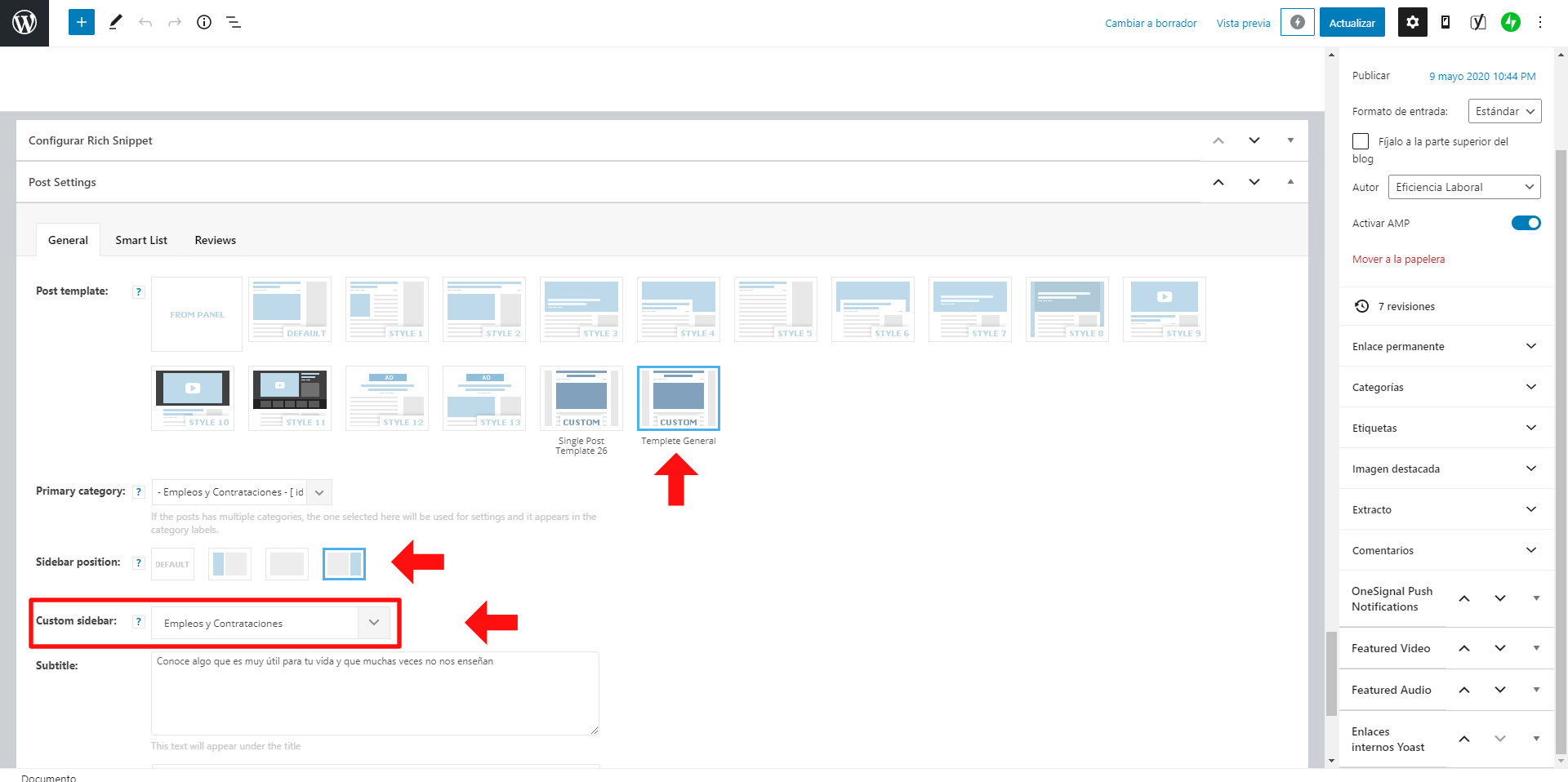
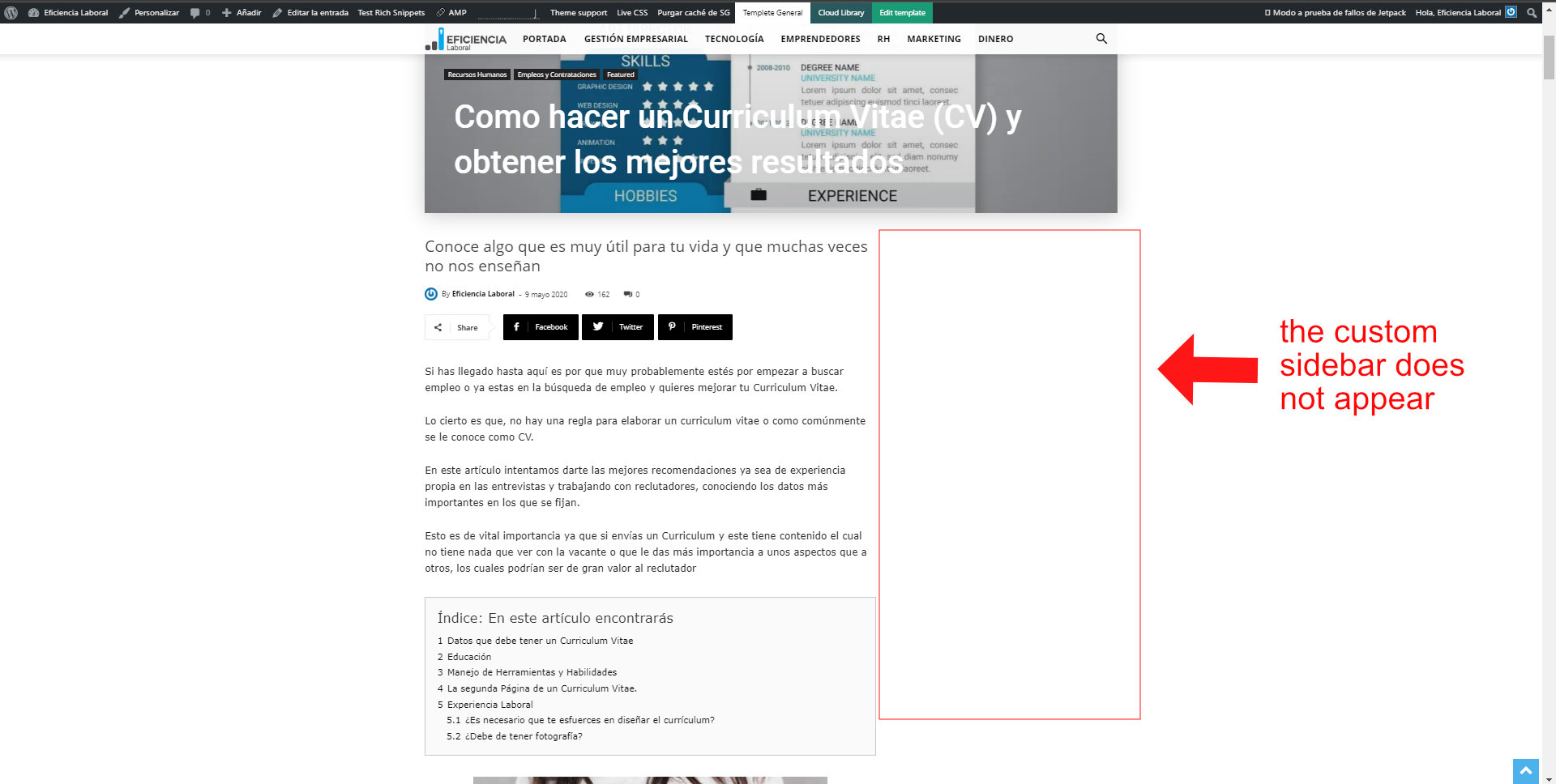
Hello, I have installed a “Cloud Templetes” to use the infinity load in the posts.
The infinity load effect works perfectly, but I’ve noticed that it doesn’t load the custom sidebar I assign to the post.
It only loads the sidebar that is added to the Cloud Templete, if one is added.
I have 28 custom sidebars that I assign to the posts according to the theme of the post.
How can I upload the custom sidebar to a post?
Attached are the images
 abdelhamidahmedabdo
 I have solved it, the cause of this problem that i have use the wrong adsense code. there are different types of adsense codes according to the ad type, i have used the code for site ad type, but the discovered that there is another codes for article inline ad and i got this code for adsense and past it in cloud post templates and it worked successfully.
 usmanlive
Hi, i have a issue on single post page, i am using predefined post template download from cloud. that has a feature when 1 post end then 2nd post auto load using Ajax which is good thing for us, but problem is when 2nd and onward post load then browser tab show “undefined” that should show post name.
how can i fix that ? can you plz guide me about that.
screen shot: https://tinyurl.com/y4lznnbc



