Alin [tagDiv]
 Hi,
Unfortunately the theme use the same logo also on mobile when is used header style 3 and 6. You can change the width for logo image on mobile using custom css media queries in Theme Panel > Custom Css: http://screencast.com/t/u2S5E5vVp
@media (max-width: 767px) {
.header-style-3 .td-full-logo img {
width: 50%;
}
}
Also if you like you can use a fixed width for screen size until 767px – http://screencast.com/t/YWSvFyfZlP60
This will be changed in version 5 of theme and will be added more header styles options.
Hope this helps!
-
This reply was modified 11 years by Alin [tagDiv].
Alin [tagDiv] Hi,
Please try this custom css to change the arrows color – http://screencast.com/t/hkWPKRiu8v1
.td-theme-slider .td-icon-left, .td-theme-slider .td-icon-right {

color: #D53131;

}
Thanks!
Alin [tagDiv] Hi,
Please try this custom css in Theme Panel > Custom Css for your main menu height – http://screencast.com/t/k2mUmDMgq
.td-header-menu-wrap {

height: 43px !important;

min-height: 43px;

}

.td-header-row.td-header-border.td-header-main-menu {

max-height: 43px;

}
For that white space you will need to remove margins for logo and header ad, but you will need custom work for that for different screen size and also it will break the main menu. So if you need this and you don’t know how to do it I suggest to hire a freelancer to do this for you – http://studio.envato.com/ as we cannot provide any type of custom work at this moment as we work hard on development, updates, fixes and support.
Also if you want to make header transparent(if you use a background image) you have an option in Theme Panel > Theme Colors – http://screencast.com/t/p8Ywhg0nt – http://screencast.com/t/n5bIEhKx
Thanks!
 kathrinhwl
Hi,
I would like to have the logo in the center, it works fine with Style 3. But on mobile the logo is too big with that style. I uploaded a smaller logo size in the theme panel, but it does not work. I think because of Style 3 with full width.
What can I do, if I want the the logo be placed on mobile like it is with Style 1? On Desktop and tablet it looks like it is with Style 3.
If it is not possible to get that, what can I do to have a better and samller logo size on mobile with Style 3? Changes in css, if so, which ones?
Here’s my website: http://www.happyworklife.de Please have a look on it on your smartphone as well to know what I mean.
Thanks a lot!
Kathrin
Alin [tagDiv] Hi,
This issue is on our list and it will be fixed as soon as possible, please try this custom css in Theme Panel > Custom Css till then: http://screencast.com/t/TcPyY8O5
.td_detect_is_android .td-trending-now-title {

top: 0;

}
Thanks!
Alin [tagDiv] Hi,
Please try this custom css in Theme Panel > Custom Css:
.iosSlider .slide-meta-author{

background-color: transparent;

}
Thanks!
Alin [tagDiv] Hi,
The default padding added there is 15px – http://screencast.com/t/EecVUfXKv1 so if you refer to this you can try this custom css in Theme Panel > Custom Css to reduce it – http://screencast.com/t/rTpycQWjH
.wpb_tabs li a {

padding: 1px 5px !important;

}
You can also add an extra class if you want to apply this on specific Tabs block – http://screencast.com/t/0zTeIZfa – http://screencast.com/t/IKnPnnXOHu
Thanks!
Alin [tagDiv] Hi,
@gmtrevor You can set background transparency for header from Theme Colors – http://screencast.com/t/zFfPVJRyO – http://screencast.com/t/fWnhLS0Q
Also if you want full menu you can use header style 9 – http://screencast.com/t/0zo02DkQxSM – http://screencast.com/t/bCjbDCVGUc
@marcosutter
Please provide a link so I can inspect this and provide an accurate solution. Do you use code that I provided to you? If you do you can try this custom css: http://screencast.com/t/JQBg5MiYZ6
.td-header-style-1 .full-bg .td-header-sp-logo {

margin-left: 0px;

}
You may have to adjust your logo image as theme’s css for logo is only 7px margin left.
Thanks!
 thechelseamagazinecompany
Hi,
IVe turned dates off across my site, but the translucent black box on the slide is still visible, but without a date in it. is there a way to remove this black box in CSS?
Thanks
Oliver
Alin [tagDiv] Hi,
You can try this custom css in Theme Panel > Custom Css to hide meta and remove gradient: http://screencast.com/t/llOAzhhKb
.td_normal_slide .td-theme-slider .slide-meta {

display: none;

}

.td_normal_slide  .td-image-gradient:before {

display: none;

}
If you want to apply this only on your homepage or a specific page you can use these classes before .td_normal_slide:
.home class for homepage.
.page-id-xx take your page id – http://screencast.com/t/6BKZBU1Ax25K
Thanks!
Alin [tagDiv] Hi,
I have checked an article from your site and share buttons are fine. If you want to use a bottom ad you can try to add margin bottom to share buttons using custom css section from Theme Panel – http://screencast.com/t/kiBPOLg2qhM9
.sharedaddy .sd-content {

margin-bottom: 50px;

}
Thanks!
 efromdc
Can you give me css to reduce the size of tabs? Id like to decrease the white space before and after the tab name by about 10 px on each side (if that ends up looking good)
Thanks
Alin [tagDiv] Hi,
Please take a look how theme’s share buttons are created here – http://screencast.com/t/FPbcteFZ and create your own share buttons there also you will have to adjust it using custom css. You will need custom work for this and we cannot provide any type of custom work at this time,sorry! You can find more details here – http://atlchris.com/1665/how-to-create-custom-share-buttons-for-all-the-popular-social-services/
I suggest you find a freelancer to help you do it, if you really need it and don’t know how to: http://studio.envato.com/
Thanks!
Alin [tagDiv] Alin [tagDiv] Hi,
Do you want to add background for Big Grid articles titles? – http://screencast.com/t/9fFDYPuNQ
Please add this custom css in Theme Panel > Custom Css if this is what you mean:
.td-big-grid-post .entry-title {

background-color: rgba(77, 178, 236, 0.7);

padding: 5px 5px 3px 5px;

}
Thanks!
 alexschneiderru
Hi,
I have a problem with Google Fonts using.
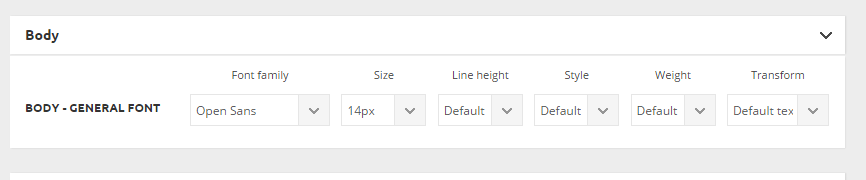
I chose this Google Font in the theme option panel http://c2n.me/3idRdU0.png but desired font (namely Open Sans) seems to not loading in the pages’ code.
This is my site (test installation) http://news.zzkk.ru/
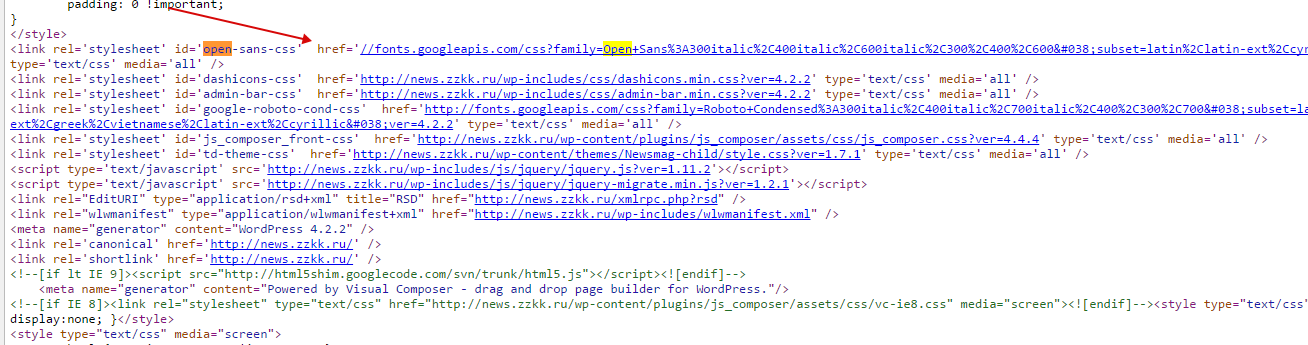
As one can see in the home page code there is no such font loading, only Roboto: http://c2n.me/3idSBUP.png (I was forced to manually load font through custom css http://c2n.me/3idSZS0.png
And there is another strange effect: this is page listing when admin is autorized on the site http://c2n.me/3idTkw1.png
This line appears in listing only when admin is autorized on the site!
Maybe I did something wrong?
Please help.
Alin [tagDiv] Hi,
You have an option to set article’s title length for module 3 in Theme Panel – http://screencast.com/t/O9CtakNT
Also you have to make some changes in module 3 to post views appear on this module:
*copy get views function – http://screencast.com/t/4hKiFXy8jFqD and paste it to module 3 – http://screencast.com/t/eHOYSjXp
<?php echo $this->get_views();?>
Add also this custom css in Theme Panel > Custom Css: http://screencast.com/t/2nNuaHGA
.td_module_3 .td-post-views {
float: right;
}
Thanks!
-
This reply was modified 11 years by Alin [tagDiv].
Alin [tagDiv] Hi,
The logo image for retina devices is loaded properly at the size that was uploaded (544×180) – http://screencast.com/t/9vAF3iz0f
If you want a smaller logo on retina devices you can try this custom css in Theme Panel > Custom Css: http://screencast.com/t/bxq0WXVG
.td-retina-data {

max-width: 27%;

}
Thanks!
Alin [tagDiv] Hi,
You have a text widget there in Footer 1 – http://screencast.com/t/J04V23DT
Also if you need to reduce more space bellow footer info you can try to reduce margin using css code in Theme Panel > Custom Css – http://screencast.com/t/j5GN0RfCNTl
.td-footer-container .td-footer-info {

margin-bottom: 15px;

}
Thanks!
Alin [tagDiv] Hi,
I have checked your site and found these errors in console – http://screencast.com/t/9etQhZPZc also ajax pagination doesn’t work. Please deactivate all plugins except of Visual Composer plugin, clear cache, disable all js/css minification and then check if you still have this issue.
Thanks!
 happymedia
hey guys,
i have a very irritating issue.
at the beginning of my website i downloaded your files
included main theme and child theme.
so i uploaded them as zip file in wordpress.
afterwards i worked with the child theme to make some modification.
the issue:
when i go to themes menu in wordpress i got the error “no child theme exist”.
but im working with my child theme with ftp.
the child theme is activated etc.
but i have this error.
when i activate other standard theme or the main newspaper theme i cannot acticate the child theme again because of the “stylesheet not exist” error.
but i have a style.css
so could u help me by that error?
when i upload the fresh child theme again with zip file im loosing all my modifications and i must copy them in from backup. this is very irritating.
could u help me solving this problem?
or shell i work only on main theme?
thank you.
if u need access i can give it to you.
all the best
 newwalter
 So YEAH!!! I did went back to original theme and cleared cache and that fixed my problem.
But I needed my modification back so I reapplied child theme but I started with blank STYLE, then copied and pasted few blocks at a time my modified css, just to make sure everything is normal.
Thank you guys for all your help!
-
This reply was modified 11 years by
newwalter.
 elvinf
 I belive I found this issue. I needed to change the style.css author and add a template name.
Looks like its working. Can you look into the logo issue? Thanks
elvinf Hi,
The URL is http://tinyurl.com/staging-demo
The theme all of a sudden is broken. WordPress is telling me that the ‘template is missing’.
I attempted to edit the style.css as you suggested and the theme broke.
Here are the steps I took.
1 – I logged into cpanel and navigated to the newsmag theme folder. Copied the Style.css and moved it over to the child theme folder.
2 – Navigated to the child theme folder and attempted to edit the style.css. My browser crashed.
3 – I attempted to edit the style.css file from within wordpress and wordpress gave me a message that the theme is broken.
What did I do wrong? How can I fix this?
Thanks
 VAtheist
Hi,
when I keep editing font in Custom Typography in the Theme Panel, I find that fonts I didnt manually change are being effected. If I change some characterisitc of one font, some other font gets reset to something different. Most noticably the Menu font changes from Titillium Web to what looks like some kind of serif font (even though the settings in the custom typography menu still read titillium web.
This seems to be a bug. Any solution besides writing out custom css for each font? Looks like I cant adjust anything in the Custom Typography section without risking the styling of some other font within my site.
Here is my site as an example. On the main page, the little thumbnail pictures’ titles have the wrong font