
 Simion C.
 Hi,
You can try a code like this, and the comments will display the way you want
– https://www.screencast.com/t/4Q0sSGb9SmM
– https://www.screencast.com/t/MVmYmBsSy
Enter the code in Theme panel->Custom Css
.comment .comment-content {

margin-left: 0!important;

}
Thanks
 Bogdan B.
 Hello,
Sorry but there is nothing to solve. This happens regardless of theme. it is the way css works. THere is no fix to be implemented by us. Simply use the theme and css in it’s default way without changing anything and there will be no fouc. If you change colors, fonts, sizes, you will start to see changes happen especially if using a demo which already changes the css to provide the style and then the user changes it again so there are already 2 rewrites on the css happening. Then you activate speedbooster and mnove the loading of the stylesheet to the footer and that delays it even more making the fouc even more obvious. As Chris said, it is all basic knowledge every webdev should know as it does not happen in our theme specifically. This happens all over the web, not just WordPress either.
Thank you!
Simion C. Hi,
That is how Block 7 looks like on a single columns layout
– https://demo.tagdiv.com/newspaper/block-7/
You could reduce the space between the modules with a code like this, if that is what you want to do
– https://www.screencast.com/t/1z2TNHlAaXvT
.td_block_7 .td_module_6 {

padding-bottom: 13px;

}
The code must be entered in Theme panel->Custom Css section.
The module that this block uses does not display an excerpt for the post content. Not all block modules have this feature.
You could use Block 11 instead, which displays an excerpt when set on one column and is similar to block 7
– https://demo.tagdiv.com/newspaper/block-11/
Then use this code to reduce the space between the modules, if needed
– https://www.screencast.com/t/jbug3my9HJo1
.td_block_11 .td_module_10 {

padding-bottom: 13px;

}
The excerpt length can be controlled in the theme panel
– https://forum.tagdiv.com/excerpts-introduction/
Thanks
 Catalin
 Hello adam21s,
Please notice that our theme does not have any such an option that allows you to achieve this effect with the basic theme options, sorry! You should use a plugin with has this functionality or you should have done some changes through the code and use some custom CSS code in order to achieve this effect/style. If you are not aware of the steps which are needed to take in this regard, please consider hiring a freelancer/developer to help you because we cannot provide custom services at the moment, sorry!
Thanks for your understanding!
Simion C. Hi,
You could try some custom code in order to achieve this, as there is no specific composer element for displaying icons, at the moment.
In my example I have used an icon (128×128) like this, and set the height for it
– https://www.screencast.com/t/yEaTLXUX
They will be displayed like this
– https://www.screencast.com/t/iQAMLrizj
But by applying some Css they will look like this
– https://www.screencast.com/t/c8NHR3DDCoXv
This may be somewhat of a solution for doing it, if you cannot find any other solution. This is the code I used, if you decide to use it, enter it in Theme panel->Custom Css. The code applies to all your single image elements, so to make it more specific you can add an extra class just to the single images you want it to apply
– https://www.screencast.com/t/oG3jqZBa1u0
– https://www.screencast.com/t/Epvr2YMTpwL
.vc_single_image a {

background-size: contain;

background-repeat: no-repeat;

}
Please let me know if you need any further help, or have more questions.
Thanks
Catalin Hello Torasko,
Indeed, in the Widgets section, there no exist any way to add your custom class but notice that you can use the Ad Box element when you can add your desired Ads and create there your custom CSS class, like this -> https://www.screencast.com/t/xlF0aImsUA
If is not what you mean, please provide more details about your problem and also, if you need more assistance in this regard, you can send us an email at contact@tagdiv.com with your log-in information (wp-admin) so we can access it your backend.
Thanks for your understanding!
 Eduardo Cornejo
So I had Newspaper v4 for a long time and just switched to v8…but, now my comments are weirdly indented to the right, instead of right under the author name. It looks weird on desktop and even worse on mobile. Is there CSS or some other way to fix this?
Here is an example: http://www.edustenia.com/4-dias/#comments
Thank you!
Simion C. Hi,
Glad you could find a solution. Simply enter the font link in the header.php file between the head tags. This file is located in the main theme folder
– https://www.screencast.com/t/YGJWc6Xm
The custom code can be entered in the Theme panel->Custom Css section.
Thanks
 enterpr1se
 I read the doc and I found that it need to add custom css class td-ss-row
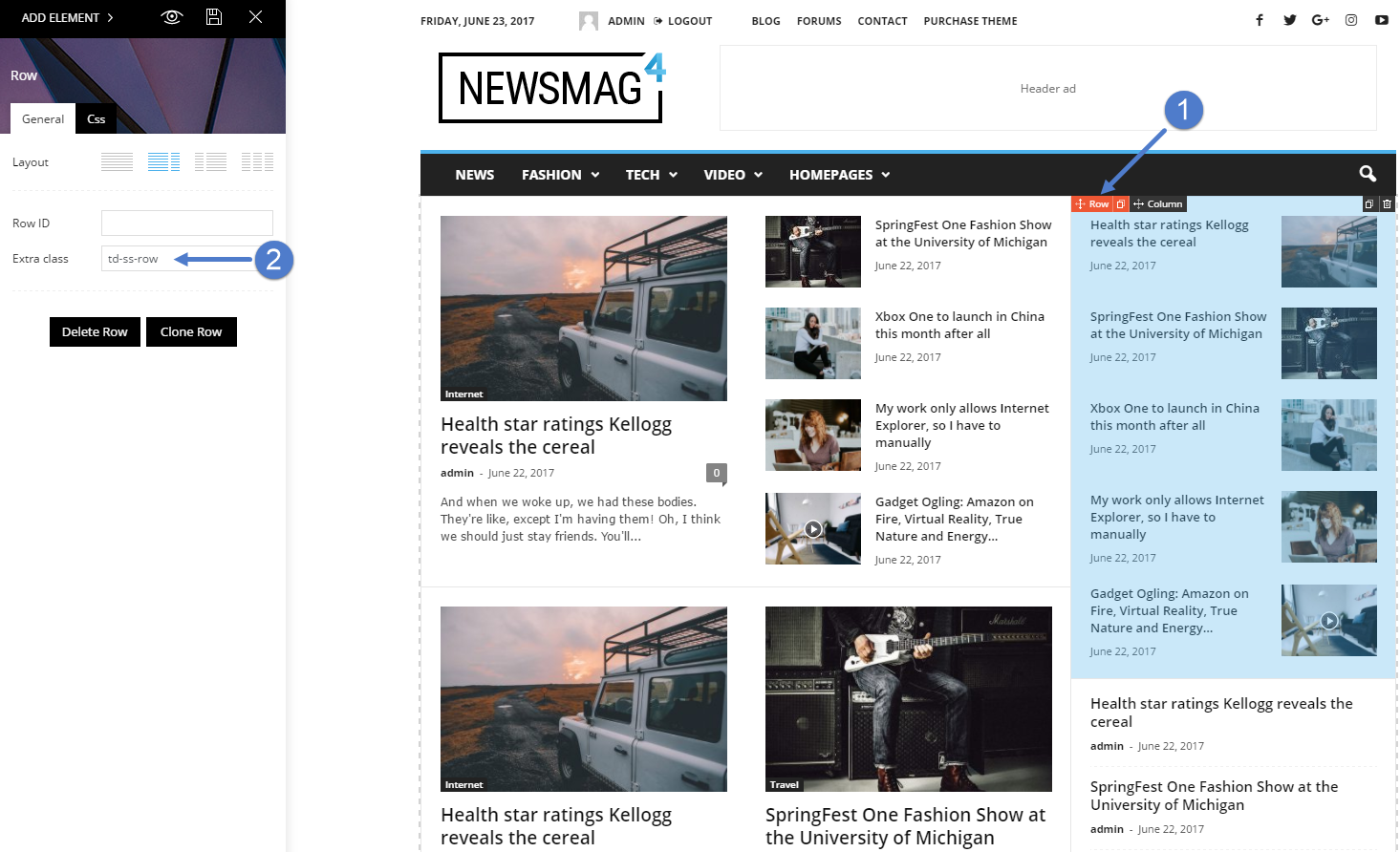
 diegofvg
 Hello Chris, I saw that you already answered this to the other colleague who wrote this topic. Thanks for the feedback, but this is totally unviable for me.
Having to change the css changing class by class will be extremely labor intensive, and in case my client needs to use the theme’s resources to change the site’s source via theme panel.
I would like to know how it was solved by the staff who developed the theme.
If necessary I can send data from ftp or admin.
Thank you.
 Torasko
 Let me ask it another way. The ‘tech demo’ version of Newsmag brings ‘Newsmag default’ sidebar. I’ve placed 3x ‘[tagDiv] Block 15’ + 1x ‘[TagDiv] Ad blox’ in it. These widgets have no way of using custom added CSS classes.
On the other hand, on the right column of the frontpage (which is made with Visual Composer), I’ve placed a ‘Social Counter’, an ‘Add Box’ and a ‘Block 7’. If I edit these from within the Visual Composer page, it gives an option to add an ‘Extra Class’, in which I place the class which executes the following code, added in the Custom CSS section of the Newsmag panel:
@media only screen and (max-width: 768px) {
.only_desktop { display: none !important; }}
Since the default sidebar doesn’t give me the option to add CSS classes to widgets (for example, I also want to hide certain widgets that are placed in the footer section), they are viewable on phones and tablets.
If you would like to see the page, I’m gonna have to give you a username and password since the website is still in development and hidden behind a htaccess-login. Could you send me a mail at j.vanleeuwen@torasko.com if you would like this?
Thanks in advance for your feedback. I’m looking forward to hear from you!
 simchris
 Need to change the styles in your style.css and then put the CSS to load fonts from typekit or Google fonts AT TOP of your style sheet, and not load separate style sheet from another site; the ‘delay’ causes FOUT since it would otherwise hold up page load — if loaded via async in the queue.
Or, put the CSS for the fonts INLINE in your header.php …
all basic webdev stuff worth learning/trying 🙂
Simion C. Hi,
If you do not want to set a custom title for those images, you can remove the white box with a code like this
– https://www.screencast.com/t/PVOBUgyVhei
.td-image-box-style-2

.td-custom-title {

display: none;

}
Enter the code in Theme panel->Custom Css.
Thanks
 CyberSafar
 Thanks a lot, I think this should solve the problem!
I tried Live CSS feature for some color change and it’s working. I have added the font code too.
Where should I add the font link? in the header.php file as you have shown? I have migrated from Joomla, where in the backend there is a facility to edit header.php. Does WordPress have similar facility? I tried using the custom code facility in the theme panel, but it is not working.
Regards,
Simion C. Hi,
It seems to be replaced by this font in the post content
– https://www.screencast.com/t/0WCalNYqi
That happens for me as well in my tests. Forcing it with custom css seems to make it apply however
– https://www.screencast.com/t/xMSKyP0T
In my case I tried loading the font directly in the header
– https://www.screencast.com/t/GxLmkSvjCqv
And applied it with css
– https://www.screencast.com/t/a3oLjsQaVnDZ
I could not say why it gets replaced with the other font, since there is no such font available at least for me, in the theme panel. It could be a default fallback. You could try applying the font manually with css as shown for the moment
– https://www.screencast.com/t/Ry54d5KA
Thanks
Simion C. Hi,
The author name and the date can be removed for all the blocks/modules, in the theme panel
– https://www.screencast.com/t/vhCAVjUuV
If you would like to remove them just from the category page grids, you can try a code like this one for example
– https://www.screencast.com/t/TZTypV0iy
.td-category-grid .td-post-author-name,

.td-category-grid .td-post-date {

display: none;

}
The code must be entered in Theme panel->Custom Css section.
Thanks
Simion C. Hi,
You can try a code like this one for example
– https://www.screencast.com/t/LBGjRMDsvD5p
It will add the same shadow for the outer wrap, just like in the News Magazine demo that you mentioned. Enter it in Theme panel->Custom Css section
@media (min-width: 1180px) {

.td-boxed-layout #td-outer-wrap {

width: 1164px;

margin: 0 auto;

-webkit-box-shadow: 0 0 5px 0 rgba(0,0,0,.12);

-moz-box-shadow: 0 0 5px 0 rgba(0,0,0,.12);

box-shadow: 0 0 5px 0 rgba(0,0,0,.12);

}}
Thanks
Bogdan B. Ok,
Please add this custom css code into your theme panel:
@media (min-width: 768px){
.td-header-wrap .td-affix .td-main-menu-logo img {
max-height: 62px !important;
}
.td-header-wrap .td-affix .td-main-menu-logo a{
line-height: 67px !important;
}
.td-header-wrap .td-affix .sf-menu > li > a{
line-height: 68px !important;
}
}
Thanks
 ptrcktn
Hello,
I was unable to enter any text in the window of the Theme Panel where custom CSS and custom Javascript and HTML go. There is just no way to select the field to input any code.
Please help.
Bogdan B. 1. No, I did not miss anything. I already mentioned ALL of the styles are present in the stylesheet. I did not show each and every code, yes. The round corners for the images are a css rule you can find in the same demo-style.css under the voice report demo files.
2. If you apply css you do not need to do anything more. Simply change the css and the results should be seen immediately and no regeneration process is needed.
Thank you!
Simion C. Hi,
This can be done, you just have to use the right code. You can use the browser inspector to identify the elements used and their classes in order to create custom code
– https://forum.tagdiv.com/create-custom-code-using-the-browsers-inspector/
For example you can try a code like this as a start, and maybe add more classes or more customization
– https://www.screencast.com/t/sWZ8sfRiophH
– https://www.screencast.com/t/O4SItaVQD
– https://www.screencast.com/t/sICsFHBh2KV
– https://www.screencast.com/t/yziOjRMA
The code must be entered in the Theme panel->Mobile theme->Custom Css. This can be improved the way you like, by adding more elements or removing them.
#td-outer-wrap {

background-color: #000;

}

.block-title,

.td_module_mob_1 .entry-title a,

.page-nav .current,

.td-page-title,

.td-category a,

.entry-title,

.td-post-content,

h1, h2, h3, h4, h5, h6,

.td-author-name a,

.author-box-wrap .td-icon-font {

color: #fff!important;

}
Thanks
Simion C. Hi,
If you are using the mobile theme plugin, the easiest way would be to try a code like this in order to remove the search from the header
– https://www.screencast.com/t/5WCpIZUc
.td-search-icon {

display:none;

}
Enter the code in the Theme panel->Mobile theme->Custom Css.
Thanks
Bogdan B. Hello,
Each demo has it’s own custom style to it. Each demo has itls own stylesheet where all of the css is found. We usually only change the css for the demos in order not to change functionality. If you want to re-create parts of one demo on another demo, you will have to inspect the css for both and try to replicate it.
You have the css for all the demos inside the main theme package under newspaper/includes/demos/
Thank you!
 Techmodar
At the bottom of the WordPress theme section is the following warning. (Many themes have been set up, but only for the Newspaper theme).
“Problematic Themes
These themes are established but not all.
name Description
Newspaper Template is missing. Individual templates need index.php template file. Subtypes need template headers in style.css style file. “
 Nicholas Gibbs
 thanks simion
i just want to ‘flip’ the colour scheme so mobile is consistent with the main desktop
black background, white fonts
i am a css novice but i’d have thought this would do the trick (but i’ve tried it in the mobile theme custom code css panel, and it doesn’t work)
body
{
color: #ffffff;
background-color: #000000;
}
