
 Catalin
 Hello aco_and_co,
If you want to change the background colour and if you want to still unchanged the footer section to be in full-width, you will have to use a bit of CSS code for a general container and apply the below code, like this ->
The code is ->
.td-main-content-wrap {

background-color:red;

}
The result -> http://screencast.com/t/zZiKNQLBn
If you need more additional customization, please notice that it require custom work and we cannot provide this service at the moment and you will consider hiring a freelancer/developer to help you in this regard, sorry!
Thanks for your understanding!
 Bogdan B.
 Hello,
The sign-in button from the mobile menu can be hidden from this setting: http://screencast.com/t/Ikd3fDek
Unfortunately this will also remove the sign-in from the desktop version as well, so if this is not waht you want, you can use a custom css to only remove the sign in from the mobile menu:
.td-menu-login-section{

display:none!important;

}
Thank you!
 Andrei L.
 Hi
You can use a custom css to color the post tiles red, here is an example: http://screencast.com/t/Z3zzAGt4J
.td_block_10 .entry-title a{
color: red;
}
Thanks!
 22places
Hi guys,
we’re having some issues with the size of our logo since we’ve updated from 6.6.3 to 7.1.1. We’re currently updating the theme in our development environment.
We’re using header style 10, but want to use the small version of the logo. As advised in the documentation, I’ve added .td-logo { width: 130px; } in Custom CSS , which is the width I would like it to be. This worked perfectly fine with 6.6.3.
This is the logo how it is supposed to be: https://www.22places.de (version 6.6.3)
This is the logo after the theme update to 7.1.1: https://spielwiese.22places.de
In 7.1.1. this line has the effect that the logo (only on the home page) is aligned to the left. When I delete the line from my Custom CSS, the logo is centered as it is supposed to be. However it still shows the bigger version (retina) of the logo.
If the line .td-logo { width: XXpx; } you’ve advised in the documentation does not do the trick, what does?
Hope you can help me out!
Thanks
Jenny
 Fabrizio Azzali
 I have done all what you told me.
1) New header-style-7.php in a child theme
2) CSS is the same you gave me
Functionality are perfect. thanks. but… not the style as you se in the image (link below)
The sticker news row goes some pixels on the left of the agination with a line beside.
You can better understand on the example on the rigt of the image i made appling style2.
See the image at:
http://www.screencast.com/users/FabrizioRome/folders/Default/media/092ff928-c6e4-4ad5-9947-efc06047d24a
Thanks
 Leo
LeoHello.
If I switch the language of my WordPress site to Hebrew – the theme indeed makes direction changes automatically.
The problem is that many elements do not fit and “sit” correctly.
How can I get full and “beautiful” RTL support without messing with the CSS?
It should support RTL out-of-the-box, doesn’t it?
Catalin Hello icsiaid,
If you want to decrease your header for politics demo, you will have to use a bit of CSS code to do that. Please try the code below and place it in Theme panel->Custom CSS area.
The code is ->
.td-politics .td-header-style-11 .td-logo-wrap-full {

min-height: 0;

line-height: 0;

}
The result -> http://screencast.com/t/Zn56QDncXXZq
Thanks.
 mhendiz
 hi
thanks for your response.
i have question.
this codes in view-source.
<link rel=’stylesheet’ id=’td-theme-demo-style-css’ href=’http://www.muhendisbeyinler.net/wp-content/themes/Newspaper/includes/demos/tech/demo_style.css’ type=’text/css’ media=’all’ />
i dont using demos. how can i delete this codes.
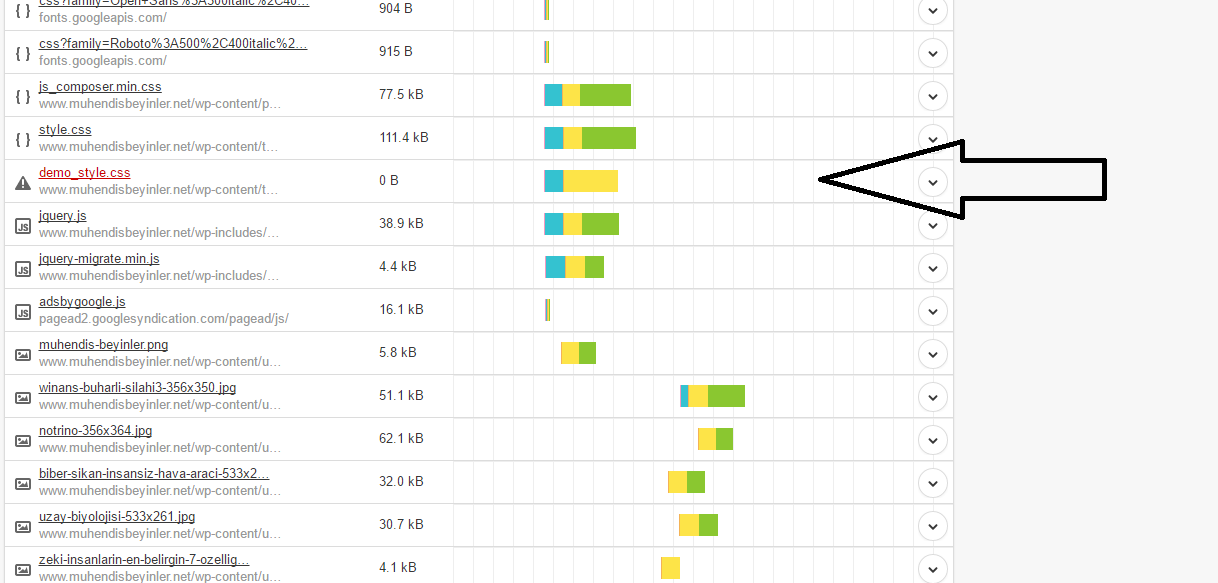
showing me 404.
i just deleted demos folder.
Bogdan B. Hi,
If you set up a cdn, you must purge the cdfn files exactly as you reset the cache from the caching plugin. A cdn is another form of cache so a css modification will only take place after all caches are cleared.
Thank you!
Bogdan B. Hi,
If you want to have the titles at the top of the grid in the default style, you can use this css code:
.td-big-grid-slide .td-big-grid-post .td-meta-info-container{

top:10px!important

}
Thank you!
Bogdan B. Hi,
We already have this on our bug list and it will be fixed in a future version of the theme. It is a simple css value that can be changed with this code:
#td-outer-wrap{

overflow:visible!important;

}
Add this code in the theme panel-custom css box.
Thank you!
Bogdan B. Hello Robert.
The design for each demo is added custom in the style.css file. There is no setting to chose one style or the other. If you want that design, you will have to install the demo as there is no way to add it from the theme panel.
Thank you!
Bogdan B. Hello,
The gradient was only added for the mobile menu, but there is a css trick to do it for the main menu as well.
Please use this code:
.td-header-wrap .td-header-menu-wrap-full{

 background: red; /* For browsers that do not support gradients */

    background: -webkit-linear-gradient(red, yellow); /* For Safari 5.1 to 6.0 */

    background: -o-linear-gradient(red, yellow); /* For Opera 11.1 to 12.0 */

    background: -moz-linear-gradient(red, yellow); /* For Firefox 3.6 to 15 */

    background: linear-gradient(red, yellow); /* Standard syntax */

}
I set the colors to red and yellow, but you can change these to the ones you like. Just add the code in the theme panel->custom css box.
Result: http://screencast.com/t/2hCJXMcRR
Thank you!
Bogdan B. Hi,
If you re-write css, you need to add the !important declaration. Please use your code like so:
.td-main-page-wrap {

padding-top: 0!important;

}

.td-main-content-wrap {

padding-bottom: 0!important;

}
Thank you!
Andrei L. Hi
Yes this can be done via css and this is an example for block 4:
.td_block_4 .td-post-date, .td_block_4 .td-post-author-name span{

display: none;

}
If you want to do it for other blocks just change block’s class, for example for block 2 you will have to use td_block_2.
Thanks!
Catalin Hello ukume,
I have checked again your website URL and I saw that you have max-height:30px which I suppose that it is custom added because we have not in our style.css this value for this type of parameter. I have tried on my side and I cannot recreate this issue. Please send us an email at contact@tagdiv.com with your log-in information so we can further inspect your setup page because it is possible that some settings from your panel to be inadequate and might cause this type of issue. We are glad to help you in this regard if that problem comes from our default code. Also, if you have some additional customization through the code and you are not aware of them, I can provide you a custom CSS code to work as properly.
Thanks for your understanding!
Andrei L. Hi
The html structure it’s generated by php combined with some custom css. It won’t work just as copy/paste because there are required some adjustments.
Thanks for your suggestion, I’ve added it on our list and when the time comes theme’s developers will consider it. However it may take some time because we have a very long lists with feature requests and we have to chose carefully what to implement.
Thanks!
Andrei L. Hi
That happens because in some situation the same thumb it’s displayed in a bigger container than on desktop. In these situations the image it’s stretched with css and its quality it’s lower.
Try to increase the value of WordPress’s compression following this link: http://www.wpbeginner.com/wp-tutorials/how-to-increase-or-decrease-wordpress-jpeg-image-compression/ then regenerate the thumbnails: https://forum.tagdiv.com/thumbnails-fix-strange-looking-images-on-blocks/ and test the site again.
Thanks!
Andrei L. Hi
The code works fine on my side even if I’ve added the code for two ads: http://screencast.com/t/KBU7trul1MBN I’ve used this code to get the previous result: http://pastebin.com/uU5mfpsM and this css: http://pastebin.com/FUGduV2h
Make sure you added the code properly, clear the cache memory then test again.
Thanks!
Andrei L. Hi
Try this css: http://screencast.com/t/zf8IWxX7nyxl
#wpstats{

display: none;

}

.td-sub-footer-container .td-pb-row{

width: 1021px;

margin-left: auto;

margin-right: auto;

}
Thanks!
Andrei L. Hi
I’ve checked your site and the header ad it’s displayed now: http://screencast.com/t/saNjNhMqj However header’s layout it’s changed a bit but it can be corrected by adjusting this css that you added in child theme: http://screencast.com/t/kDS00CVR
Thanks!
 goldfish45
after adding cdn settings css can’t detect …why this happening??
 icsiaid
 Never mind all these questions, I will summarize my questions in to one.
my website is welovescience.co.kr
How do i make the header space very tight so that the main menu and front posts go up like in “digg.com” ?
I searched the whole forum regarding changing the header size, but it does not work.
Simply putting in the css code in the custum css box does not have an effect whatsoever.
Thank you for your kind support.
-
This reply was modified 10 years by
icsiaid.
icsiaidpost link: https://forum.tagdiv.com/topic/how-to-reduce-font-size-of-the-text-logo/#post-116077
I previously asked how I can reduce text logo size.
I’m a newbie to wordpress, but putting in the codes inside the custom css box does not change anything, even though when i simulated it in LiveCssEditor it does change.
What I want to do is to make my website as simple as possible BY making my header very small as well as all the texts inside of it. like digg.com
What am I doing wrong?
and please give me a recommendation of a theme that can resemble digg.com?
 Pohtecktoes
Hello,
Is there a way I can remove the white space below my menu and above my slider?
https://thetravelintern.com/
I tried this custom css and it didn’t work.
.td-main-page-wrap {
padding-top: 0px;
}
.td-main-content-wrap {
padding-bottom: 0px;
}
Thank you.
