
- TutorialsDefault Block Settings Guide
 Calin
Calin Hello,
If you want to use the smart snap for menu, then you need to go in Theme Panel> Header> Main Menu and make this settings -> http://prntscr.com/ps40ix
Thank you!
 Vlad S
 Hello !
Please make sure that you follow all the steps found in our tutorial here: https://forum.tagdiv.com/header-manager/
Thank you !
Calin Hello,
I’ve just checked your mobile logo and this is the one from the desktop version, so in order to have a bigger logo, you can upload a logo for mobile in theme panel, with size 140x48px -> http://prntscr.com/ps3h2x or you can use a cloud header from tagDiv Cloud Library, edit it with tagDiv Composer and make it to look how you like ->http://prntscr.com/ps3hz5
Thank you!
 delizard
Hello,
i have a problem with a big login box that appear for some seconds at the top of the page every time a new page is loaded.
Please look this screenshot: 
I don’t need users login in my website, so I’d like to remove this box directly from the code, deleting the code that generates it.
Can you tell me please in which php file can i find this code?
Thank you very much,
kind regards,
Francesco
 moneymake
Header Menu Icon
How do I make it?
*Explanation
http://carloansinfor.com/wp-content/uploads/2019/11/header-menu.jpg
 dimitrisv
I managed to hide the image, yet I would like to also claim the space of the image for the title of the search results.
I did try
.td-module-thumb{
display: none;
width:1px;
}
.entry-thumb{
display:none;
width:0px;
height:0px;
}
But to no avail.
Also the php that creates this is fixed only for the mobile version (see header-amp.php). It appears that for the pc browser version this is customisable but I cannot find where it is in the panel. Thank you!
 sejpost
I have a 728×90 header banner and a 300×90 mobile version at the top of my site at http://www.coronadotimes.com. However, the mobile banner does not consistently show on a phone…why is that?
Here is the code for the header banner:
<div class="td-all-devices SP_Full"><a rel="nofollow" target="_blank" href="https://www.coronadoshoresco.com/?utm_source=coronadotimes&utm_medium=bn&utm_campaign=generic&utm_content=header_bn"><img src="/wp-content/uploads/2019/10/Header-Shores-v2.jpg" /></a></div>
<div class="td-all-devices SP_Mobile"><a rel="nofollow" target="_blank" href="https://www.coronadoshoresco.com/?utm_source=coronadotimes&utm_medium=bn&utm_campaign=generic&utm_content=header_mobile_bn"><img src="/wp-content/uploads/2019/11/Shores-Mobile-Header.jpg" /></a>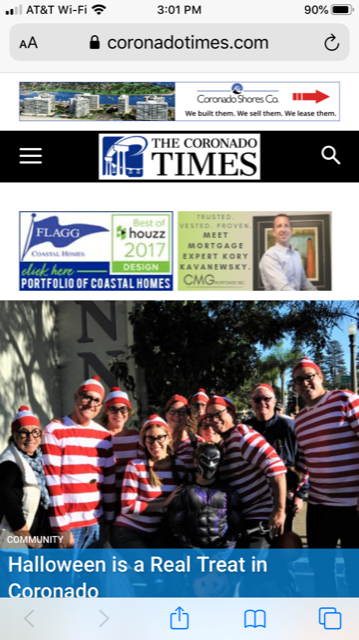
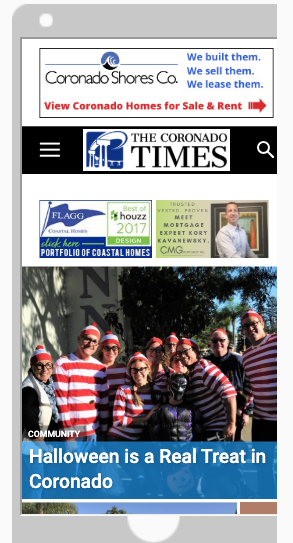
Any advice on how to make sure the mobile banner shows on phones, etc.?
Code:
<div class=”td-all-devices SP_Full”> </div>
<div class=”td-all-devices SP_Mobile”>
Thanks!
 Rodolfo
I can’t change the home page with the publisher. I tried to create a new page and everything works.
Only the home (a message appears to me that the header is saved, but the second is not. Then closing the editor tells me that the page has not been saved). Tested with disabled caches and plugins. The problem remains. I tried to copy the home page code to a new one and the problem reappears. I can’t resolve, can I send you an access?
 reflector
After importing a header, customizing it in TD Composer (all 4 zones), and setting it as my “cloud library template” in the header section of the theme panel, the mobile theme refuses to adopt the new header. What steps am I missing?
 TariqulSuman
 Hello,
I would like to show my top header menu in responsive mobile view.
How can I do that?
 jaydeedaley1
 Dear Support
Can you send me the code to populate the living mag header so that I can edit it in Cloud?
Thanks
JD
 brandoni
 edennastal
 https://realheroreport.wpcomstaging.com/
Please see the default headers shown on the homepage. “Fashion Week” etc. Where do I change these to appropriate header names?
 Anthony1978
See here: https://demo.tagdiv.com/newspaper_travel/
Hello if i want to change the header background image from Newspaper – Travel Guides the camel!
I get this message: Invalid data Current state has involved an issue. You could try an UNDO operation (CTRL+Z / CTRL+SHIFT+Z) What to do ?
Also how can i change the text for EDITOR PICKS and POPULAR POSTS and where can i find the POPULAR CATEGORY ?
And where can i change the footer text : ABOUT US and Follow us ?
Regards,
Anthony
jaydeedaley1Dear Support
I would like to change my header to the living demo header if possible but when I import the living theme header it’s blank. https://snipboard.io/sF2pi1.jpg
I notice that during the installation of the living demo no header is present. It seems as though the header is just within the theme panel header section? https://snipboard.io/JcRMPQ.jpg
But when I add an image for the background, the image is not replaced. I get the impression that the background image is changable in another location.
I look forward to hearing from you.
Thanks
JD
When I changed the header background in the dashboard
 Benedict Paramanand
Hello,
My URL is sustainabilitynext.in
On PC my website seems OK.
But on mobile, as it uses the responsive theme of Newspaper Theme,
the logo on the header is too small.
Is there any setting to make it appear bigger.
Calin Hi,
I’ve just checked your website and I can not see something that do no look good on you header -> http://prntscr.com/pr4kfz if the problem is still there please provide some more details and some screenshots.
Thank you!
Calin Hi,
If you do not want to have header on some pages or single post templates then you’ll need to edit it with tagDiv Composer click on header manager and set no header like this -> http://prntscr.com/pr39zb
Thank you!
Calin Hi,
Please check all sections in tagDiv Composer editor for all device, in this way you’ll be able to adjust the header -> http://prntscr.com/pr2zc5
If there is still a problem, please provide some more details and some screenshots, also a link where I can check this problem would be very useful.
Thank you!
Calin Hello,
In order to change that background color you need to click on logo -> http://prntscr.com/pr0xlp after that click on row -> http://prntscr.com/pr0xyt
I think that you want to have a full width on header background, if is so then please make sure that you set the row stretch like this -> http://prntscr.com/pr0vjz after that in css tab set the background image like this -> http://prntscr.com/pr0w53
Hope this will help you!
Thank you!
 dano100
Please see
We are seeing a big dead white space in the header of home and category pages, we are seeing this in several browsers as well as mobile. This popped out of nowhere as there have been no changes to the theme is several days. Can someone please help?
edennastalOn the homepage, there are default category headers over clusters of articles such as “Fashion Week” and “Gadget World”. I can’t find where to change these to appropriate titles. Appreciate any help on this. Thank you!
brandoniHi
I kept blank the code text on HEADER AD in the theme panel. Today, whit not reason, I seen the google advertising on the header.
I don’t no why
this is web site: https://www.fingerpicking.net
regards
Reno
 steven777
The footer menu also is displaying in the main menu. I have spent 2 hours trying to get this right.
I started with the Animal News Demo and started modifying it.
How do I display the header on some pages and hide it on others?
 dfrosso
Hi.
I designed a custom header with the header manager, it looks good on desktop and phone, but it doesn’t look good on tablet viewport (vertical position), the design breaks on this device/size view.
How can I resolve this?
Thanks.



