
- TutorialsDefault Block Settings Guide
 Filandor
Hi. 1) I tried to find this button:

everywhere (AD setting, header, menu, in php files) but cant. Where is it?
 Catalin
 Hello cashflow24,
The ticker at the top uses a shortcode from this plugin – https://wordpress.org/plugins/cryptocurrency-price-ticker-widget/ and you can place it in a column text element for tag div composer.
After you have installed that plugin you should add the shortcode generated by the plugin and place in the header column text like this -> https://www.screencast.com/t/AB20uPgwMr
Regarding on the second error, try to edit your page with TD Composer and identify the element. Remove and add it again and check the results. Clear all the caches and check the results.
Thanks for your understanding!
 Lareine
I want to show ads on header and want to show different ads by category. I try to use php if is category functions but it not work.pls help me
 emmak
emmakIt needs to go in the header and I am also using the standalone mobile theme. Should I edit the theme files directly or is there a better way.
<script async=’async’ src=’https://www.googletagservices.com/tag/js/gpt.js’></script>
<script>
var googletag = googletag || {};
googletag.cmd = googletag.cmd || [];
</script>
<script>
googletag.cmd.push(function() {
googletag.defineSlot(‘/360007671/xx_dmpu’, [[300, 600], [300, 250]], ‘div-gpt-ad-1524001383878-0’).addService(googletag.pubads());
googletag.defineSlot(‘/360007671/xx_bb’, [[970, 250], [970, 90], [728, 90]], ‘div-gpt-ad-1524001383878-1’).addService(googletag.pubads());
googletag.defineSlot(‘/360007671/xx_mpu’, [300, 250], ‘div-gpt-ad-1524001383878-2’).addService(googletag.pubads());
googletag.pubads().enableSingleRequest();
googletag.enableServices();
});
</script>
 Bogdan B.
 Hello,
Indeed if you use a standard logo and not a text logo, there will be no tagline displayed. If you need a tagline under the logo, it can only be added by customizing the header php file.
Here is an example of how you can add a tagline:
Step 1. Place this code in header-style-10.php
<div class="customtagline">

    <p>Tagline text</p>

</div>
https://www.screencast.com/t/g4XAhsV6TZS
Step 2. Place this code in the theme panel-> custom code-> custom css section:
.customtagline{
display:table;
margin-left:Auto;
margin-right:auto;
font-size:14px;
}
Thanks.
 Clecio
 Hi Edward !
Thank you so much. With your information, also I find in:
Theme Panel > Misc > Block Settings > Global Block Header Template
Thanks for all !!!
 Edward
 Change Header template:
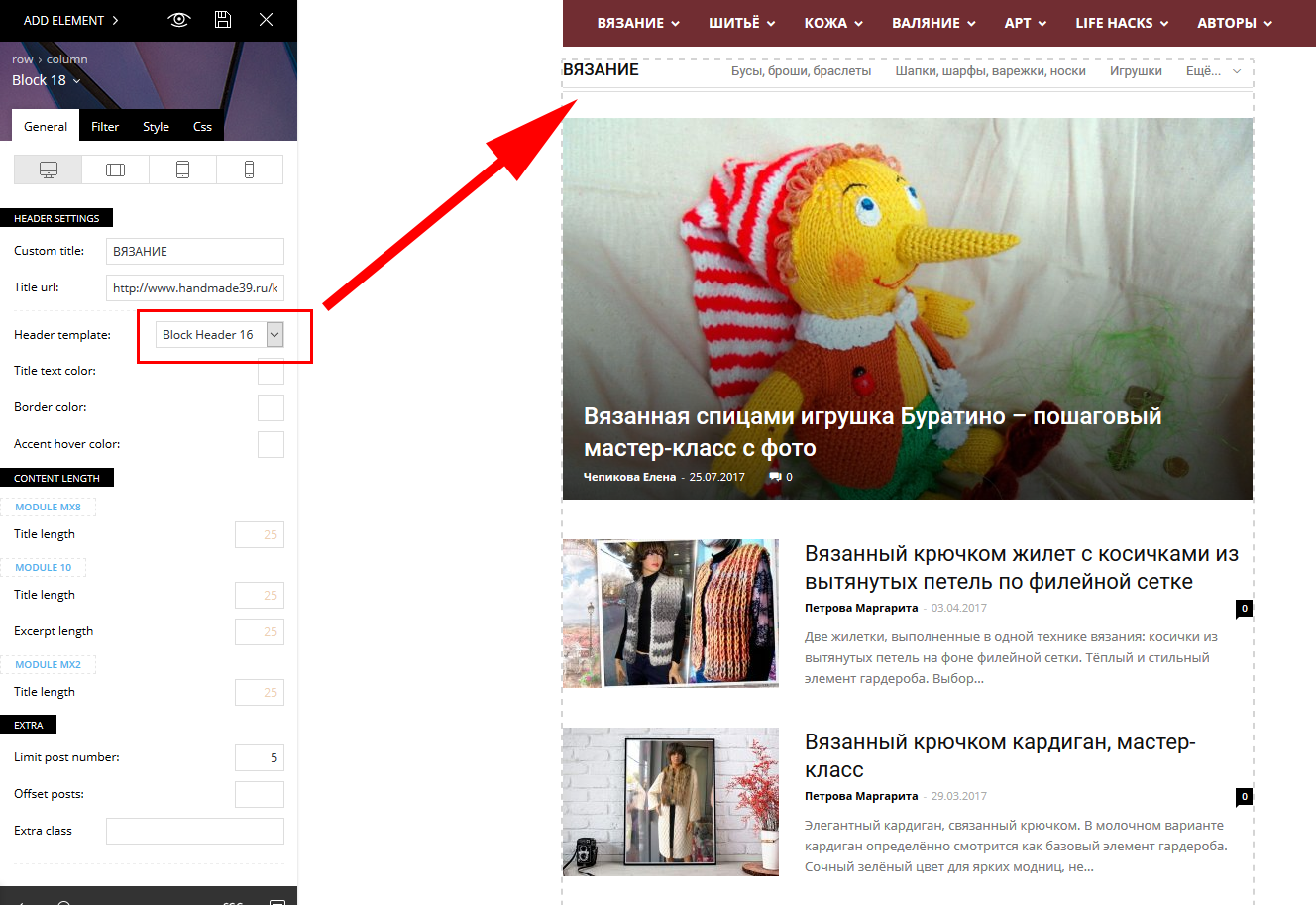
 Alex89
Hello I have a problem with the block header color, as soon as I save my setting and then look results, the headline gets a black background, does anyone know how I change the global? Thanks in advance. Here are the pictures:
1) https://www.dropbox.com/s/fvbgzuuigxyg7yx/before%20save.png?dl=0 (as I want it)
2) https://www.dropbox.com/s/z3md5ypsfb6ti4u/after%20saving.png?dl=0 (after saving)
3) https://www.dropbox.com/s/0ynejp27nfkqiqv/css.png?dl=0
 Lecache
Hello,
I’m building a website where I need to have :
– The logo (.png)
– A text tag line below (using your Header style 10)
Sadly, text tagline only appear if a text logo is set only. It doesn’t show up if using an image logo ! Is there a way to enable it ?
Thank you
 kamoe
kamoeHello, When my site loads for a fraction of a second some colors will display as blue and before it gets into the correct colors I’ve choosen. I think there are some css issue due to how design was done. When I created the design for this site I started with a demo and then modified it. So I assume the colors I see loading at first are related to this.
How can “remove” these old demo rolors while remaining the current look of the site? If not possible the other option is to “Reset theme settings” but that will reset ALOT of stuff not related to my problem.
If you look at the header while loading “www REMOVE spania THIS .no” you’ll see the problem.
What are my options to fix this? What would the relevant CSS file be to try to fix it editing the CSS manually?
Thank you
 Nikolaas49
 Hi,
Unfortunately, this also did not help.
See: https://www.screencast.com/t/svqMtsIZqH
I deleted the provided code, and I tried the following code (I added !important):
.td-craft-ideas .td_block_template_6 .td-block-title {
background-image: none !important;
}
This is the result: https://www.screencast.com/t/FQBi8yrXPy
Now we’ve managed to delete the image, but no also the Header-image in the Widget area is deleted..
Previously Bogdan B. said the image should not even be there. Maybe that’s the problem? We try to delete an image that should not even be there?
As mentioned before, I changed the header image manually (this is the topic: https://forum.tagdiv.com/topic/excerpt-not-shown-on-blog-page-change-background-of-headers/). Maybe something went wrong there?
I hope you can help me fix this!
Kind regards, Nick
Catalin Hello Nick,
You should use the code below and place it in Theme panel -> Custom CSS area.
The code is ->
.td-related-left {

background-image: url(https://demo.tagdiv.com/newspaper_craft_ideas/wp-content/uploads/2017/03/header-bg.png)!important;

background-repeat: no-repeat;

background-position: center center;

background-size: auto 100%;

line-height: 2;

}

.td-related-right {

background-image: url(https://demo.tagdiv.com/newspaper_craft_ideas/wp-content/uploads/2017/03/header-bg.png)!important;

background-repeat: no-repeat;

background-position: center center;

background-size: auto 100%;

line-height: 2;

}
The result is here -> https://www.screencast.com/t/c3vaEQuhdB6
Hope this helps!
Thanks.
 AntoineVerdier
 Well, I put the php code in the dedicated header-style-2.php after the menu and it is working fine. My question now is can I put the modified header-style-2.php file in the child theme?
Thank you
AntoineVerdier Thank you for your help. In that case which header file should I modify in the Header folder? (there are so many!) Also, I am using the child theme, would it work if I put the modified header files in the child theme?
Thank you
Catalin Hello lucchinifederico,-
You should use the code below and place it in the Theme panel -> Custom CSS are.
@media (max-width: 767px){

.td-wpml .menu-top-container .top-header-menu > li {

display: inline!important;

}

}
The result is here -> https://www.screencast.com/t/5wvDmL8j0oHX
Thanks for the message!
 Margherita
Hi,
I recently installed the Ajax Load More plugin and purchased the Previous Post Add-on.
I would like to know if you have encountered any problems with this plugin, and what you suggest to install this shortcode inside the single template .php file (or if it should also be installed in the single loop or elsewhere).
Thank you
——- example ——-
<? php get_header (); ?>
<main id = “page-content”>
<div class = “post-container”>
<? Php
// The loop
if (have_posts ()):
while (have_posts ()): the_post ();
// replaced with Ajax Load More shortcode
echo do_shortcode (‘[ajax_load_more post_type = “post” repeater = “default” previous_post = “true” previous_post_id = “‘. get_the_ID (). ‘” posts_per_page = “1” button_label = “Previous Post”]’);
endwhile;
endif;
?>
</ Div>
</ Main>
<? php get_footer (); ?>
 Skryzer
Hello,
I tried to do some basic seo-stuff with yoast, but I noticed, that the edited snippet won’t show up in google, so I checked the quellcode of my website on that specific article.
It said, that there is no meta-description, but as I said, I created one with YOAST. Do you know where the issue could be?
I looked in the header.php and found the call – I also looked into the hook_wp_head-function and for me it looks okay, so the call is there..
So I don’t know what to do. D:
Nikolaas49 Hi Bogdan,
Unfortunately, this did not help. (The header image is still shown)
Is there another way to fix this problem?
Nick
Bogdan B. Hello,
Please change the block header template for that block. Some header templates do not show ajax filters at all.
Thanks.
 ashubais
I want to add the following code to AMP (Tagdiv AMP) header & footer of html as well –
<script async

      custom-element="amp-auto-ads"

      src="https://cdn.ampproject.org/v0/amp-auto-ads-0.1.js">

   </script>
How to do it?
 ctoweett
 The ticker at the top uses a shortcode from this plugin – https://wordpress.org/plugins/cryptocurrency-price-ticker-widget/ and you can place it in a column text element for tag div composer.
After you have installed that plugin you should add the shortcode generated by the plugin and place in the header column text like this -> https://www.screencast.com/t/AB20uPgwMr
 fadwaqasseh
Template is missing. Standalone themes need to have a index.php template file. Child themes need to have a Template header in the style.css stylesheet.
Even I used FTP to upload the theme they gove me this message
I uploaded just the theme for wordpress
 leeview
Hi there .
I’m trying to install the Crypto Newspaper demo here :
https://demo.tagdiv.com/newspaper_crypto/
Whatever I do, after the demo import with content, I am missing the Price Ticker in the top header and that Price Table a bit below .
I only get :
[ccpw id=”132″]
[ccpw id=”230″]
Am I missing anything or how do I recreate this ?
 blkphoenix66
If any one of the support team could email me about this its too much to put in post. Basically its an ad team but they are wanting to make modification to the header & body of the theme in order to incorporate their tagging system. I have already explained to them about the ad system in place in the theme and we already use adRotate to manage ads. Before i tell them no, want to check if such implementation is even possible. If you provide a support email address I can provide you with additional details.
Nikolaas49 Hi Bogdan,
I’m sorry for my late response.
Thanks a lot for your help!!
Could you please tell me where I have to add this code?
In Newspaper > Theme Pannel > Custom Code > Custom CSS?
I did not add the image manually over there. I only changed the header background-image of Header Box 6 (please see this topic I created: https://forum.tagdiv.com/topic/excerpt-not-shown-on-blog-page-change-background-of-headers/)
I look forward to your response!
Nick



