
- TutorialsDefault Block Settings Guide
 theheritagelab
 Hello,
Sorry to jump in here but am facing the same issue. @Calin — in the screenshot you shared, I see the Zone where the options appear to disable desktop /mobile loading. However, when I click the header area I don’t see the “Zone”. Only “Header Menu” when I click on the “Row”. Am I doing something wrong / missing something?
 nour_aw_fs
Hello
hope you can help. after updating my theme, the header and menu bar malfunctioned.
it looks like code instead of the actual header . please this is urgent
 Anamaria
 Hi,
1.You can to disable the Sign in/join from Theme Panel -> Header -> https://i.imgur.com/YwttygP.png
2. You can’t change it only if you create a modal popup-> https://forum.tagdiv.com/modal-popup/
3. You can remove the shadow from here https://i.imgur.com/URpifXl.png
Thank you!
 contactASN
https://autosecnews-jmeoh5rxuz.live-website.com/
How do you change the Header title of “td-pulldown-size” ?
It’s currently written as “Applications”
Previously, I have changed them via the TagDiv Composer and hovering/clicking the element and changing/customizing the name in editor box, however when I hover over the elements on the bottom of the website there is no configurable element.
 qris
qrisHello,
I dont’know why i cant edit posts on my website. There is no button “Edit with TagDiv composer” except sites.
So when editing sites looks correct:
– edit button accessible
https://ibb.co/X7FzmTV
But on any other post pages:
– edit button unaccessible
https://ibb.co/P9FY6n3
And can’t click or edit 🙁 I tried to disble all plugins but without success. WordPress, plugins and Newspaper are updated to newest versions ; also tried downgrade Newspaper – no results.
I would be grateful for any help
Krzychu
 David
DavidHi, I’ve got 3 question related to the newspaper pro cloud template.
1. How can I hide the “Sign in” part from the mobile menu? Screenshot: https://prnt.sc/XTF3fqqItAOp
2. How to make the mobile menu on opening slide from right to the left? I’m not using the mobile search and moved the toggel to open the menu to the right. Screenshot: https://prnt.sc/CFPgNLlrWkBE
3. How to remove the background shadow from the mobile header? Screenshot: https://prnt.sc/Ff0FwziJVlyq
Thank you!
 Calin
Calin Hi,
Do you have the last theme version Newspaper v12.6.3? IF so, make sure that you try those options – https://i.imgur.com/VoA98Vl.png – https://i.imgur.com/nDouKGI.png also on cloud header, you can disable the mobile header on desktop and the desktop version on mobile – https://i.imgur.com/pMABF57.png – https://i.imgur.com/9veBsYd.png (if you are using mobile page you can disable the that one too).
Thank you!
 egm_ar
Hi good evening,
I’ve imported the Urban Observer header, but when I try to edite it on TD Composer, I get the following code:
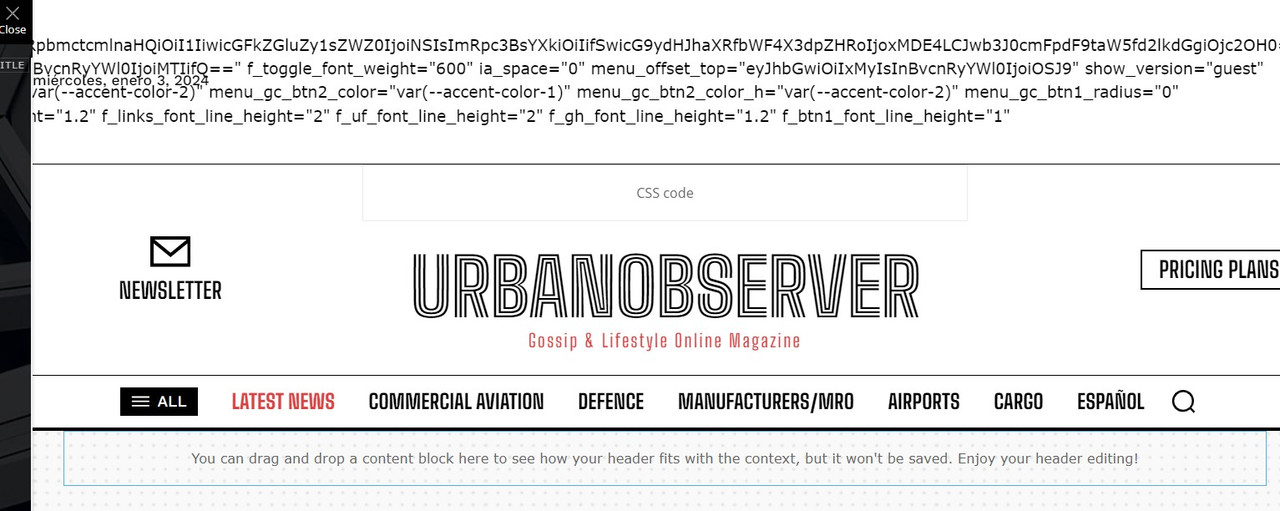
What could be happening?
Thanks in advance!
 Fryant
Hello,
My website is in two languages, Spanish (original) and English (translation), using WPML as recommended.
The Spanish website has a header in Spanish, and the English website has a header in English. Both headers have a search function.
I have designed a search template in Spanish, and another search template in English.
How can I force the theme to pick the English Search Template when a search is done through the English header, instead of the default one in Spanish?
Calin Hello,
I just checked the provided score and the results appears to be good – https://i.imgur.com/ndFxK2i.png – https://i.imgur.com/nlyGytv.png
What I recommend is to make sure you have the latest theme version, Newspaper v12.6.3 and use the theme optimize options – https://i.imgur.com/5IXDV7y.png – https://i.imgur.com/ZctwGIf.png also on cloud header use tagDiv Composer to disable the desktop header on mobile and the mobile header on desktop – https://i.imgur.com/ZIKaKec.jpg – https://i.imgur.com/Sbeqzql.png
Also, if you are using mobile page or mobile theme plugin the please make sure that you use a cache plugin that has mobile cache option.
Thank you!
 rahuldas
I’m currently facing an issue where the site name (.com) is appearing [https://imgur.com/QWW76mQ]. I’ve already implemented the recommended Google code in the header: https://developers.google.com/search/docs/appearance/site-names
However, the problem persists even after two months. I’m wondering if there might be a function in this theme preventing this from happening. If that’s the case, could you please advise on how to correct this issue?
Anamaria Hi,
You can assign a header template for the category if you duplicate the category template and assign a header template for this template.
The same steps are for all templates -> https://forum.tagdiv.com/topic/how-to-add-different-sidebare-for-different-posts-with-the-same-category/
Thank you!
 webowner001
Hello, I have just updated my site – http://FODPhotoSite.com – everything seems well, EXCEPT for the
Top header on main page
This is a Cloud header created – as you can see there is too much black space above and below, the naigational menu and the weather icon. How do I reduce the extra space that is not needed.
Pleaes respond urgent. thank you.
 cokemayorga
Hello good evening,
Along with my greetings, I would like to report and see if there is a solution to the following.
When editing a page through TagDIV Composer and then trying to save, there is an option that gets stuck in a loop (Save Header).
I am sharing a screenshot: https://imgur.com/a/cpahTUo
Thank you in advance,
Jorge
 simchris
 do you have proper open graph tags, and in your page source header is featured image linked to?
 ustunerilker1
Hello,
Unfortunately, I couldnt close white spare place in mobile and tablet appearance in below of the header and upper of the footer except desktop version.
Any help please.
 SVK_Support
How can I copy a category (with a predefined header)?
https://schweizerverpackungskatalog.roffy.ch/wordpress_SVK/category/politik/
SVK_SupportHow can I copy a category (with a predefined header)?
https://schweizerverpackungskatalog.roffy.ch/wordpress_SVK/category/politik/
regards roffy
 Maneek
Good day.. My site https://shippingandfreightresource.com is having a long LCP and failing Core Web Vitals mainly due to google ads on the site.. Can you assist in telling me how I can defer these google codes to below the fold or in the footer instead of in the header..?? Where can I activate this on the template..?? Meaning, I want to move google ad codes and other .js codes to footer instead of it loading in the header..
 freakkz
Hi there,
When I see my desktop and mobile versions are very different, like the header, the logo isn’t updated, and other things.
So my question is, How can I sync desktop into mobile? as I do not want to make 2 changes in each version.
Every change is made on the desktop to appear on mobile.
Thank you!
 starcambodia
When you open the NEWSPAPER template website, the site will not be displayed and the download will start automatically.
The downloaded file contains the following information.
Please help me.
?php
/**
* Front to the WordPress application. This file doesn’t do anything, but loads
* wp-blog-header.php which does and tells WordPress to load the theme.
*
* @package WordPress
*/
/**
* Tells WordPress to load the WordPress theme and output it.
*
* @var bool
*/
define( ‘WP_USE_THEMES’, true );
/** Loads the WordPress Environment and Template */
require __DIR__ . ‘/wp-blog-header.php’;
 LNN
LNNHelp pleace! How I can insert php code or shortcode in header blocks? Row html don’t read them.
 ilouie
 Thank you for your reply. I’ve used this option and this is where the problem is, when I add a header to the mobile. If I add the same header as the desktop version, the desktop version would display the mobile site version, and if I add completely different header, the mobile site would display as the desktop site version, which would be incorrectly displayed on a mobile device. I’m all out of options. Here’s the version I’m using: 2. Mobile pages: https://tagdiv.com/newspaper-10-3-7-update-brings-customizable-and-fast-mobile-pages
BTW, if I use version 1, and if I remove certain information I don’t want to show on the mobile, then the desktop will not show it either..
-
This reply was modified 2 years by
ilouie.
Anamaria Hello,
Please let check if you don’t have set the header to No Header from Manager -> Header -> https://i.imgur.com/yWx8ZRR.png
Thank you!
 twhitfield27
1 What is the custom CSS to do this.
On Home page, Header LOGO Text = MY WEBSITE
make MY the color RED
make WEBSITE the color black.
2 Where does custom CSS go? The documentation for this is OUT OF DATE and shows a Template settings which no longer exists.
3 Or how can the space in the header area be increased so that a decent sized Image will fit?
4 for the record, LIVE CSS is a POS and does not work. Of course, documentation is incorrect.



