
- TutorialsFrom WPBakery to tagDiv Composer
 Atithya
Hi Team,
My website electronicsforu.com is showing a mobile view homepage even on desktop. Please check if I had made any changes in settings. As I have not made any changes on the website.
 solodundeji
My activity of setting up the theme for my new website has been paused because I couldn’t find the homepage template template among Cloud Templates. Is there any solution?
 calinonet
 My website is https://www.myaffordableluxury.com. Just open the homepage on any mobile device and you’ll see the featured images are missing from the posts.
 squallhajime
menu mouse over not working – https://imgur.com/a/zgBRrUB this happens only in the homepage template. there is an additional css id that is being added to the menu. I cant find where to remove it.
calinonetI’ve disabled lazy-loading from the theme settings and this helped on posts pages, but images are still not displayed on the homepage (mobile version only).
 Anamaria
 Hello,
1. Please set the filter to “Category – Current category ” => https://www.screencast.com/t/i5SdReIpi will display the posts that contain that category if you are on the category template, if you are on the homepage, then you can set the different filters on blocks.
2.Unfortunately, for Category Siblings the theme doesn’t have the option to choose what categories will be displayed.
Thank you!
 Vlad S
 Hello!
The invalid reply from server endpoint was due to a glitch in our server. That should be working now.
The footer cannot be modified from theme panel like all the other templates. For the footer you can simply open it in any template. Go on your homepage, select edit with tagDiv Composer and you’re able to edit your footer.
Thank you!
 Bettina
 Hello!
Please edit the homepage with TagDiv Composer and check the settings from this element “Header live search”. If there is everything alright, then start looking for a plugin conflict, deactivate ALL plugins except tagDiv ones, also if you are using child theme or cache plugin, deactivate them, clear all cache and try again.
Thank you!
Anamaria Hello,
Please tell me what the error is if it’s from the console => https://www.screencast.com/t/cc3ZBPN3Cluy it is related that the ads are not loading.
The homepage seems to display correctly => https://www.screencast.com/t/I4UzAdDr8u also, on mobile => https://www.screencast.com/t/Lh7Rnq56i3
Thank you!
 jsupple05
 Don’t worry I fixed it. The problem was that I created a separate mobile template for the homepage and edited the mobile header and footer in there assuming that that would apply globally across the site, tried to select “global” next to it but this did nothing.
I had to edit the mobile header and footer that are associated with the desktop homepage for it to apply by default across the site.
 Ramletb
 Thank you Bettina, I have tried the full size image select on the images we currently have on our homepage, category pages and single post pages and they are still not populating thumbs on mobile. I have also downloaded and run the regenerate thumbs plugin with the same result. Please advise on what else I can try. Thank you
Thumbnail settings in Theme Panel: https://pasteboard.co/K8SYIWG.png
Single Post Settings: https://pasteboard.co/K8SZcNr.png
Single Post Mobile: https://pasteboard.co/K8T1Q1C.png (full size not an option)
Article Image Size: https://pasteboard.co/K8T087K.png
 northrenfrewtimes
We migrated from a regular WP theme to Newspaper theme, towards the end of 2020. Our developer has worked with Newspaper theme often and has never had a problem with similar setups on other sites.
In April 2021, we noticed all our theme settings (colours, logos, fonts, etc) were suddenly gone and the main plugins that run the site were uninstalled. Our homepage looked like a bunch of code (which was just tagDiv shortcode that wasn’t being rendered).
We reinstalled and activated the necessary plugins, but the theme settings were still missing. What’s more, the theme settings were very limited after this happened. We were no longer able to edit the header or footers the way we could before this happened. But even though the backend was different and we couldn’t get the site visually back to where it was before, the website looked presentable, so we left it as-is. Cut to June 2021, and it happened again. All the necessary plugins to run tagDiv were uninstalled and all our settings reset.
So now we’re concerned this will just keep happening. We checked the logs, and we get this error right before everything went wonky on the site:
H01071: Got error ‘PHP message: PHP Fatal error: Uncaught Error: Class ‘tagdiv_theme_plugins_setup’ not found in /var/www/vhosts/domain.ca/httpdocs/wp-content/themes/Newspaper/functions.php:348\nStack trace:\n#0 /var/www/vhosts/domain.ca/httpdocs/wp-includes/class-wp-hook.php(292): {closure}()\n#1 /var/www/vhosts/domain.ca/httpdocs/wp-includes/class-wp-hook.php(316): WP_Hook->apply_filters()\n#2 /var/www/vhosts/domain.ca/httpdocs/wp-includes/plugin.php(484): WP_Hook->do_action()\n#3 /var/www/vhosts/domain.ca/httpdocs/wp-admin/includes/class-theme-upgrader.php(472): do_action()\n#4 /var/www/vhosts/domain.ca/httpdocs/deleteme.wpzipk.php(16): Theme_Upgrader->bulk_upgrade()\n#5 {main}\n thrown in /var/www/vhosts/domain.ca/httpdocs/wp-content/themes/Newspaper/functions.php on line 348′
In terms of plugin conflicts, we’ve been assured that the SAME plugins we have are running on sites that also have Newspaper theme without any issues. So we’re confident it’s not a plugin conflict. Our settings are as per the recommendations from tagDiv. Our host provider can’t see anything wrong on the server level.
What are your recommendations?
Anamaria Hello,
If I understood correctly, you made a mobile page for the homepage, so please make sure you set it => https://www.screencast.com/t/bYroSq7x8T9, also, the header and footer are taken from the standard ones. All you have to do is edit the mobile page, and in Manager (Website Manager) you need to import or the easy way is to convert the existent header/footer like this => https://www.screencast.com/t/HrjOBNayd -> https://www.youtube.com/watch?v=SpGkOnJeNZY (03:11 – Mobile Templates & Pages)
If you don’t mean this please give me more details, screenshots.
Thank you!
Anamaria Hello,
Our homepage is made by our designers and unfortunately can not reproduce the effects on elements that are custom code, but if you want to have a structure similar to our homepage (contains the same elements), you can import from the Cloud Library the template – Homepage – Smart APP – https://www.screencast.com/t/SfQijgq3 after which you can edit with tagDiv Composer, to change/add/delete the style and content of the elements.
If you encounter problems when editing your homepage or elements, you can ask me to be able to help you.
Hope that help you!
Thank you!
jsupple05Hi,
I am having trouble with Mobile Pages after trying to update my theme from a older version. I have used the new custom header and footer functions and got them working successfully across the site on desktop. I have worked out how to create a mobile template to apply to all Category Pages, Posts and the Homepage. But I can’t work out how to apply a template to all other pages on mobile. Our site has six or seven existing Pages that we use. The new custom headers appear on the pages on desktop but don’t appear on mobile (I get an unedited version of the cloud template I imported).
The only way I can see to fix this is if I design all the pages individually with Tag Div and then import the content to separate mobile templates. As our pages were not designed with the Tag Div plugin the content won’t easily copy over so that will be a laborious process. Is there any easier way I can apply the new mobile header and footer to existing pages when on mobile without going through all this?
The testing site I have set up is at solidarity.asn.au
 sidusinfieri
 Thanks, the problem is that the mobile plugin is very limited but the responsive version (which I would prefer) is not enough flexible.
1) The main content in my homepage is a row with three columns (1/4 + 1/2 + 1/4) and on mobile devices (responsive, without mobile plugin) I would like to show first the bigger central column (1/2) and then the other two. Is there a way to do it? (Like if in “Life News” demo site I’d want to show on mobile Cardi B photo-news before the Latest News section – https://demo.tagdiv.com/newspaper_life_news/ )
2) And is there a way to hide a block/segment just on mobile? I can’t find the right info in documentation and if I modify it (for instance the number of post shown) having selected the mobile icon, the desktop version changes too.
3) Is there a way (through the theme) to have a totally different page to show as mobile homepage alternative?
Thank you Bettina!
(I can’t link you the website because I’m working on a virtual server)
 Sam_91
Anamaria showed me last week how to design a footer like your site she showed me a video tutorial for that it was very helpful.
I request Anamaria can you show me how to design a page like homepage of your site – https://tagdiv.com/
Just need to see those functions through the video tutorial.
Anamaria Hello,
This issue has been discussed here: https://forum.tagdiv.com/topic/error-on-homepage-2/ please check it.
Thank you!
Anamaria Hello,
For the comments on homepage please disable this option from Theme Panel -> Template Settings -> Page Template => https://www.screencast.com/t/izMZkco5 to display it.
Hope this helps you!
Thank you!
Anamaria Hello,
This issue has been discussed here: https://forum.tagdiv.com/topic/error-on-homepage-2/ please check it.
Let me know about your results!
Thank you!
sidusinfieriHello, I would please like to know (if possible) how to modify mobile theme in order to obtain the following results:
1 – hide author and/or date from grid in mobile homepage
2 – increase height of grid elements in mobile homepage
3 – change the gradient overlay to a flat overlay in mobile homepage
4 – hide the “latest articles” title (without removing the “latest articles” module) in mobile homepage
Thanks in advance for your possible help! Best regards!
 ICTDESK
I have tried to use the text column element but I could not edit the text. When I tried to edit the input just go away after I closed it
ICTDESK Hi @questit,
I see the slider on your homepage, it is really nice. Can you please share the solution/code with me? I want to do the same for my website.
Regards.
 haizattabdul
Hi i just updated newspaper theme 11 but the my website got a missing/broken menu and search button in homepage.
URL: https://www.yoy.my/
Photos: 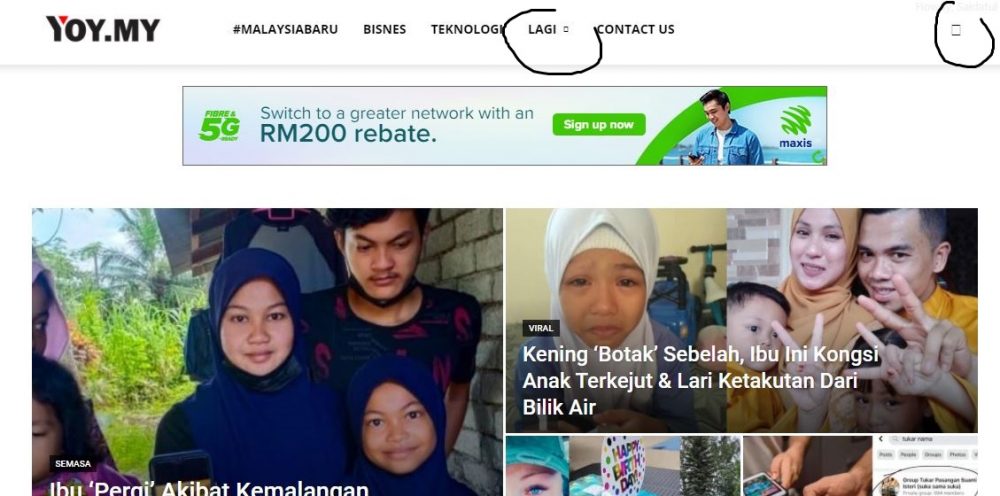
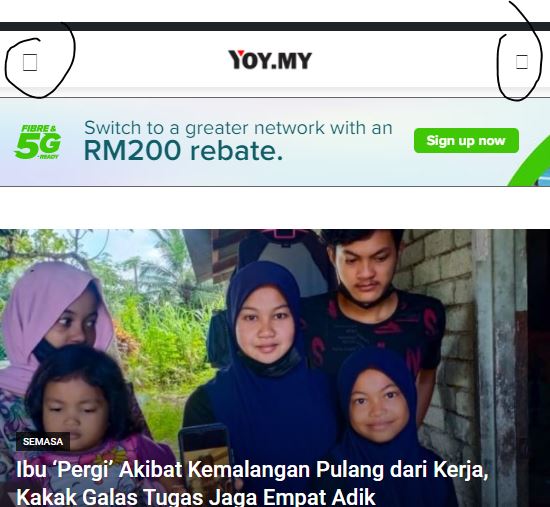
Please help.
 priyank
I have purcahse your Newspaper 11 theme and inside that I am using Art Blog Pro theme..
one issue there.. In your demo grouping category working but
In My website grouping category not working
For ex:
In Home page several categories slider with blog content like ARt, interview,
So In Home page In Art showing all categories with Art which actaually wrong – shows must only shows Art Category..
Screenshot 1:
https://worldvblog.com/NewsPaperThemeIssue/Craft%20Category%20Shows%20different%20Category.png
You can see in screenshot 1 home page has craft category But It shows also different category
Which I have also attached screenshot 2
screenshot 2:
https://worldvblog.com/NewsPaperThemeIssue/You%20can%20see%20this%20is%20different%20category.png
Can you please quick help into this.. Because I need quickly setup my website..
Thank you



