
 didtav
hello,
I installed the template gourmet pro using prebuilt website.
my problem is on the single post, the next post | previous post on the template is written as Artikulli tjetër and Artikulli paraprak.
how can I change Artikulli paraprak and Artikulli tjetër to next post and previous post?
because I can’t seems to change it from tagdiv composer
thanks for your answer
 Calin
Calin Hi,
If you need to manually update the plugins, then please go in your themeforest account and download the full package from there -> https://i.imgur.com/bHaSCDh.png and after that manually install the plugins.
Thank you!
Calin Hi,
The WP Super Cache need to be set like in our guide -> https://forum.tagdiv.com/cache-plugin-install-and-configure/
Also this option “Mobile + AMP” means that the mobile theme layout will be used for mobile and amp version.
Also, for sucuri.com please check this guide -> https://docs.sucuri.net/website-firewall/troubleshooting/troubleshoot-cache-issues/ -> https://i.imgur.com/U1ZigLD.png
I hope this will help you!
Thank you!
 anthonyblfc
 Hello, don’t think I’ve ever been so worried to edit something so much in my life ha. I have no idea how all this coding stuff works. All the articles just make no sense to me really. I have installed the Htaccess plugin on WordPress as it looks like the safer option so I can test it first when I’ve tried the code.
I have no idea what I should be putting in the htaccess do you know please exactly what I have to type in I hope you can provide the code and I can just copy and paste it in and the problem is solved thank you very much for all your help. I would be completely lost without you thanks
 jaykey21
 Hi,
I actually need the file to manually upload it. That is the only way to verify the integrity. Installing via the theme doesn’t work for integrity. They want to make sure the files match. Can you send me the files so I can upload the 4 plugins? Or the link to download them.
Thanks,
James
 Jose
JoseHello team,
I have installed Newspaper on my test site, before using it on my real site.
I have disabled Lazy Load in the theme (Newspaper options). Lazy Load is also disabled in the cache plugin (LiteSpeed). But the first image (featured image in articles) and the logo do not load automatically. They only load when I scroll on the mobile. This problem happens on mobile.
Example of the error (see in mobile): https://cutt.ly/IZhom04
I have tried disabling Wp’s native LazyLoad, but the problem persists.
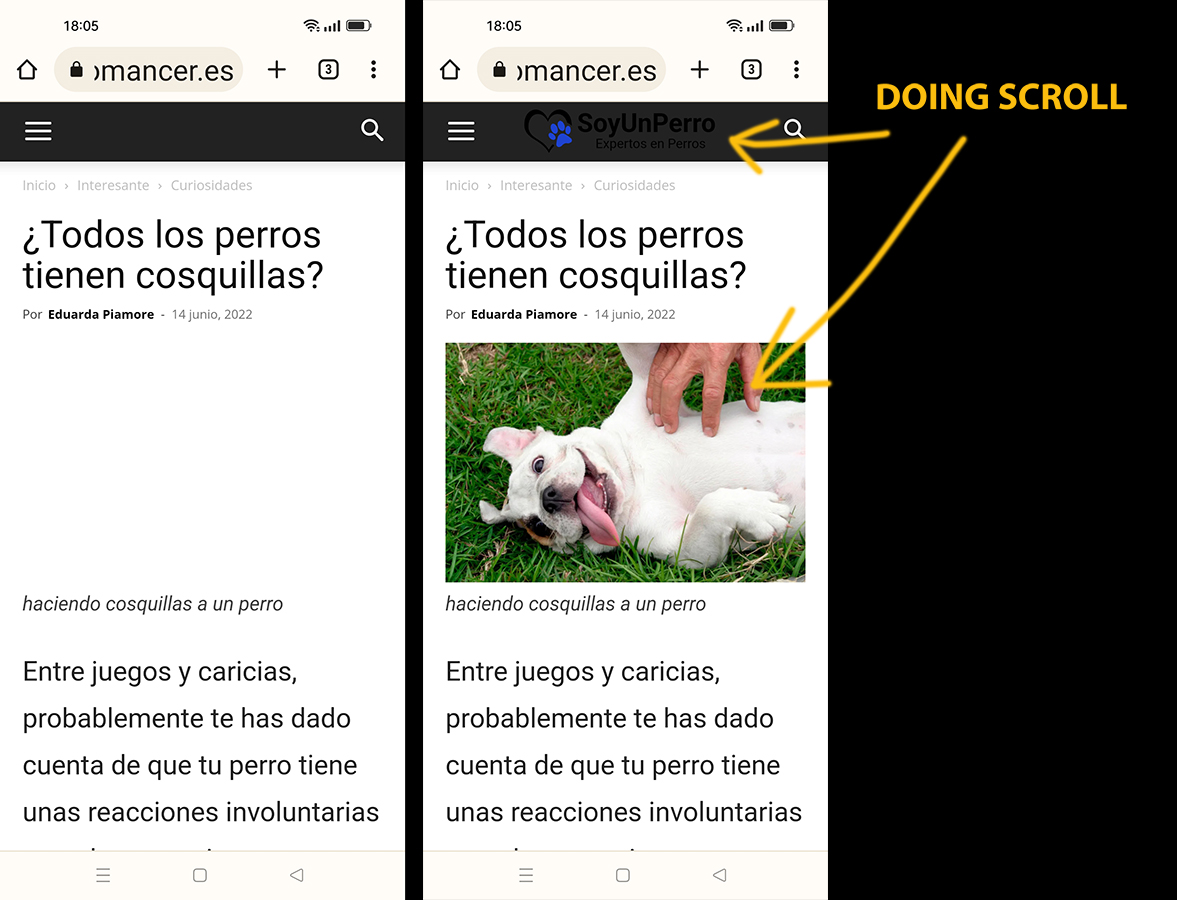
 Anamaria
 Hi,
This plugin is not required from version 10.4, because the new demos are using cloud templates, also, maybe some plugins blocked the process to install and activate the plugin.
Thank you!
 iptwins
 Hello,
thank you for your answer.
I did the installation and activation, and indeed it solved the problem.
Is it during the upgrade that TagDiv standard was uninstalled ? or it’s something that had to be added ? (for my good understanding)
Thank you very much.
 PCZoners
 Thanks that is a great help!
The one last issue I have is that no matter how many cloud templates I import/install, tagdiv only lists a single cloud template.
The site wide theme I’m using is called Metropolitan, however, I decided to use a different cloud template for a single post instead (Newspaper Pro) so tagdiv should show two different cloud templates in its list to choose from, but it doesn’t. It JUST says Metropolitan even though i’m not actually using Metropolitan.
Could this be a config error or install corruption of the newspaper theme?
Many thanks.
Calin Hi,
Those 3 plugins are theme plugins and you can install them in 4 ways.
1. Install them from Newspaper > welcome section (only required plugins)
2. Install them from Newspaper > plugins
3. Install them from Plugins by selecting the plugin from the downloaded package
4. Setting the plugin manually using cPanel/FTP/File manager
Unfortunately, I do not know how WP Ceber is working, so I do not know exactly what is this plugin searching to check in other plugins.
Thank you!
Anamaria Hello,
Please let me know if you use the Gutenberg plugin, not the default editor -> https://wordpress.org/support/topic/editor-has-encountered-an-error-typeerror-this-activatemode-is-not-a-function/ -> https://support.rankmath.com/ticket/latest-1-0-63-version-breaks-divi-when-event-tickets-plugin-installed/
If yes, please disable it.
Thank you!
 canopi_life
 Hi Anamaria,
Thank you for the reply!
I’ve followed your guide and fixed some mistakes. Really big help!
Post
1. Error: I’ve asked for help by email, and received support from your college Bettina. So far the post template is still not editable.
2. (solved) I’ve followed your guide, but somehow the code doesn’t work. However, it’s logical that the line icon doesn’t have to be shown on desktop. So I withdraw this question.
3. (solved) I found a plugin that can add users without email.
4. I would like to show other creators on post template, same as what “author box” does. Is it possible?
Search
1. I’d like to change the text as well as the design.
2. The first solution you’ve provided only exclude pages from live search box: https://imgur.com/x25K8WH. Pages are still shown on search page: https://imgur.com/yvaDiLc
I‘d like to exclude pages from search page. Is it possible?
Mobile
1. (solved) The problem was fixed after I uninstalled AMP plugin
Best,
Yen
-
This reply was modified 4 years by
canopi_life.
jaykey21Hi,
I need 4 of the tag plugins to upload to my site. I am using WP Ceber and it is requesting that I upload the plugins for integrity. The 3 plugins are tagDiv Composer, tagDiv Cloud Library, tagDiv Social Counter, and tagDiv Mobile Theme. How do I get these files to upload to check the integrity. I already uninstalled and reinstalled but it is still asking me to upload the files.
Thanks,
James
 hisureshkumar
 This is generic advice. If the theme is creating cumulative layout shift with some unknown element within newspaper theme, the support to be provided. I am giving up now and I would uninstall this theme. I took the paid theme 2 weeks back. Any way I can get refund of my money ?
PCZonersHi there,
I’m having issues with my website: http://www.pczone.co.uk
I recently installed a new cloud theme (Metropolitan) and customised it to my linking. No issues there.
However, I have noticed that certain post features such as smart lists and review summaries no longer work with the new cloud post template. If I try to use one of the default templates instead they work, but I cannot edit them with tagdiv to fit my new theme – the green ‘edit with tagdiv Composer’ box does not appear anywhere, unless I switch back to the cloud template, then it comes back.
And when it comes to cloud templates, the theme is supposed to give me a list of different templates I’ve installed and therefore can quickly switch between, but it does not – it only lists one cloud template no matter what I do.
I have tried disabling all other non-newspaper plugins but this made no difference. Please advise!
Thanks,
Jim D.
didtavwebsite: https://home.navia.id
hello,
I tried to install the prebuilt website on a fresh wordpress instalation but the homepage is not loading, other page, post, category is fine. only the homepage. I also tried to import the homepage template from cloud template, but that also doesn’t work
please help, thanks
 choiwj1012
Hello!
I am advertising Google Adsense in Newspaper Theme.
I recently got my account suspended for invalid clicks.
So, I installed the AICP (Adsense Invalid Clicked Protector) plug-in in the ad box as shown in Figure 1 (https://ibb.co/qMTjb9L)
However, the code is displayed as shown in Figure 2(https://ibb.co/4S7D50J)
How can I fix it?
 joesmuid
 Hey,
Thanks for getting back to me, I had worked out how to do it and installed the London pro one, but didn’t like it, so I went to work making pulses pro perfect for my needs.
I have a problem though, I have installed the big grid flex 10 at the top of my page, it does not fill the page, i have tried adding an inner column to it to get it full page, but I cannot.
Have a look at my homepage at https://thehighlandtimes.com/
Ideally I would like the top section of the page to be filled as it looks wrong with the smaller box at the head of the page, my question is: how do I get the box to fill the full page?
Or can I add another item to fill the space so it takes up the full page?
Thanks,
Joe
 bstaff
 Hi Bettina, that seemed to do the trick. I followed a larger troubleshoot not I found on the forum. I deactivated all my plugins, I activated a non-newspaper theme, them i reactivated the Newspaper theme and reactivated all the plugins. Which re-installed the Opt-in builder.
ONE PROBLEM: everything is working fine now, but the URL that my website logo points to has changed to my staging server. I went into Cloud Templates and found the active header and checked and it is pointing to my proper URL, however the logo in the main theme is still pointing to a subfolder with my staging site.
Should be https://regulatorwatch.com
Currently is https://regulatorwatch.com/June24-BK
How do I change this back to it’s original?
Let me know thanks!
b…
 jjschneider
 Hello, after modify FS_METHOD in wp-config.php file and change plugin folder permission installation still fail.
No problem with FTP configuration, I can install other themes or plugins.
Thanks !
 Bettina
 Hello!
A code in your frontend is appearing only when you have a plugin uninstalled and it should be installed, so instead of the code, it will display the element from that plugin. In your case, you use an element from the Opt-in Builder plugin and if the plugin is uninstalled, then the code it will appear.
Thank you!
canopi_lifeHello tagDiv team,
There are several problems I’ve encounter with the theme that require your help.
website: https://staging3.canopi.tw
Post
1. Error: I cannot edit the post template due to the error “Errors at columns elements: 2(models) : 1(dom). The model does not match the content Current state has involved an issue. You could try an UNDO operation (CTRL+Z / CTRL+SHIFT+Z)”.
2. Social share “line” icon doesn’t show
3. Can I add authors who are not WordPress users?
4. Is it possible to add different types of creators, such as photographer, designer etc.?
Search
1. How can I customize “no posts to display” page?
2. How can I hide pages from search result page?
Mobile
1. The tagDiv mobile plugin has been uninstalled. I only set RWD to fit mobile screen. But when I check on mobile device, sometimes it appear with weird layout, with the button ‘exit mobile version’ on the bottom. When I click it, it led me to the RWD version. Is it possible to not show the mobile version option at all?
Thank you in advance!
Yen
 be2name
Hello,
I have a custom post type “podcast”. On the AMP version of the startpage those CPT is not displayed in the latest post list. I have AMP plugin installed and use the mobile theme for AMP pages. How can I enable CPT in that list?
https://www.literaturcafe.de/?amp=1
Anamaria Hi,
Please don’t share your credentials on the forum. Send them via email contact@tagdiv.com Also, I checked and seems when I tried to install the plugin required FTP access, please try to remove this request and try after installing the plugins.
https://wordpress.org/support/topic/wp-requiring-ftp-access-to-install-theme-plugin/
http://kb.rolet.com/install-wordpress-plugins-without-ftp-access/
Thank you!
 unividea
 Hi Anamaria;
Currently, the only domain name where my license is installed is “www.cryptohbr.com”. I reset it in other domains and completely deleted the 2nd active subdomain “nft.cryptohbr.com”. However, the system says I have to wait and I can’t make changes right now.
[url=https://www.hizliresim.com/h8ttbvz][img]https://i.hizliresim.com/h8ttbvz.png[/img][/url]
“To use a license key on a different domain, you can unassign it from the list anytime after 2022-08-25 08:11:57 UTC + 02:00. ”
I have to work in order to work time and not be a victim in my life financially, and for this I have to start my work as soon as possible. I would be grateful if you could eliminate this waiting problem. Thank you.


