
No search results were found in Documentation!
 thedowntowndweller
I’m using header style 11. The logo is showing up WAY too big. http://www.thedowntowndweller.com is this the size it’s supposed to be? How could I make it less tall? It is taking up way too much space. I used exactly the dimensions specified in the documentation.
 Bogdan B.
 Hello,
1. If you want to add a custom ad at the top of the site, you can use a do_shortcode function and use it in the top menu file: http://screencast.com/t/szEdT7nC
<?php echo do_shortcode('[td_block_ad_box spot_id="custom_ad_1"]'); ?>
This code will render the custom ad 1 spot in the theme panel
2. For a full logo you will have to use a header style that uses the full logo. These are styles 9, 10 and 11
3. For a language switcher you will need to use plugins as the theme has no such option.
Thank you!
 khabor
good morning, i just need help for 3 item.
1. how can i place a custom ad top of the site like (http://bdnews24.com/or http://banglanews24.com/)
2. how can i make my logo full page in width. like http://banglanews24.com/ this site
3. i want to place a button i the top ( language switcher ) which have to shows in every page … pls help me for that
 Catalin
 Hello laurena86,
You can try the code below and place it in Theme panel->Custom CSS area.
@media (max-width: 767px){

.td-header-main-menu {

height: 120px;

}

}

@media (max-width: 767px){

.td-main-menu-logo img {

max-height: 100px !important;

width: 200px;

top: 60px;

}

}

@media (max-width: 767px){

.header-search-wrap .td-icon-search {

padding-top: 35px;

}

}

@media (max-width: 767px){

#td-top-mobile-toggle{

top:35px;

}

}
The result -> http://screencast.com/t/BqesKyKxQI
Thanks.
Catalin Hello Sharozdawa,
Please notice that our Recipes Demo uses the Header Style 11 which display the logo in full-width. As you can see, this photo is just a logo with high dimensions which can be changed from Theme panel, like this -> http://screencast.com/t/02vUFQskTm In your case, please notice that the “Quotes” logo image is too short and it does not cover the entire container which is destined for full-logo width. You should change your logo and replace it with another bigger one.
Thanks for your understanding!
 laurena86
 Hi Catalin
I’ve currently got this code in my custom CSS as per the above but nothing has changed at all on my site?
Also there is a red error message next to the first line saying expected RBRACE at line 162 column 1, any idea what that means?
Cheers!
Lauren
@media (max-width: 767px){
.td-header-main-menu {
height: 120px;
}
}
@media (max-width: 767px){
.td-main-menu-logo img {
max-height: 100px !important;
width: 200px;
}
}
Catalin Hello tagdivchick,
There is an option for it in Theme panel if you will use some header styles such as -> http://screencast.com/t/8sVtIjXB For more information about logo section, please consult here -> https://forum.tagdiv.com/logo-favicon/
Thanks for the message!
 tagdivchick
Hi, I have Newspaper theme, I want to use just a standard text based logo, instead of having to upload an image. How can I do this?
laurena86 Hi Catalin
Thank you – I see that it increases the width but it squashes the logo and remains the same height. I would like that whole black bar plus the logo to be double the height at least?
Many thanks
Lauren
 LTH
LTH Bingo, it was a conflicting plugins prolem ! Thanks.
One more question, very simple… How to remove the blank space between the logos in my sidebar ?
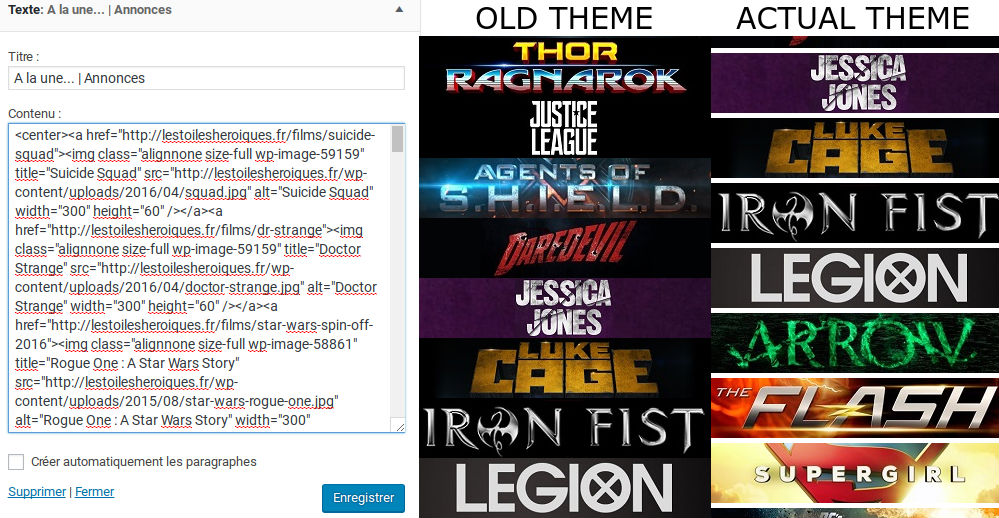
In my actual theme, there is no blank space. It’s strange.

 Gadgetsay
Hi there,
I wanted to add my youtube videos on footer of every post just like when you open my homepage as http://www.gadgetsay.com you will see bottom youtube widget but in posts I want them to be added just before the logo, about and social wodgets in footer,
You can see in the footer there is a line one is blank and another footer having logo, about and social buttons, can you please tell me how can I add YouTube widget just above those there widget in black footer!
Regards
Gadgetsay
 Dan18392
Hello,
On the mobile version of my site, my logo displays twice: once at the top, and once in the middle of the page. It’s only supposed to display in the middle.
Also, there are big “About Us” and “Follow Us” buttons below the logo in the center of the page. Don’t know why these are here. The mobile editor doesn’t seem to have an option to change them.
Any help greatly appreciated.
Bests,
Dan
 yater
yaterDear TagDiv community,
Curious how I would add custom text or html to the header area of my wordpress website using newspaper. Currently I have a logo I put in on the theme editor but it is limited to the predefined specs also I wanted to add text below my logo and above my main menu for my website. I am using style number 10.
Any help would be greatly appreciated.
Thanks
Catalin Hello Johan,
Sorry for the delay because yesterday we have had a problem with our forum and that’s why you did not get any response, sorry!
If you want to change the logo for mobile section you should check the Theme panel, like this -> http://screencast.com/t/XaJK6GMSgilQ For more information about Logo on mobile, please consult here -> https://forum.tagdiv.com/logo-favicon/
If is not what you mean, please provide more details so I will be able to provide a more accurate response.
Thanks for the message!
Catalin Hello LaurennePierrick,
Unfortunately, the theme does not have any such an option for this, sorry! As an alternative for you would be to use the Header Style 9 and you should use a big logo, like this -> http://screencast.com/t/zbOql6bhoP and the result should see here -> http://screencast.com/t/zbOql6bhoP
If you want to display more levels in our theme and if you are not aware of the steps which are needed to take in this regard, please consider hiring a freelancer/developer to help you because we cannot provide custom work at the moment, sorry!
Thanks for your understanding!
 Alin [tagDiv]
 Hi,
The font used on Say What logo image is Gotham Narrow Ultra.
Thanks!
Bogdan B. Well your footer provides a 404 not found message. Please remove your footer logo and upload it again in the media library. You can use the footer section of the theme panel: http://screencast.com/t/p1YreTiVFyrV
Thank you!
 nextpulse
What is the font type used in the logo image ‘Say What?’ demo template?
(NOTE: The logo font not the theme font)
thanks
Catalin Hello logosi,
Please refer to the following topic here -> https://forum.tagdiv.com/topic/different-background-for-different-pages/
Thanks for the message!
 amizzer
 Yes, Facebook luckily works again, thank you.
But please, I still need help with footer logo, which heavily affetcs my loading time (waterfall screen above).
Any advice?
Thank you,
Andrej Kováč
 Johan
JohanHello can you help me?How to move logo mobile version from menu? But I need change logo mobile version to header. Not together with menu. How to for change this logo?
 Nano
NanoHi, I noticed some weird changes under this forum? Is it hacked?
The primary logo or the home page is now: WPIon, there is no way to seach under Newspaper and Newsmag theme.

Now it search under two categories- All theme and IonMag… What is this? Do you merge with some other company?
Should I worry about anything?
Thank you
Bogdan B. Hello,
Please make sure you change your logo in the header section of the theme panel and clear cache afterwards.
Thank you!
Bogdan B. Well I no longer see any logo on your site: http://www.irreverentgent.com/
You can simply remove any logo from the theme panel header section or footer if you want to remove the footer logo.
Thank you!
 GARBAR
 Hi,
I have a similar issue. I am using Header Style #5: Full dark menu with logo
The top bar, main menu and footer are normally full width (unboxed).
The theme normally has no background image.
When I upload a background image, the top bar, main menu and footer all become boxed, and loose their full-width sizing.
I want to have a background image and keep all those full width. How can we do this?
Thanks,
G.
