
No search results were found in Documentation!
 simchris
 Per the theme install how-to (see link right side of page); you need to install from the theme zip file and not the “all files” zip, as that includes all sorts of support stuff. You can find the theme zip INSIDE of the big zip 🙂
Usually a good idea to download any zip file from the web and open it on your local PC/Mac to “see” what is inside it before uploading to your website — this also helps ensure there is no malware or other things you might not want to install — in some cases — irrevocably — on your website.
 Cubewebsolution
Hi, i have been facing an issue that the online tools that scans H tags are unable to scan the H1, H2, H5 and H6 tags. i have used these tags at the time of publishing the articles but i couldnt find any at the time of scanning. i have used http://www.seoreviewtools.com/html-headings-checker/ and many others as well. i have used H1, H2, H5 and H6 in many posts, i even checked the source code, style.css file as well and everything seems fine there. pls have a look at the report given below
H1: 0
H2: 0
H3: 5 Best Upcoming Smartphones in 2016 for You
H3: 5 Most Amazing Wallpaper for iPhone App Here
H3: Best Free Music Downloads Websites you can Enjoy With
H3: Watch TV Online – List of Apps you can Use to…
H3: Buying Assassins Creed Unity Online Can be a Loss
H3: 5 Best Upcoming Smartphones in 2016 for You
H3: Buy iPad Pro Only after Reading this Post Properly
H3: NVidia Shield Tablet is Available at $199
H3: Sony Xperia Z5 Best Accessories that will Improve its Productivity
H3: Galaxy S7 May have Xperia Z5s Features
H3: OnePlus X have 5-Inch display and Much More only at $249
H3: Best Smartphone 2015 which you can Buy Right Now
H3: Droid Turbo 2 with 48 hrs of Battery Back up
H3: Xiaomi New Mini-Segway only at $300
H3: iPhone 7 May have Intel’s Processor
H3: Ultimate Hacking Keyboard that Splits into two and is Programmable
H3: Common iPhone 6s problems and Steps to Fix them
H3: iPhone Cases that Heal itself in 20 seconds
H3: Microsoft Lumia 950 and 950XL is Launched with Awesome Unique Feature
H3: Tiny Robot which is also a Phone
H3: 5 Most Amazing Wallpaper for iPhone App Here
H3: Best Free Music Downloads Websites you can Enjoy With
H3: Watch TV Online – List of Apps you can Use to Watch Online TV
H3: Google Maps Android – Now for Android Product
H3: Tumblr Apps iPhone – List of App Development Tools
H3: A Quick Look at Android App Development
H3: Make Mobile Malware Proof with This Easy Guide
H3: Steps to Download Facebook Videos without any Softwares
H3: Buying Assassins Creed Unity Online Can be a Loss
H3: Walking Dead game- A Sensational Experience
H3: World of Warcraft Free game Guide and Story
H3: Play Minecraft Games Online and Improve Your Skills
H3: Rise of the Tomb Raider is the Top Offering Console.
H3: Download free GTA San Andreas – Techniques for Defeating Your Xbox Game
H3: Hidden Windows 10 Features
H3: Build a PC with this Easy Guide
H3: Meet the New Pocket PC Kangaroo
H3: Acer Launched New Portable Laptop
H3: First Ever Microsoft Laptop is launched
H3: MS Office 2016 Launched Finally
H3: 5 Best Upcoming Smartphones in 2016 for You
H3: 5 Most Amazing Wallpaper for iPhone App Here
H3: Best Free Music Downloads Websites you can Enjoy With
H4: NEWS UPDATES
H4: GADGET GALLERY
H4: APPS AND SOFTWARES
H4: GUIDE BOOK
H4: A WORD FROM BULLETINTECH TEAM
H4: GAMING
H4: Computers
H4: POPULAR POSTS
H5: 0
H6: 0
simchris False positives. Not actually malware.
All content on ThemeForest is very rigorously inspected before you can download it.
 Patrick
 Hi,
The malware is in the header tab field.
I’ve my banner, and I had blank lines then the script of the malware, I removed it but it seems that everytime I did an update(6.6.2 yesterday) with the envato toolkit, it came back. Could you check ?
Thanks
 Speedster
Hi!
I have updated theme, wp and plug ins, but WP Antivirus Site Protection still send warning for this files:
“””””””””””””””””””
WP Antivirus Scan Results
Latest Scan Result
No files for review.
Review is required
/wp-content/plugins/js_composer/config/templates.php
/wp-content/plugins/maintenance/js/select2/select2.min.js
/wp-content/plugins/w3-total-cache/lib/CSSTidy/data.inc.php
/wp-content/plugins/google-pagespeed-insights/google-api/src/contrib/Google_AnalyticsService.php
/wp-content/plugins/js_composer/include/classes/editors/class-vc-frontend-editor.php
/wp-content/themes/Newspaper/includes/wp_booster/wp-admin/panel/td_view_import.php
/wp-content/themes/Newspaper/includes/wp_booster/wp-admin/panel/td_view_import_export_settings.php
* Please note: Hackers can inject malware codes inside of the normal files. If you delete these files, website can stop to work or will be not stable. We advice to send request to SiteGuarding.com for file review and analyze.
“””””””””””””””””””
Notice, I have update all this files and plug ins and theme tonight, and still this morning the WP Antivirus Site Protection marked this as potential malware.
Please help.
 Bogdan B.
 Hello,
I have checked your website and saw the click ads being called on every link. Unfortunately we have no advice to give you except try to do a virus or malware scan.
Maybe these topics will help:
https://wordpress.org/support/topic/malware-removal
http://securepress.org/tutorial-how-to-remove-malware.php
https://www.elegantthemes.com/blog/tips-tricks/how-to-scan-your-wordpress-website-for-hidden-malware
You can contact your hosting provider and report the problem.
Thank you!
PatrickHi,
We have a malware on our website, which opens clicks window when one clicks to view an article.
I found this line var host = ‘//go.oclasrv.com’;
If you check in our website http://www.mondafrique.com, you can see it at line 633
But I can’t find it in any of the scripts I have in newspaper folder or in the plugin folder.
Sometimes it is not active sometimes it is I’m mad with that thing, have you heard of any similar case ?
Do you know where it came from and how to remove it for good ?
I installed word fence and sucuri security but their scan say the site is clean
Thanks
Patrick
simchris Theme has no infections. We’ve been using it for 2 years on multiple sites and we check system consistently for any issues including Google search console, dedicated server scanning, Securi, PCI-DSS etc.
You need to have your site checked carefully for malware, change passwords, reinstall all plugins from clean copies; remove any old themes and plugins not in use; scan your site with SECURI (free), and if your host has a security scanning service have them also check for rootkits and other nonsense.
Only YOU can fix your site if its been compromised. Note that some older versions of plugins, WordPress itself, are hackable, so these need to be up to date. Many older plugins prior to 2015 and not updated may have the cross-site vulnerability, comment injection vulnerabilities, etc.
 Andrei L.
 Hi
We have tested the theme security rigorously before releasing and also it was tested and analyzed by Envato reviewers and if would have any security issues would not pass their reviews.
Also I’ve test your site with a malware security scanner and fond some malicious activities: https://sitecheck.sucuri.net/results/pavlikeni.com/ – http://screencast.com/t/ktyzW0bxVB Checking our demo too can be seen that is no thread there so can’t be a theme’s issue: http://screencast.com/t/hfBXLFGJSqzD
Try to deactivate all plugins except Visual Composer, clear all caches and test again. Also I found here some resources that may help you fixing this iisues: http://smackdown.blogsblogsblogs.com/2008/06/24/how-to-completely-clean-your-hacked-wordpress-installation/ – http://vivavivugeek.blogspot.ro/2014/03/detect-and-remove-spam-seo-blackhat-seo.html
Hope this help.
Thanks!
 komnoutog
Is it normal that the theme multiplies images itself? In ftp I see in uploads folder (2015/11) of every image multiple versions in different sizes, well according to filename. Maybe because of responsiveness? Let me know because i had an malware attack and i have to monitor everything close now..
 Emil G
Hi,
We receive several messages stating that some antivirus/malicious code scanners are detecting a TDS Malware in the theme. This is a false positive, we carefully check each release before we upload it and Envato officials are also checking the files before they go public.
The theme includes many classes which start with tds_… , this may trigger the false positive report some of you received.
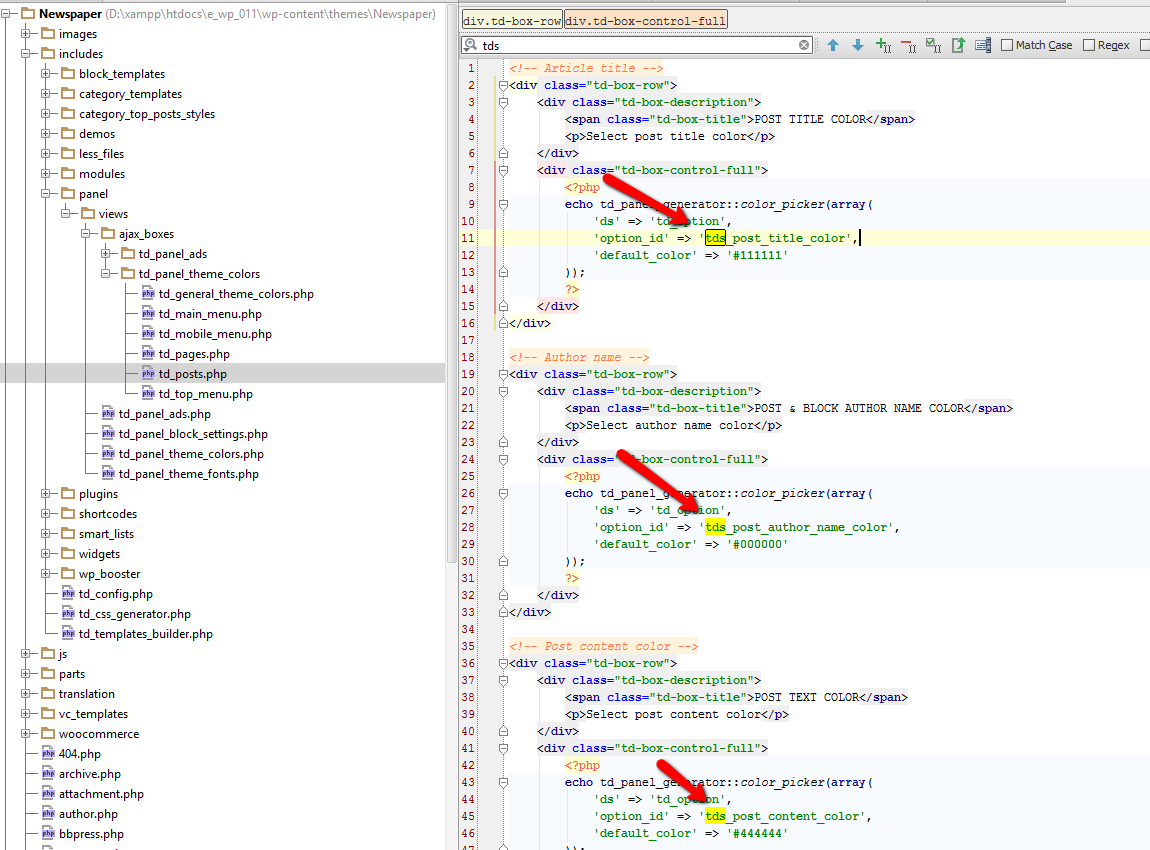
To check if the warning is real or not try to scan it with multiple scanners and see if the results are the same, also check the code on the file which is reported to be infected:
– download the theme again on your personal computer
– log in via ftp and open the reported file
– compare the file with the one from your personal computer and see if the code is identical or it was changed
Thank you!
Emil GHi,
We receive several messages stating that some antivirus/malicious code scanners are detecting a TDS Malware in the theme. This is a false positive, we carefully check each release before we upload it and Envato officials are also checking the files before they go public.
The theme includes many classes which start with tds_… , this may trigger the false positive report some of you received.
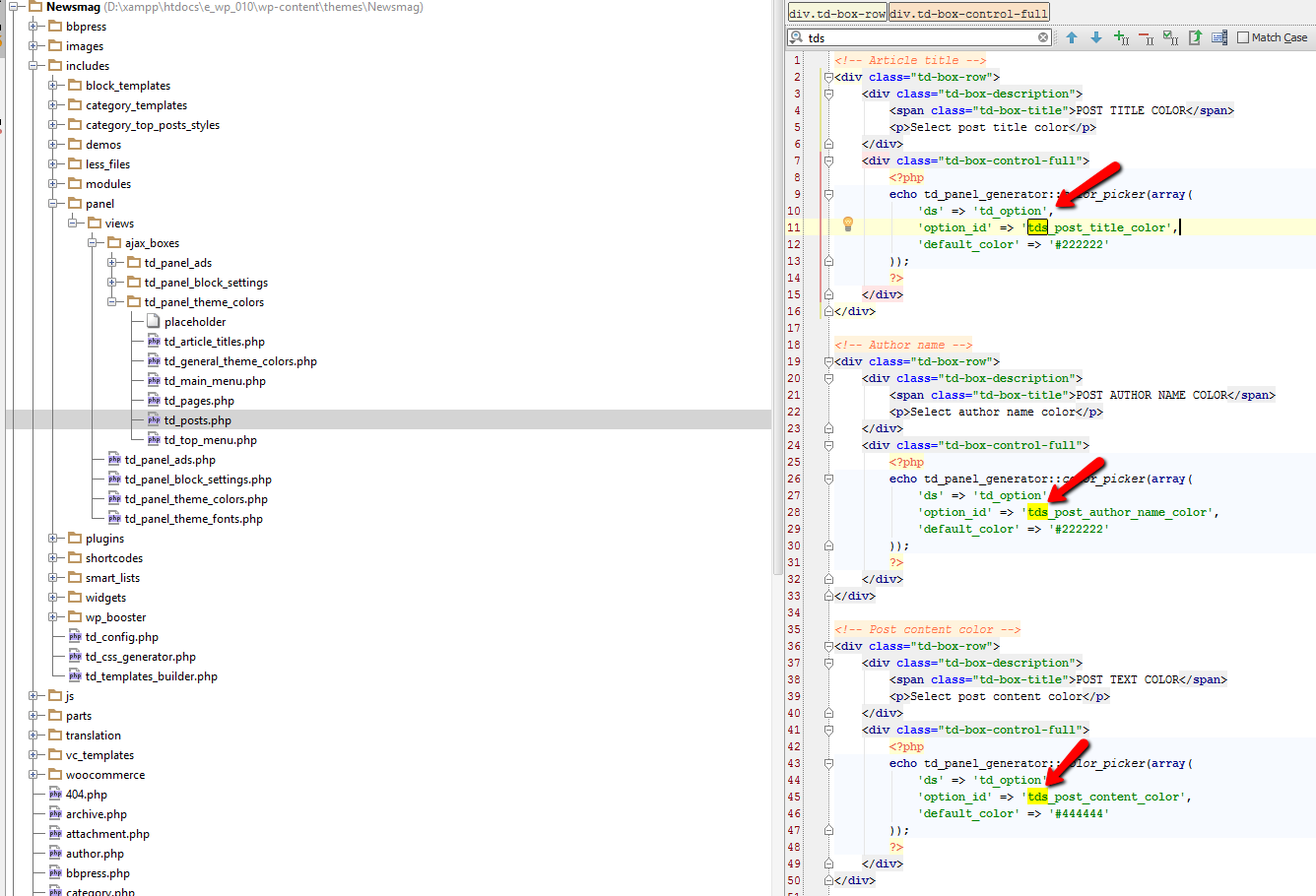
To check if the warning is real or not try to scan it with multiple scanners and see if the results are the same, also check the code on the file which is reported to be infected:
– download the theme again on your personal computer
– log in via ftp and open the reported file
– compare the file with the one from your personal computer and see if the code is identical or it was changed
Thank you!
simchris Since this keeps coming up, you will likely need to make a note of this on the FAQs page, as some hosting scanners seem to think the class or hook using the phrase tds, is related to “TDS” malware.
simchris It doesn’t say it’s malware, it says “this file is not commonly downloaded” … which merely means Google’s caching system for Chrome hasn’t had a lot of hits to that specific file. You can simply click the arrow and select “keep” … or more info.
The language used here DOES imply “oh no, danger Will Robinson …!”
https://support.google.com/chrome/answer/6261569?p=ib_download_blocked&hl=en&rd=1
Apparently ThemeForest has had their share of bad eggs:
More info for software developers and website owners
To help protect users, Google maintains a list of websites that are known to host malicious downloads and a list of trusted software publishers. If you're a software publisher and your binaries are flagged by Chrome, learn how to resolve malware or unwanted software issues related to your downloads.
This is part of Chrome’s updated security which has a “threshold” for files loaded off the web and downloaded to hard drive, to stop malicious files being written to your HD when they are zero day files.
Several other files do same thing, like a u-design theme update, and woocommerce tabs plugin. Newspaper 6.5 does not 🙂
In case anybody was curious about that 🙂
 shae101s
 I definitely DO NOT have malware on my comp. I follow through all other links here with no issue, it only comes up for your site. So I’m not sure @gfran5
 gfran5 Andrei L.
 Hi
I am not sure why Google Chrome warns you regarding the theme’s folder. We checked the theme’s folder, also envato check it before being approved for sale and there is no virus or malware so you can ignore the warning and download the folder.
Thanks!
 Larane
Hi,
I just bought another newsmag license. While downloading directly from Envato Google Chrome stops the download and warns me that the file could be malware.
What does this mean? Just keep it?
Thanks,
Carolin
 Lucian
 Hi 3gca,
I have checked your site and found it working properly except of this wp booster error present on category pages: http://screencast.com/t/1UhaO8Abn – this happens because the setting you currently use has been changed in the latest update. It’s enough to go to theme panel > categories and set the category template: http://screencast.com/t/JmI2zZx8xoV make sure you clear the cache, purge cdn file if you’re using and test again.
Please provide more details about other issues you experience after latest theme update and also make sure you empty all chase, purge cdn files if your using any and make sure your also test this without plugins, just theme’s plugins.
Please also provide more details about the ‘Malware’ warning from your website after theme update so we can look into it.
Please let us know!
Thanks for the message!
 3gca
3gca And secondly Webmaster tools has escalated ‘Malware’ warning on our website after this upgrade.
simchris Then your site likely got hacked due to a zero day flaw where somebody hacked the site before you had applied the security patches of the past couple of months for WordPress and various plugins; and/or your host didn’t properly secure their server.
Best bet is to
disable all advertising systems entirely …
a) reinstall all plugins – check all plugins on WordPress.org FIRST to see if they are updated in 2015 for security; if not then don’t use them; don’t use any plugins from free websites, abandoned plugins from Envato, etc. — YOU need to audit all your plugins one by one; perhaps use Securi to scan your site first!
b) reinstall WordPress; delete all themes not being used; all third party themes; start with twenty-eleven
c) douhle check your htaccess and wp-config files to see that nothing odd was added
d) ask your hosting provider to do a security scan of your site for virus/malware
perhaps do these first:
e) double check your comments for spam you have not deleted; consider turning off all comments if you are not using security checks for comment spam
f) do a search on your site for the term “Viagra” to see if content injections are being done into your posts — this is sure sign you have been hacked and/or have malware plugin
 stevencage89
 Fixed it, apparently it was the dashbida malware that kept redirecting. Back to 1.7mb page size.
simchris Sorry if I sounded mean and rude. Was having bad day.
I don’t work here, so don’t take any response from me as anything from TagDiv, who have more patience than a dog waiting for his master to come home, with treats 🙂
There is “adware” in circulation which injects Prosperent links into text; but most of the sites claiming to remove it are, themselves, pushing malware.
FYI
http://www.google.com/safebrowsing/diagnostic?site=prosperent.com
-
This reply was modified 11 years by
simchris.
 youngren
 So, I am wrong to think it came from the update (delusional – ouch, pretty harsh response).
Thanks for the idea to check for malware.
simchris I think you are delusional,
First, how can you make money on links to social media,
Second, tagdiv has never inserted paid links in any theme.
Perhaps you can show example of this crazy concept…
You may have an infected computer injecting prospetent into your broswer via malware.
You should immediately download and run malwarebytes anti malware pro to disinfect your system, and perhaps setup a security strategy for your systems.
