
- TutorialsFrom WPBakery to tagDiv Composer
- TutorialsWhat is Ajax preloading?
 Bogdan B.
 I have also tested on mobile phones, not emulators as we know emulators are not trust-worthy…but I your featured images were present and I could not see any image issue. As for the bold tag, You must check the smartlist and see where it comes from. Access the backend and access text mode (html mode) and insect the tags and see if there is a bold or strong tag anywhere.
Thank you!
 schindyguy
Hi I have custom ad slot 4 and 5 set with 2 different ad codes:
http://screencast.com/t/1cf33ZlfxbT8
Custom ad slot 4 is disabled on phone
Custom ad slot 5 is disabled on desktop, tablet l, and tablet p
So if set correctly that means custom ad slot 4 code should be displayed in source code for desktop and tablets. Custom ad slot 5 code should only be displayed on mobile
I am injecting the ads in loop-single using short codes: http://screencast.com/t/kZhSaXMVFB
However when I view source of the page, the css styles are being applied but both scripts are appearing in viewsource on the page: http://screencast.com/t/LOch5Chrs
Is there a way to only show the custom ad slot 4 code for desktop and tablets and only show ad slot 5 for mobile?
Thanks
 BeautyGeek
 Hi,
So i have done what you told me to do but the result is still the same. The logo shows perfectly on desktop view.
But it won’t show on mobile view
 sgt_carbonero
when i go to the dropdown menu on mobile (Iphone) this shows:
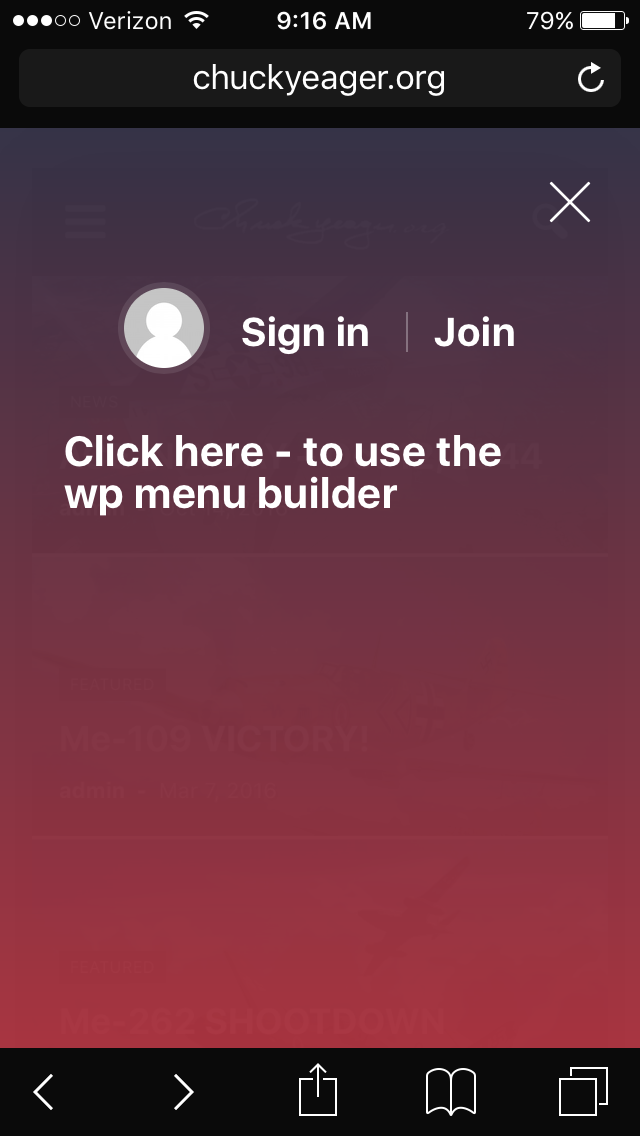
–it wants me to sign in?
Help!
Thanks
 Nano
Nano Hey Chris.
Hope you are doing great 🙂
Today, I thought to look for any previous thread on keyword “plugin organiser” and then I was sent here 🙂
Actually, I am looking for a way to keep using “mobile theme plugin” while still being able to use Visual composer based page on some pages. I asked the same question here: https://forum.tagdiv.com/topic/how-can-i-use-visual-composer-on-specific-page-on-mobile-theme/ . I think that “Plugin organiser” can help me to achieve this result.
But here when I read this, I agree that we must try to avoid using any new plugins. So, is there any way to achieve this ( enabling visual composer on the certain page even when I am using TagDiv mobile theme plugin or disabling mobile theme plugin on certain page/post ) using few codes under functions.php ?
-
PS: I know everything is possible when a developer puts his mind into it, but I just want to know if it’s possible to do with few codes so that I can do it by myself too.
Thank you
 MasonK
 You have to physically go onto a mobile device to see the issue present, also I didn’t add a bold tag.
Bogdan B. Hello,
I have checked your links on mobile and the images are present on your site. Please check with a different device as i cannot see the issue. As fort the bold text, simply remove the bold tag from your post in post edit. Our theme does not add random bold tags.
Thank you!
 eugenio811
Hi guys,
I have a problem.
When my site goes to mobile my sidebar goes way down.
This causing the image sliders i used to place more ads to be at the botom of my homepage.
My question:
Is there an option to make the sidebar come first on the homescreen on mobile and then the content.
Bogdan B. Hello,
The child theme is the source of all your problems. There is definitely such a thing as an outdated child theme.
please read this topic to understand how the child theme works: https://forum.tagdiv.com/topic/setting-up-child-theme/
In the latest version of the theme we removed the mobile theme install from the theme panel as lots of people activated it and did not know what the plugin does. We added installation instructions in the documentation here: https://forum.tagdiv.com/the-mobile-theme/
You can see if the plugin is active or not if you have the mobile theme settings in the theme panel: http://screencast.com/t/1osEtjytUn or from the plugins section of wordpress.
Thank you!
 Andrei L.
 Hi
I’ve checked your site and the LinkedIn button works fine no both mobile and desktop devices: http://screencast.com/t/ectJeqjjL – http://screencast.com/t/Ex7i3tXNf4Pg
Thanks!
Bogdan B. Hi,
Here is the official documentation for the mobile theme. You should read a bit to learn about the mobile theme functionality: https://forum.tagdiv.com/search/mobile/
Thank you!
Andrei L. Hi
Yes you can add a background image for mobile menu from theme panel > background: http://screencast.com/t/TIucsFQd4f
Thanks!
 Catalin
 Hello bustedflushltd,
Unfortunately, our theme does not have any tested plugins that allow you to create a table, sorry! We have no idea about the theme behavior with this type of plugin and we cannot say for sure if it will work or not as properly with the theme, sorry! Also, please notice that we cannot provide custom work and support for untested plugins, sorry! You should try to find another plugin which works with the theme, or also, please notice that if you want to add some tables in your theme, you can use the HTML to add them in your backend, using the HTML ROW. As more references in this regard, you can consult some tables generator like this -> http://www.tablesgenerator.com/html_tables for this implementation.
So, if you want to hide some elements in tablets and mobile mode, you can use the @media queries which allow you to target the width of these devices and with a bit of CSS you can hide it in this regard. For more references about this rule, please consult here -> http://www.w3schools.com/css/css_rwd_mediaqueries.asp
If you want to make some customizations in site and if you are not aware of the steps which are needed to take in this regard, please consider hiring a freelancer/developer to help you because we cannot provide custom work at the moment, sorry!
Thank you for your understanding!
MasonK Here are a few specific links:
You will have to look on a mobile device to notice no article image.
Also, I wasn’t able to get this posts smart list issue solved:
Halloween Special: 10 Best Pokémon Cosplay Outfits & Costumes
 tagdivchick
Hi, I’m trying to find the location for the above search box in mobile.
I’ve done excessive searching and its NOT
mobile/parts/search.php
mobile/parts/td_walker_mobile_menu.php
mobile/parts/menu-mobile.php
mobile/parts/header-menu.php
mobile/search.php
Help! I’ve looked everywhere!
 computerpalm
Please see this page: http://independent.ae/3500/educating-girls-south-sudan/
Article is using Post Template 8 and there is a strip of the mobile menu background appearing. I have tried disabling plugins but no luck. Any suggestions?
Browser: Chrome on Windows.
 mbhusal
Hi there!
I really love your designs and have been using them for a while and intend to do so for many more years. I have a couple of issues/questions now:
1. Internal search on my site is not working. I get the following message whenever I make a search entry: wp booster error:
td_api_base::mark_used_on_page : a component with the ID: search is not set.
………/wp-content/themes/Newspaper/includes/wp_booster/td_api.php
2. I use a pretty old child theme, is it also necessary to update the child theme if its too old? Or is there such a thing as outdated child theme?
3. Since I updated to 4.7, I can’t see mobile theme active on the theme panel. I updated the latest one through FTP since you announced an issue with Yoast Seo, but it is still not working.
Many thanks for your time!
 joventu
 Update… I’m still getting use to this Mobile Theme settings and just realized that it has its own Mobil Editor for pages/post. When I insert the shortcode there, it is now working as expected. so looks like its good now 🙂
Thank you!
-Franklin
Andrei L. Hi
The ads for mobile theme can be added in theme panel > mobile theme > mobile ads: http://screencast.com/t/jJ40skymRo The top menu was not intent to be displayed on mobile devices and you will need some customization in theme’s code to achieve a similar rezult.
Thanks!
 coup_de_theatre
 Hi Andrei,
yes the website homepage in mobile devices seems ok, but if you try to scrool on the screen to the right or left the site wobbled left and right and doesn’t remain fixed and central. Try it!
The same problem on every posts, try this for example: http://www.fermataspettacolo.it/teatro/mon-seul-desir-la-dama-desnuda-lunicorno
You can also see the images on the post, (not the first but the other images), that not are align on the center, but out of position on the right.
Let me know how I can tell the detail for to enter in my wp-admin or other things, oviously in private message.
Thanks for your help and comprehension.
Massimo
Andrei L. Hi
I’ve checked a few posts from your site an both mobile and desktop devices and the featured image is properly displayed: http://screencast.com/t/TVqrFaVP0vv – http://screencast.com/t/7CEwDwTTt4K If yous till have this issue try to clear all caches, purge the cdn files if you’re using then test the site again.
If the problem persist please provide a link where we can inspect it closer and we will get back to you as soon as possible.
Thanks!
Andrei L. Hi
I’ve checked your site and mobile menu works fine now: http://screencast.com/t/t4opXnZLHmQN If you still have this issue try to clear all caches, purge the cdn files if you’re using then test the site again.
Let us know ho it goes.
Thanks!
Andrei L. Hi
The opacity can be changed from theme panel > mobile theme > theme colors: http://screencast.com/t/xiPbIHqsGXAY – http://screencast.com/t/2UI65QJytm5
Hope this helps!
Thanks!
Andrei L. Hi
If you’re using mobile theme plugin you need to edit td_module_single_mob.php file and modify the code for sharing buttons: http://screencast.com/t/OQG7Y0Ilf
Thanks!
Andrei L. Hi
To achieve that you will need some customization in theme’s core files. If the plugin generate shortcodes then you can use do_shortcode() function to achieve that: http://screencast.com/t/lJ4w3ayLi and for mobile here: http://screencast.com/t/NiQwXWenYrO
' . do_shortcode('shortcode-goes-here') . '
Note that the plugin is not tested and we can’t guarantee that it will work fine with Newspaper theme.
Thanks!
