

Hello,
I’m contacting you because I’m having two major problems that are preventing me from taking full advantage of my newspaper theme.
The first is that I have a caching problem and I don’t know if it’s linked to the theme or not. I’m using LiteSpeedCache and every day I have to clear my cache, otherwise my site doesn’t display and the images no longer display.
Regarding the PageSpeed test, I can’t solve the following problem:
Avoid excessive DOM size / A large DOM uses more memory, leading to longer style calculations and costly layout adjustments. Find out how to avoid excessive DOM size. Here is the screenshot:
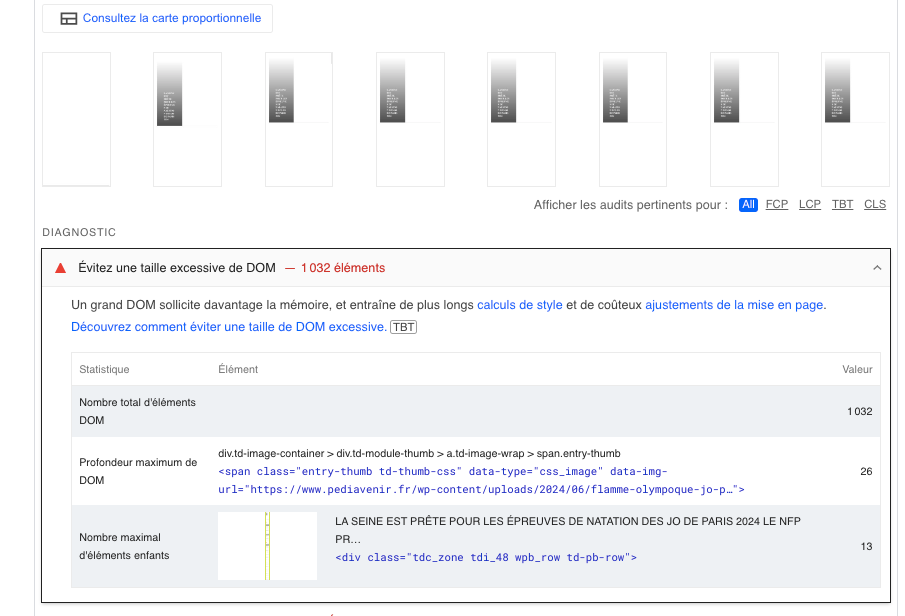
Thanks for your help!

Hello!
We recommend the Wp Super Cache plugin.
There is all about the DOM. Which means you need to have less elements into that container or row, as such on that page. I can suggest you only to take care of how many elements you use on that page. You can try to use a cache plugin or a plugin which can minify the page or combine some elements in order to reduce its size.
To increase the page speed you can check these similar topics for more solutions:
– https://www.infophilic.com/get-almost-100-pagespeed-newspaper-theme/
– https://forum.tagdiv.com/topic/score-100100-pagespeed-with-newspaper-wordpress-theme/
– https://developers.google.com/speed/docs/insights/v5/about
– https://www.youtube.com/watch?v=tnkVapqhIHc
– https://www.xtechkr.com/optimize-newspaper-theme/
– Check those guides : https://web.dev/lcp/ – > https://www.sqlpac.com/en/documents/google-pagespeeds-lighthouse-6-new-features-lcp-cls.html -> > https://wp-rocket.me/google-core-web-vitals-wordpress/improve-cumulative-layout-shift
– https://forum.tagdiv.com/topic/to-high-cumulative-layout-shift-in-mobile-theme/
Please check the tutorials from those platforms gt metrix and Google Pagespeed Insights and I’m sure you can increase the page speed.
Please note that page speed is not covered by the support team: https://forum.tagdiv.com/newspaper-theme-support/
Thank you!
Thank you for your help, I already use litespeedcache, is the plugin you recommend better?
Also, if you go to my site on the mobile version, you’ll see that there’s almost nothing on the home page, which is why I can’t figure out how to fix my DOM problem. Is it a theme problem? The cache?
It seems that when the page loads, the elements are displayed incorrectly. Thanks for your help!
Hello!
No. I do not recommend it. You can use any extra plugin that is not tested with our theme but please take care of a future plugin conflict.
This will require custom work, which is not covered by the support team.
For customization and other services, you can contact our custom work team here: https://tagdiv.com/premium-customization-services/.
Disable the cache to see if the problem is because of the cache.
Thank you!
I understand that this isn’t part of the support as it’s part of the services you sell, but I’d still have liked to have some documentation related to the litespeed cache extension.
As for your video on the CSS analyzer, I don’t have it in my menu. Is this normal?
I don’t understand why when I disable the cache, the speed score is so bad. It’s below 70. How can this be? Why is the mobile theme so slow?
thank you
Hello!
I’m sorry for that.
You can have a great score, but it needs some adjustment and optimizations.
We know that page speed is very important, and we try to optimize the theme as much as we can, so you can have a great score with less optimization than before.
However, page loading speed can depend on many factors, and each website is unique from this point of view.
A great solution is to use the Google PageSpeed Insights tool, so you can see exactly what you should optimize on your website.
For customization and other services, you can contact our custom work team here: https://tagdiv.com/premium-customization-services/.
Thank you for understanding!
