


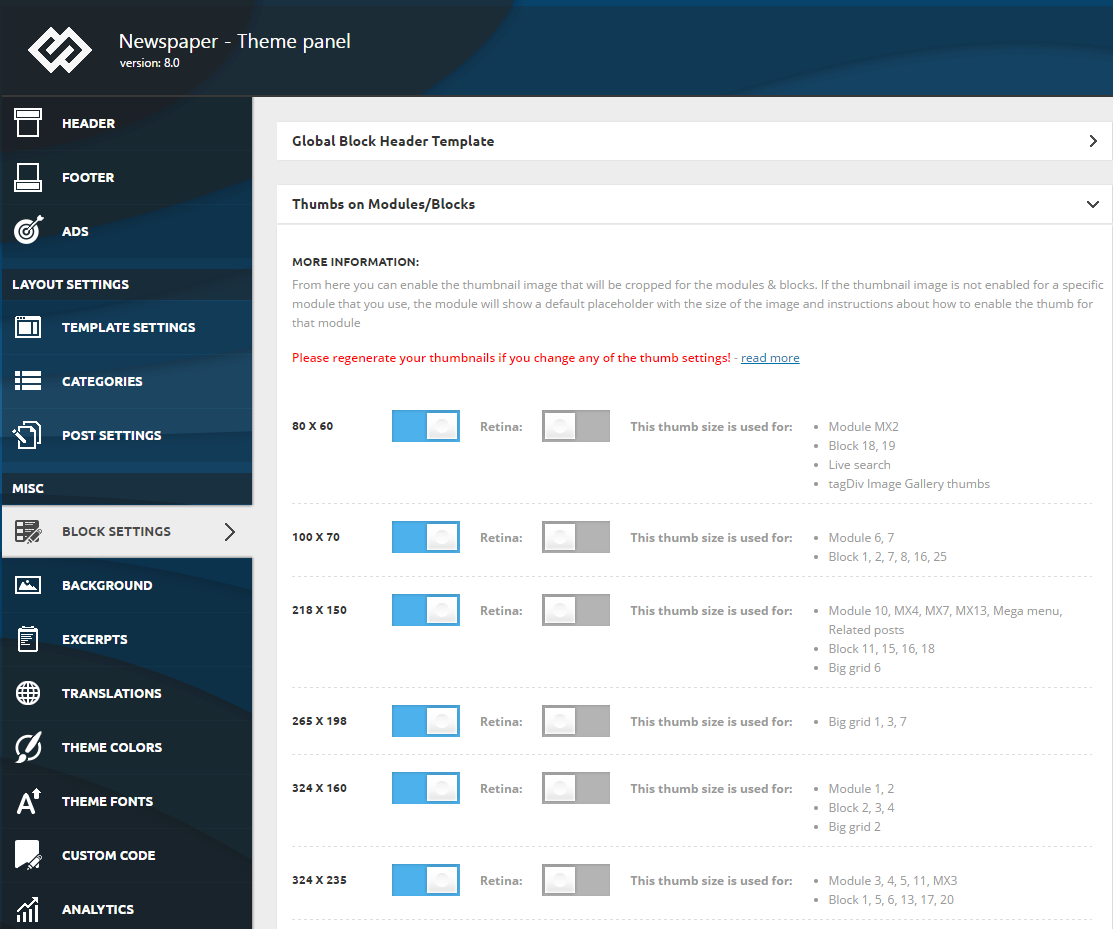
To make your website faster, you can control which thumbnail is generated. To do this go to Theme Panel > Block Settings > Thumbs on Modules/Blocks and disable the unused ones to save space on your server:
Thanks for your reply, if i disable the thumbnails then my site will show an image with instructions (enable thumb from theme panel -> block settings). I want to use the main image and not thumbnail image or default theme image (with instructions). It’s possible?

Hi,
The original image will not be used, that would increase the page size very much. That is why the theme creates thumbnails and displays those instead of the original images
– https://forum.tagdiv.com/theme-thumbs/
Don’t disable all of the thumbnails, disable the ones that are not used anywhere. Analyze which elements you use and disable the others.
Here you can see what module each block or grid uses
– https://forum.tagdiv.com/theme-blocks-modules/
Displaying thumbnails instead of the full original images is a feature, it greatly reduces the total page size, and improving the loading speed significantly.

After you check the blocks and disable the thumbnails like Simion says, install “force regenerate thumbnails” plugin and check for the option to regenerate thumbnails under Tools in wp-admin. This will delete the unused thumbnails. Also, check this guide https://www.pickaweb.co.uk/kb/how-to-decrease-inode-usage-in-cpanel-server/.
