


Same issue here. Truly makes our websites look unprofessional.


After the lastest update, I’m still having a problem with Instagram. I received a “critical error” e-mail from WordPress, too.
Our Instagram feed is not appearing on our pages after the update. We see the following error message on our page:
Instagram GalleryBlock Render Failed – Invalid OAuth access token.
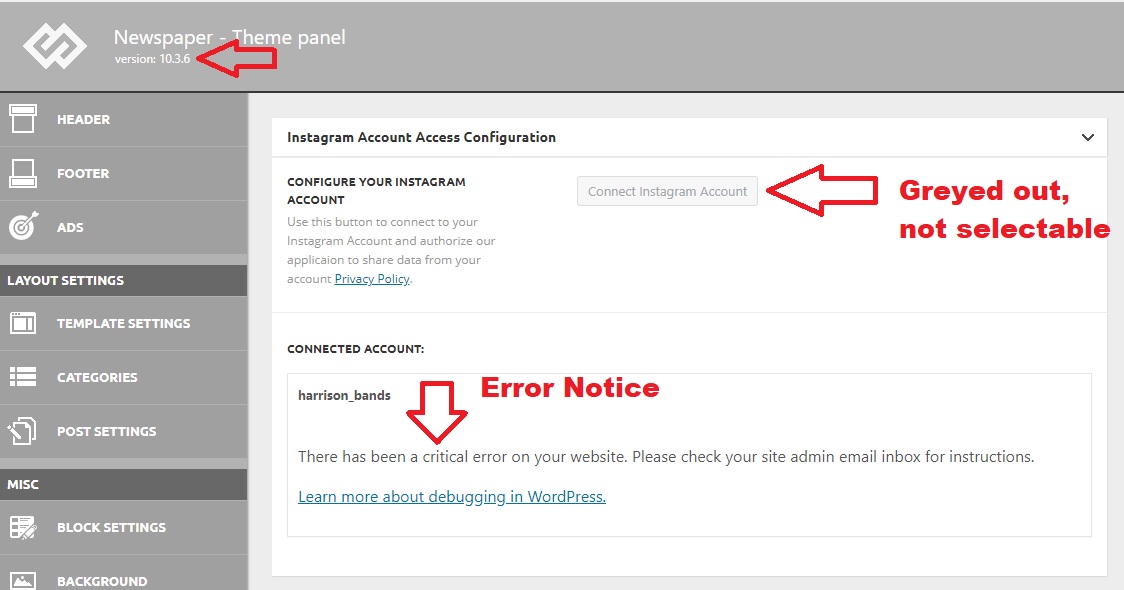
We accessed our Newspaper Theme Panel, and our Social Media area, and our button to access the Instagram feed is “greyed-out” and not clickable. The following message appears below:
harrison_bands
There has been a critical error on your website. Please check your site admin email inbox for instructions.

I have the same problem too:
“There has been a critical error on your website. Please check your site admin email inbox for instructions.”
I rolled back to before the update, I believe I will skip this version.
Hi,
The Instagram account will can be use now only if you are using Newspaper v10.3.6 also you must set a new Instagram id, the old one will no longer work, this should look like this -> https://i.imgur.com/QOPVkDY.png and the Instagram should work again-> https://i.imgur.com/5tfq0PO.png
Thank you!
I’ve tried setting a new Instagram ID, but I can’t select it from the theme panel. The button is “greyed out” and not selectable. I also received the following message from WordPress after the upgrade. Note this says I’m running 10.3.5, but my theme panel confirms 10.3.6
When seeking help with this issue, you may be asked for some of the following information:
WordPress version 5.4.2
Current theme: Newspaper (version 10.3.5)
Current plugin: tagDiv Cloud Library (version 1.5 | built on 06.05.2020 14:38)
PHP version 7.3.20
Error Details
=============
An error of type E_COMPILE_ERROR was caused in line 1358 of the file /home4/harritf2/public_html/wp-content/plugins/td-cloud-library/includes/tdb_functions.php. Error message: require_once(): Failed opening required ‘tdb_template_import.php’ (include_path=’.:/opt/cpanel/ea-php73/root/usr/share/pear’)
Hi,
Please try the follow steps.
1. Disable tagDiv Composer -> https://i.imgur.com/uzBdRB9.png
2. delete tagDiv Composer -> https://i.imgur.com/xGGfYE7.png
3. Reinstall tagDiv Composer -> https://i.imgur.com/Ay0zJHn.png or -> https://i.imgur.com/ZMgV9at.png
4. Make sure that all the settings are like in our requirements, please follow the guide carefully
– https://forum.tagdiv.com/requirements-for-newspaper/
and please increase all requirements that are lower, and follow all steps.
If the problem persists, please deactivate ALL plugins except tagDiv plugins (theme plugins), also if you are using child theme or cache plugin, deactivate them, clear all cache and try again.
Let me know the results!
Thank you!
Working now, after following your instructions, and our Instagram feed is live again on the page. Thank you for the help. One more question. I noted that the new ID indicated that it was good for 59 days. Does this mean Instagram will require a renewal of credentials through the theme every 60 days?



