Hi,
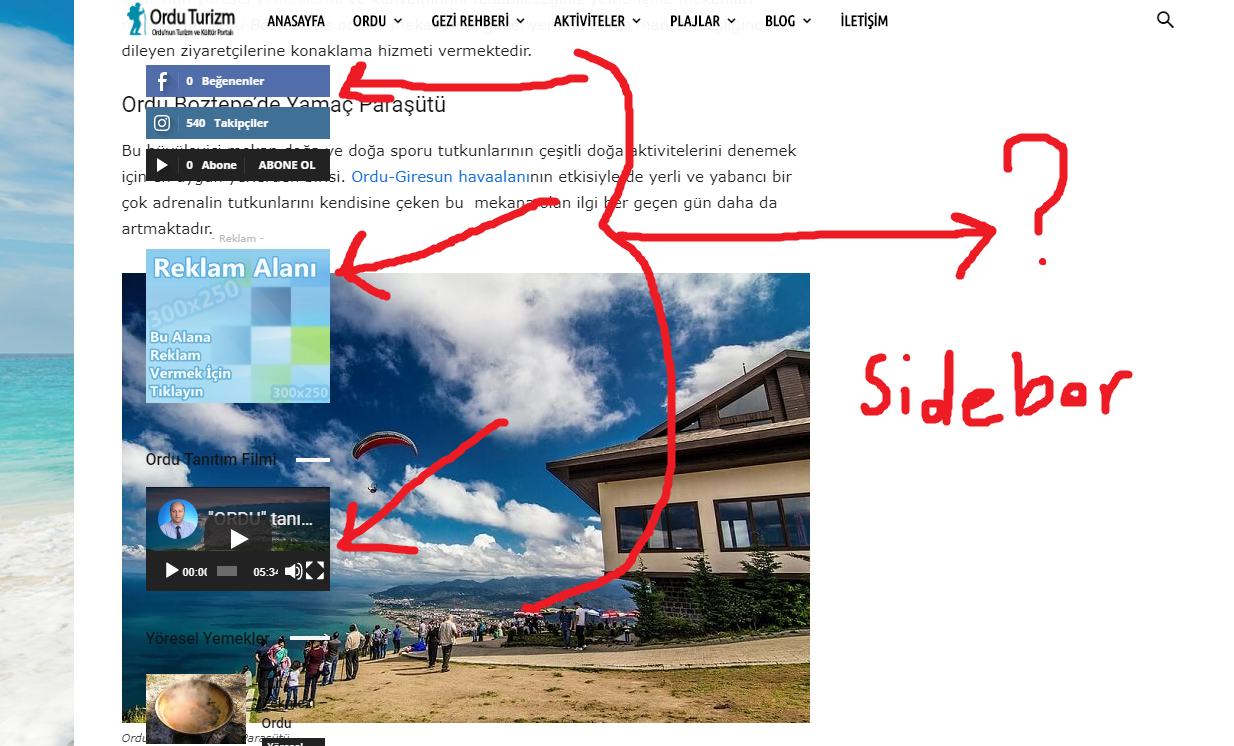
I did add from the components but it doesn’t appear in the sidebar. Only here https://www.orduturizm.com/ordu-turizm-events/ and here on the category pages https://www.orduturizm.com/turizm-aktiviteleri/ appears. I’ve done a lot to eliminate the problem, but I guess I failed. Could you help?

Hi,
I don’t quite understand the problem. This seems to be a 404 page
– https://www.orduturizm.com/ordu-turizm-events/
From what I can see the 404 page may be using a cloud template. If that is the case, try to edit the cloud template and modify it as you want – http://prntscr.com/o3bhfz
Or you could change the 404 template – http://prntscr.com/o3bi3d
This is a category page – https://www.orduturizm.com/turizm-aktiviteleri/ using a predefined category template. Looks alright from what I can see, the sidebar appears.
The screenshot link is not working – http://prntscr.com/o3bjgr
Thanks
Hi,
“This is a category page – https://www.orduturizm.com/turizm-aktiviteleri/ using a predefined category template. Looks alright from what I can see, the sidebar appears.” yes it comes out here…
but…
on another page >>> ” https://www.orduturizm.com/orduda-gezilecek-yerler/ ”
>>> https://i.hizliresim.com/DOEZrl.png …. <<<<< If you make the page up and down, you will see it.
Thanks.

Hi,
Seems that the sidebar is over the content for some reason. The HTML structure of the post is not how it should be. The sidebar container is in the post content, it shouldn’t be there.
Does it happen if you set a different sidebar? For example create a new sidebar and enter a simple block in it, then set it for the post.
Or does it happen if you chnage the post template?
Let me know.
Changing the post template or the sidebar used is not difficult to do. The post template can be changed by editing the post – http://prntscr.com/o47utj
Change it and check if the issue is solved.
If it’s not, change the sidebar next. Create a new sidebar like this
– https://forum.tagdiv.com/sidebars-tutorial/
It will appear in the widgets section, now add a block in it for example
– http://prntscr.com/o47wos
Then set it for a post where the issue happens – http://prntscr.com/o47xm5 and check if the issue is solved.

Hi,
Please send us an email at contact@tagdiv.com with your log-in information (wp-admin) and CPanel access so we can take a closer look at it.
Thank you!