Above is my website and I am using newspaper theme package.
After upgrading td composer plugin I am facing some issues.
I am using advance ad plugin so when I am adding any ads and click on save I am getting following error.
“There has been a critical error on this website. Please check your site admin email inbox for instructions. If you continue to have problems, please try the support forums.”
So I have enabled debug then I found td composer issue.check below notice and warning.
Deprecated: File class-phpmailer.php is deprecated since version 5.5.0! Use wp-includes/PHPMailer/PHPMailer.php instead. The PHPMailer class has been moved to wp-includes/PHPMailer subdirectory and now uses the PHPMailer\PHPMailer namespace. in /home/mcmupw94bhs4/public_html/forcemedia.digital/wp-includes/functions.php on line 6121
Notice: Function _load_textdomain_just_in_time was called incorrectly. Translation loading for the advanced-ads-selling domain was triggered too early. This is usually an indicator for some code in the plugin or theme running too early. Translations should be loaded at the init action or later. Please see Debugging in WordPress for more information. (This message was added in version 6.7.0.) in /home/mcmupw94bhs4/public_html/forcemedia.digital/wp-includes/functions.php on line 6121 Notice: Function _load_textdomain_just_in_time was called incorrectly. Translation loading for the tribe-events-calendar-pro domain was triggered too early. This is usually an indicator for some code in the plugin or theme running too early. Translations should be loaded at the init action or later. Please see Debugging in WordPress for more information. (This message was added in version 6.7.0.) in /home/mcmupw94bhs4/public_html/forcemedia.digital/wp-includes/functions.php on line 6121 Notice: Function _load_textdomain_just_in_time was called incorrectly. Translation loading for the td-cloud-library domain was triggered too early. This is usually an indicator for some code in the plugin or theme running too early. Translations should be loaded at the init action or later. Please see Debugging in WordPress for more information. (This message was added in version 6.7.0.) in /home/mcmupw94bhs4/public_html/forcemedia.digital/wp-includes/functions.php on line 6121
Warning: Undefined array key “9YPsSaYlkyc” in /home/mcmupw94bhs4/public_html/forcemedia.digital/wp-content/plugins/td-composer/legacy/common/wp_booster/td_video_playlist_render.php on line 303 Warning: Undefined array key “4h2FqahPC2M” in /home/mcmupw94bhs4/public_html/forcemedia.digital/wp-content/plugins/td-composer/legacy/common/wp_booster/td_video_playlist_render.php on line 303
Pleas help me on this.

Hi,
For the problem _load_textdomain_just_in_time from td-cloud-library, please download and reinstall the plugin from here -> https://cdn.tagdiv.com/wp-content/uploads/2025/07/td-cloud-library.zip
The warning seems to be related to the Youtube ids that no longer exits, so you can check on your pages for the youtube ids: 9YPsSaYlkyc and 4h2FqahPC2M and remove them.
So here I need to remove cloud library plugin and install new cloud library plugin given by you.
Am I right? Please confirm.
If i do this will there any problem ? because I have created many templates in cloud templates.
there are many custom templates created by me in cloud templates.
will this process of td cloud library plugin removal and reinstall affect my current pages?
please check attached screenshot link also.
https://forcedet.media/issue_3.png
Please provide me help on this also give me response on my last message also
Thanks for responding.
If i do this will there any problem ? because I have created many templates in cloud templates.
there are many custom templates created by me in cloud templates.
will this process of td cloud library plugin removal and reinstall affect my current pages?

I’m having a similar issue when trying to add or update any ads on my site. Here’s more info that I get from WP Engine, but I have no idea how to resolve it. I’ve rolled back versions, re-installed, etc. Thanks for any help:
When seeking help with this issue, you may be asked for some of the following information:
WordPress version 6.8.2
Active theme: Newspaper (version 12.7.1)
Current plugin: tagDiv Opt-In Builder (version 1.7.1 | built on 29.04.2025 10:50)
PHP version 8.2.29
Error Details
=============
An error of type E_ERROR was caused in line 3276 of the file /nas/content/live/presspass/wp-content/plugins/td-subscription/includes/td_subscription.php. Error message: Uncaught TypeError: array_key_exists(): Argument #2 ($array) must be of type array, null given in /nas/content/live/presspass/wp-content/plugins/td-subscription/includes/td_subscription.php:3276
Stack trace:
#0 /nas/content/live/presspass/wp-includes/class-wp-hook.php(324): td_subscription::td_post_theme_settings_mb_save_filter(NULL, ‘17551’)
#1 /nas/content/live/presspass/wp-includes/plugin.php(205): WP_Hook->apply_filters(NULL, Array)
#2 /nas/content/live/presspass/wp-content/plugins/td-composer/legacy/common/wp_booster/wp-admin/external/wpalchemy/MetaBox.php(880): apply_filters(‘wpalchemy_filte…’, NULL, ‘17551’)
#3 /nas/content/live/presspass/wp-content/plugins/td-composer/legacy/common/wp_booster/wp-admin/external/wpalchemy/MetaBox.php(2081): WPAlchemy_MetaBox->apply_filters(‘save’, NULL, ‘17551’)
#4 /nas/content/live/presspass/wp-includes/class-wp-hook.php(326): WPAlchemy_MetaBox->_save(17551)
#5 /nas/content/live/presspass/wp-includes/class-wp-hook.php(348): WP_Hook->apply_filters(NULL, Array)
#6 /nas/content/live/presspass/wp-includes/plugin.php(517): WP_Hook->do_action(Array)
#7 /nas/content/live/presspass/wp-includes/post.php(5110): do_action(‘save_post’, 17551, Object(WP_Post), true)
#8 /nas/content/live/presspass/wp-includes/post.php(5212): wp_insert_post(Array, false, true)
#9 /nas/content/live/presspass/wp-admin/includes/post.php(453): wp_update_post(Array)
#10 /nas/content/live/presspass/wp-admin/post.php(227): edit_post()
#11 {main}
thrown
Hi jpegjoe,
The situation you have with the ads should not be related to the error you detailed, but just in case, please try the following. Make a full backup of the site and go to Newspaper > Updates and look at the theme versions, there you should see a version RC12.7.2, install that version and the error you gave as an example will disappear. That version is the new update of the theme that we hope to make official this week.
Thank you!
Hello Sir
I am still getting the below error.
Above is my site.
I am running an advanced ad plugin on my website.
Here when I add any new ad in advance ad plugin after saving as I am getting below error.
Uncaught Error: array_key_exists(): Argument #2 ($array) must be of type array, null given
in /home/mcmupw94bhs4/public_html/forcemedia.digital/wp-content/plugins/td-subscription/includes/td_subscription.php on line 3276
Call stack:
td_subscription::td_post_theme_settings_mb_save_filter()
wp-includes/class-wp-hook.php:324
WP_Hook::apply_filters()
wp-includes/plugin.php:205
apply_filters()
wp-content/plugins/td-composer/legacy/common/wp_booster/wp-admin/external/wpalchemy/MetaBox.php:880
WPAlchemy_MetaBox::apply_filters()
wp-content/plugins/td-composer/legacy/common/wp_booster/wp-admin/external/wpalchemy/MetaBox.php:2081
WPAlchemy_MetaBox::_save()
wp-includes/class-wp-hook.php:326
WP_Hook::apply_filters()
wp-includes/class-wp-hook.php:348
WP_Hook::do_action()
wp-includes/plugin.php:517
do_action()
wp-includes/post.php:5110
wp_insert_post()
wp-includes/post.php:5212
wp_update_post()
wp-admin/includes/post.php:453
edit_post()
wp-admin/post.php:227
Query Monitor
https://forcedet.media/issue_3.png
Check above link for error screenshot.
I have used a query monitor plugin to trace this issue.
Also my website is very slow. The tag div composer for the page sometimes it takes too long to load.
Is there any issue with the newspaper theme?
Which php version will be ideal for running this website ?
Let me inform you that my hosting server is godaddy.
Can you provide me with a solution to this error and slow site issue?
Please help me with this.
Regards
Scott
Hi,
A quickfix is to enable the lockers for the events, please check in the theme panel and you should see your events post type and enable the locker for them here https://prnt.sc/2vRjAnM-IliL This just enables the option to use lockers for the events, you don’t have to actually set lockers for them, just enable that option.
As a PHP version, you can use 8.3.
Related to pagespeed for medium speed you can use this guide https://forum.tagdiv.com/how-to-make-the-site-faster/ (a free cache plugin that can provide cache and also optimize the js and css, optimize the images and convert in webp format). Use forom the theme panel this option – https://i.imgur.com/9DgGmdf.png
For premium cache plugins we recommend WP Rocket – https://forum.tagdiv.com/wp-rocket-and-newspaper-theme-optimization-guide/
Thanks.
Hello Sir,
Sorry not getting your point.
the screenshot which you have sent that kind of custom post type and event options are not coming in my newspaper theme panel option.
When I am adding any news ad in advance ad plugin I get error which I have mentioned in my last message.
IS there any solution on that?
Hi,
That was an example of what to do to resolve the situation you are facing, so there was no need to have that cpt, just a similar one.
But now there is no longer a need to do anything from above; just make a full backup of your website, update the theme and theme plugins after that, and the problem should be resolved.
Thank you!
Hello Sir,
After your last message and new theme update advance ad extension which was clashing now working fine but my website is very slow after upgrade of theme.
Is there any solution for it?
My website is heavy and loaded with images.
Is there any new update coming which can solve this issue?
I have also installed cache issue and configured as per theme guide but site is slow.
My site is forcemedia.digital
Please help me on this
Hello Sir,
After upgrade newspaper theme to 12.7.2 site is working perfect and advance ad clashing issue was solved after few time 12.7.3 new paper theme version arrived and after upgrade my site is getting slow.
My site is forcemedia.digital
Is there any issue why my site is slow?
Also let me inform you I have godaddy panel so is there any issue of compatibility with newspaper theme?
Also my current php version is php 8.1 do I need to upgrade php version to make site fast?
Please help me on this issue.
Hi,
You can update the php version to 8.3 and you can also use wp super cache will not be enough make sure that you use something for images and for html, css and js and Cloudflare – https://forum.tagdiv.com/how-to-make-the-site-faster/
For best results, we recommend WP Rocket – https://forum.tagdiv.com/wp-rocket-and-newspaper-theme-optimization-guide/
Thank you!
I have already used super cache plugin and ewww image optimizer plugin for image optimization.
What is cloudflare is it wordpress plugin or I need to set up on my godaddy server ?
Also please let me if I revert newspaper theme version then will that make site fast?
wp rocket is commercial plugin am I right?
please do response.
Hi,
You have cache and optimize images, but please use Autoptimize for optimizing html, css, and JS. This will bring better results.
WP Rocket doesn’t have a free version, only premium, but there are other free plugins that you can try, like – https://wordpress.org/plugins/wp-optimize/ – https://wordpress.org/plugins/litespeed-cache/
Setting an old version of the theme normally does not improve the site speed.
Thank you!
Hi,
“Autoptimize, this plugin is breaking my website.” – this is because one of the options that was selected is breaking the layout, you need to check each option you want to use https://forum.tagdiv.com/autoptimize-install-configuration/
If you want, you can test other plugins and see which one provides the best results for you, but each must be tested to determine which options can be used without affecting the website layout or functionality.
Thank you!
I have upgraded website newspaper from 12.7.4 to 12.7.5.
Now my website is slow.
https://force24news.com/ this is my website.
Please help me on this issue.
Regards
Scott
Hi Scott,
I understand. The issue is that the update from Nesaper 12.7.4 to 12.7.5 does not include any changes that should affect the website’s speed.
What I recommend is addressing the problem with the image that has been set as a background on the site but cannot be found: https://i.imgur.com/xWXB1KQ.png
It appears this image may be used as a background for the header menu—likely on the main header, sticky header, and possibly the mobile header as well.
Hello Sir,
Thanks for reply.
Yesterday I have upgraded newspaper from 12.7.4 to 12.7.5.
After that site got slow.
Also I am not getting you last message background image point.
Can you clarify it?
is there any php version issue?
Do I need to upgrade php version because I am using shared hosting.
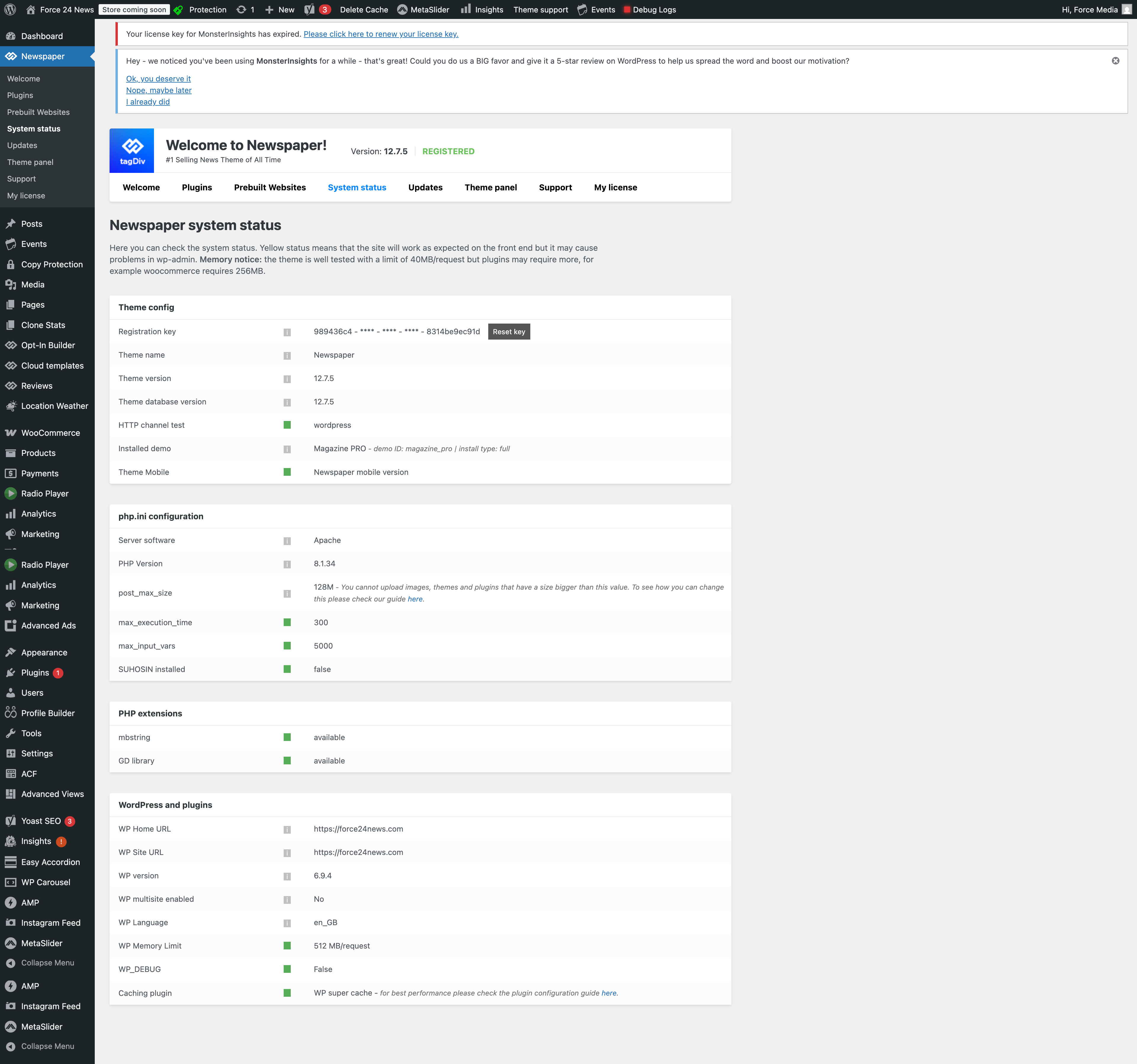
Please check below link
https://force24news.com/System-status.png
It is system status of site and server.
Should I update anything in that?
Please check.
Regards
Scott
Hi,
The system status is OK. What you should do is resolve the issue with the image that was set to load in the cloud header menu as a background image. The image has been deleted from the media library, but it is still linked to some rows, which can cause loading speed issues.
Please follow my example: edit the homepage, select the header menu row, and check the CSS tab. Where the background image is set, click “Remove,” then save your changes – https://prnt.sc/iZ-izfb-0jyd
Sorry for the late response.
You are coorect site was slow because of malware on server.
But I am facing one issue after upgrade of theme.
I have configured wp-super cache as per theme documentation but after doing any update in content it is not reflecting on site immediately.
Is there any issue after upgrade theme ? update tooks so much time to reflect on front end.