

Hi there! I hope you’re having a great day!
I’m using the Urban Observer demo, and where the newsletter sign-up is, I put the WordPress subscription widget.
The problem with this is the top and bottom margins are too big.
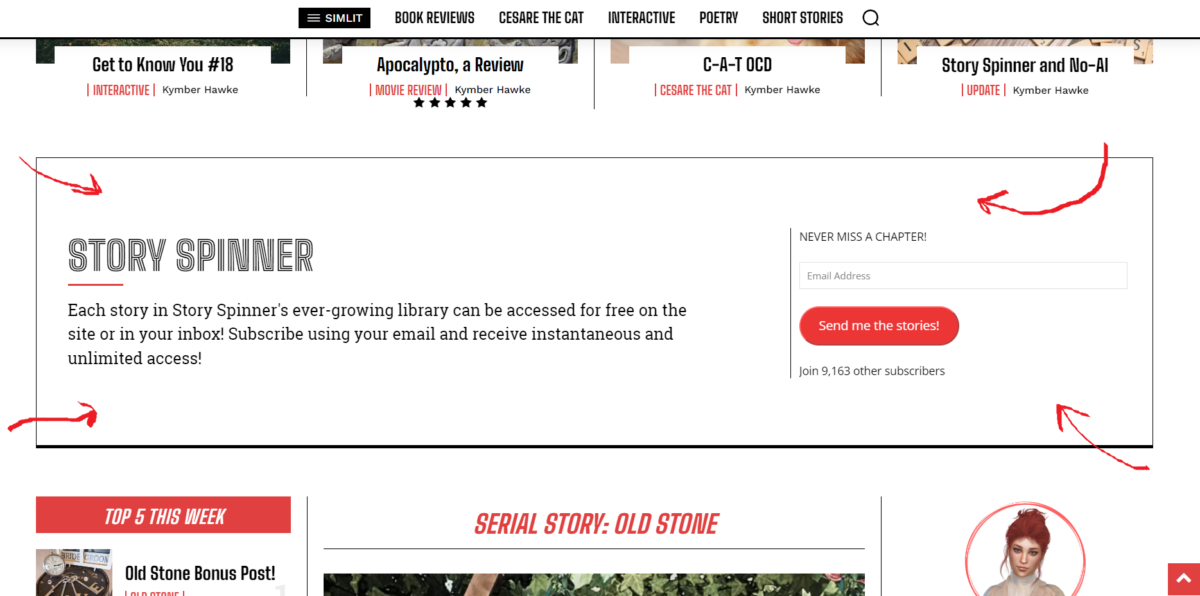
I’ve tried adjusting the margins in the cloud templates for the home page to no avail. I’m thinking the issue is to do with using a sidebar widget there, but I wondered if you had any suggestions to reduce the top and bottom margins?
Thank you.
My site is https://booomcha.com/

Hello,
You need to select the row and in the tab css you can change the padding -> https://i.imgur.com/EXeMUVl.jpg and on the column the margins -> https://i.imgur.com/vwh7BR1.jpg
Thank you!
Yes, thank you for your response. As I mentioned, I’d already tried that.
Here is what it looks like in the tdcomposer:

As you can see in the above example, I have the padding set to “0” and in the tdcomposer, the margins/padding looks like I want it to.
But from the front end, it still looks like this with tons of padding:

I’m not sure what the problem is, and hoping you can help me.
Thank you so much.
Hi,
Please check if your settings are saved. If are saved, then please check if you don’t have an object cache file -> https://forum.tagdiv.com/general-options-may-interfere-newspaper-theme/ if you have one, please delete it and check after -> https://i.imgur.com/XuPGnOo.png
Thank you!
Hello,
I would like to take a look. Can you please contact us via email at contact@tagdiv.com and provide the wp-admin access? Include the link to the topic in the email.
Thank you!



